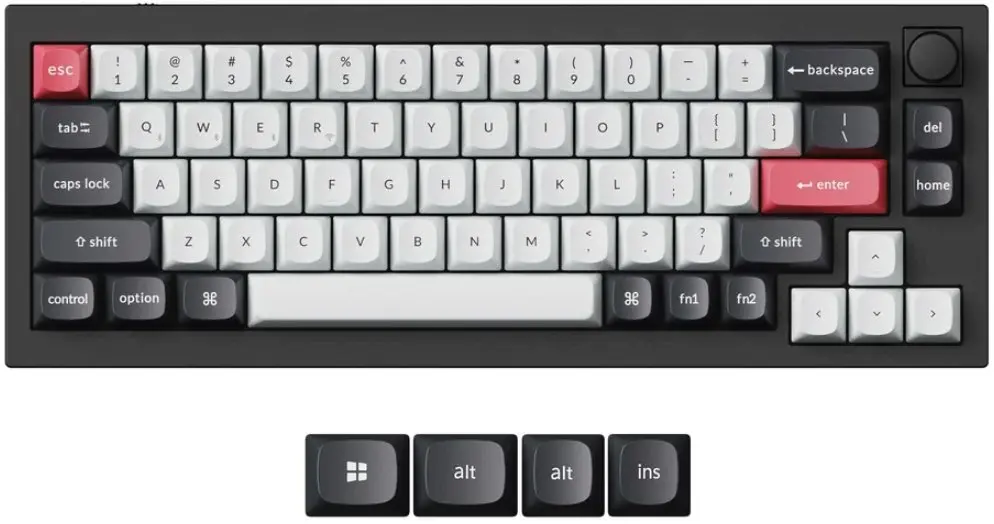
In this comparison, the Keychron Q2 HE QMK Gateron Double-Rail Magnetic Nebula Keyboard Q2H-M1 with Magnetic Switches is evaluated alongside similar Keychron models: Keychron Q2 HE QMK Mechanical Keyboard with Gateron Double-Rail Magnetic Nebula Switches and RGB Backlight, Keychron K2 HE Resin Edition Mechanical Keyboard Gateron Double-Rail Magnetic Nebula, Keychron K2 HE Concrete Edition Keyboard with Gateron Double-Rail Magnetic Nebula Switches, Mechanical Keyboard Keychron K6 HE Standard Edition with Gateron Double-Rail Switches, 65% Layout, and Mechanical keyboard Keychron Q6 Max QMK VIA with Gateron Jupiter switches, full-size layout. All these devices are designed for gamers, programmers, and professionals, but they differ in chassis materials, keyboard layouts, switch types (magnetic switches with adjustable actuation vs. traditional mechanical switches), and firmware customization support.
⚙️ Below is a comparison of the key specifications for these keyboards, covering switch types, software customization options, build design, and intended use cases.
| Specification | Keychron Q2 HE QMK (Q2H-M1) | Keychron Q2 HE QMK (Q2H-P1) | Keychron K2 HE Resin Edition | Keychron K2 HE Concrete Edition | Keychron K6 HE Standard | Keychron Q6 Max QMK VIA | Practical significance |
|---|
| Switch Type | Gateron Double-Rail Magnetic Nebula | Gateron Double-Rail Magnetic Nebula | Gateron Double-Rail Magnetic Nebula | Gateron Double-Rail Magnetic Nebula | Gateron Double-Rail Switches | Gateron Jupiter switches | Magnetic switches offer adjustable actuation and rapid response times, whereas Jupiter switches focus on traditional tactile mechanics. |
| Software Support | QMK firmware | QMK firmware | Customizable actuation features | Customizable actuation features | Standard connectivity and setup | QMK / VIA firmware | QMK and VIA support provide advanced macro programming and complete layout customization. |
| Design & Build | Mechanical build for demanding users | Mechanical build with RGB backlight | Resin-infused build edition | Concrete edition build | Compact 65% layout | Full-size layout | Chassis materials and layout size affect desk space utilization, portability, and desktop aesthetics. |
◎ The table below outlines which user needs and use cases make each product option most suitable.
| Use case | Recommended product | Why |
|---|
| Competitive gaming and custom actuation | Keychron Q2 HE QMK (Q2H-M1) | Magnetic switches and QMK support deliver high-speed performance and precise response for demanding gamers. |
| Professional typing and gaming with lighting | Keychron Q2 HE QMK (Q2H-P1) | Combines high-precision magnetic switches with full RGB backlight for comfortable use in low-light environments. |
| Unique desktop aesthetics | Keychron K2 HE Resin Edition or Concrete Edition | Distinctive chassis materials (resin or concrete) paired with advanced magnetic switches for a custom setup. |
| Portability and compact desk setup | Mechanical Keyboard Keychron K6 HE Standard Edition | Compact 65% layout is ideal for travel and limited desk space without sacrificing core functionality. |
| Spreadsheet work and heavy data entry | Mechanical keyboard Keychron Q6 Max QMK VIA | Full-size layout with a numeric keypad provides comfort for extensive number crunching and office tasks. |
The comparison demonstrates that the Keychron Q2 HE QMK Gateron Double-Rail Magnetic Nebula Keyboard Q2H-M1 with Magnetic Switches stands out through its specialized magnetic switch architecture and QMK support, engineered for high-precision typing and gaming. It is best suited for users who require customizable key actuation without needing a full numeric keypad. A buyer might prefer this model over the alternatives when seeking rapid response times and professional programmability in a streamlined layout.