
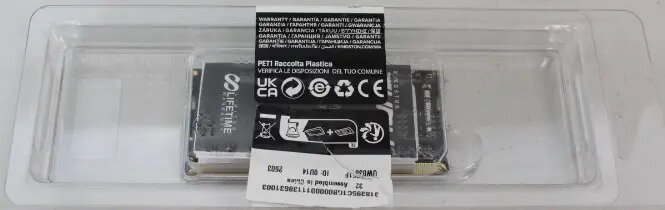
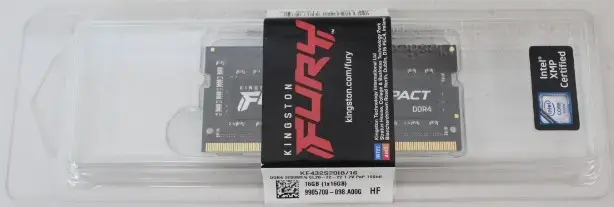
The Kingston Fury Impact 16GB DDR4 3200MHz SODIMM memory module is a high-performance upgrade designed specifically for laptops and small form factor systems. This memory module provides a significant boost to system responsiveness and multitasking capabilities, allowing your notebook to handle demanding applications and heavy workloads with ease. Engineered for efficiency, it operates at a low voltage of 1.2V, which helps in maintaining thermal stability and extending battery life in portable devices.
Advantages
This memory module offers a seamless plug-and-play experience, automatically overclocking to the highest published frequency supported by the system BIOS. By utilizing the DDR4 standard, it delivers faster data transfer rates and improved bandwidth compared to older memory generations. The unbuffered, non-ECC design ensures compatibility with a wide range of modern laptops, providing a reliable and stable computing environment for both professional tasks and gaming.
Suitable for
- Upgrading laptop memory for faster multitasking
- Improving system responsiveness in notebooks
- Enhancing performance for resource-intensive applications
- Small form factor PC builds requiring SODIMM modules
This module may not be suitable for desktop computers that require full-sized DIMM memory slots, as it is physically designed for the 260-pin SODIMM standard used in notebooks. Additionally, it is not intended for server or workstation environments that specifically require ECC (Error Correction Code) memory for data integrity.
Key specifications
- Capacity: 16GB
- Memory Type: DDR4
- Speed: 3200MHz
- Form Factor: 260-Pin SODIMM
- CAS Latency: CL20
- Voltage: 1.2V
- Configuration: Unbuffered, Non-ECC
How to use
To install the Kingston Fury Impact module, first ensure your laptop is powered off and disconnected from any power source. Open the memory compartment cover on your laptop, typically located on the bottom panel. If existing memory modules are present, carefully release the retaining clips to remove them. Align the notch on the new 16GB SODIMM module with the key in the memory slot and press it firmly into place until the side clips snap shut. Once installed, replace the cover and power on your device; the system should automatically detect the new memory capacity.
What to consider before purchase
- Verify that your laptop supports DDR4 SODIMM memory
- Check your system's maximum supported RAM capacity
- Ensure your motherboard supports the 3200MHz frequency
- Confirm that your device has an available memory slot
Usage recommendations: For optimal performance, it is recommended to install memory modules in matching pairs if your laptop supports dual-channel architecture. Always handle the memory module by its edges to avoid touching the gold contact pins.