


Leave your address - as soon as the price of the product goes down, you'll know about it right away
Laptop Stand KRISBERG 2549 — adjustable cooling riser for notebooks
In cart {{totalProductsCount}} item(s)
Your cart is empty
Laptop Stand KRISBERG 2549 — adjustable cooling riser for notebooks
Leave your address - as soon as the price of the product goes down, you'll know about it right away
Laptop Stand KRISBERG 2549 — adjustable cooling riser for notebooks
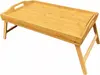
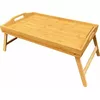
KRISBERG 2549 laptop stand is a compact adjustable cooling riser for notebooks designed to lift the device to improve airflow and provide a more ergonomic typing angle. The stand fits most laptops and delivers stable support to reduce overheating and minimize neck and wrist strain during extended use. Its slim profile and adjustable height make it suitable for home, office, or mobile work setups where better cooling and comfort are required.
The adjustable design allows quick changes to the viewing and typing angle while the open structure promotes passive airflow beneath the laptop, aiding heat dissipation without adding noise. Constructed to provide solid support, the stand keeps the laptop secure on desks of different surfaces and reduces direct contact between the bottom case and desk, which helps lower surface temperatures and extend component life. Its compact footprint and lightweight build simplify transport and storage for users who switch work locations.
Place the KRISBERG 2549 on a flat, stable surface and unfold or set the riser to the desired height position. Position your laptop centrally on the stand so that non-slip contact points align with the laptop base to prevent sliding. Adjust the angle to achieve a comfortable viewing height and typing posture. Ensure the laptop vents are not obstructed and that the device sits securely before starting work. When transporting, fold the stand or return it to its compact shape and keep it in a laptop bag or sleeve.
Use the stand on stable surfaces and avoid excessive force when changing height positions. Combine passive elevation with regular software and hardware maintenance to keep laptop temperatures within manufacturer-recommended ranges. If using for prolonged periods, pair the riser with an external keyboard and mouse to further improve ergonomics.
{{highlightedFeature.featureTitle}}:
{{getProductFeatureValueById(product, highlightedFeature.featureId)}}