

Save time and money with our discounts!
In cart {{totalProductsCount}} item(s)
Your cart is empty
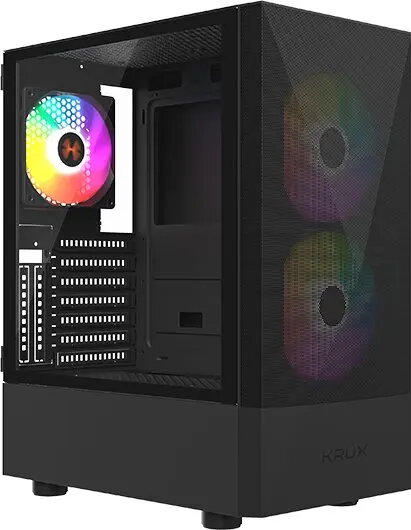
KRUX Vako Pro Computer Case (KRXD020)
The KRUX Vako Pro computer case is a robust and functional chassis designed to serve as a reliable foundation for modern desktop systems. Engineered for efficiency, this case provides a well-organized internal layout that simplifies the installation of essential hardware components while ensuring that your PC build remains secure and protected. Its design focuses on practicality, offering a balanced approach to internal space management and structural integrity for various computing needs.
The primary strength of the KRUX Vako Pro lies in its versatile internal architecture, which facilitates straightforward component mounting and cable management. The case is constructed from durable materials that provide long-term hardware protection, while the internal design promotes effective airflow to help maintain stable operating temperatures for your components. Its clean and professional aesthetic makes it a suitable choice for a wide range of environments, from home offices to professional workstations.
This case may not be suitable for high-end gaming builds that require extensive liquid cooling systems or multiple large graphics cards, as the internal dimensions and airflow configuration are optimized for standard desktop components. Additionally, users seeking specialized aesthetic features like tempered glass panels or complex RGB lighting integration may find this model too simplistic for their specific visual requirements.
To use the KRUX Vako Pro, begin by removing the side panels to access the internal mounting points. Install your motherboard, power supply, and storage drives according to the manufacturer's instructions for each component. Route your cables through the designated openings to ensure a clean build, then secure your graphics card and other expansion cards into the appropriate slots. Once all components are installed and connected, replace the side panels and secure them with the provided screws before connecting your peripherals and power cable.
For optimal performance, ensure that all internal cables are neatly organized to prevent obstruction of airflow. Regularly clean the air intake areas to maintain efficient cooling and prevent dust accumulation inside the chassis.
{{highlightedFeature.featureTitle}}:
{{getProductFeatureValueById(product, highlightedFeature.featureId)}}
| Warehouse | Stock | Delivery to the store | Store Price | |
| EU57 | 1 | 30.06.2026 Best delivery | 51.99 € Best price | |
| WH337 | 10 | 01.07.2026 |
New
|
|
51.99 €
Stock:
1
Delivery Date:
30.06.2026
Best delivery
Warehouse: EU57
|
|
New
Stock:
10
Delivery Date:
01.07.2026
Warehouse: WH337
|