{{ totalProductsCount }}

In cart {{totalProductsCount}} item(s)

Total:
{{sum | formatAmount}}

Your cart is empty

header-product WLAN interface Kyocera IB-37 for Laser/LED printers
118.99 €

WLAN interface Kyocera IB-37 for Laser/LED printers

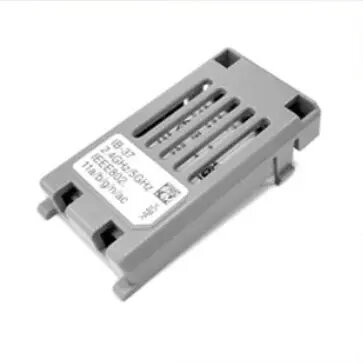
WLAN interface Kyocera IB-37 Photo 1
Keep track of price changes You keep track of price changes
Watch the price drop

Leave your address - as soon as the price of the product goes down, you'll know about it right away

You keep track of price changes

WLAN interface Kyocera IB-37 for Laser/LED printers

{{email}}
You keep track of price changes

WLAN interface Kyocera IB-37 for Laser/LED printers

{{email}}
{{selectedOffer && selectedOffer.price | formatAmount}}

Short description

The Kyocera IB-37 WLAN interface is designed for Laser/LED printers, ensuring wireless connectivity. It is compatible with various ECOSYS models, providing flexibility and ease of use. The multicolour design allows for seamless integration into your office setup.
Available at price 118.99 €: 16 pcs.
Total available for order: 18 pcs.
Warranty: 2 Years
SKU: 11397204
free shipment

Cheapest delivery:

Venipak Pickup LV, Venipak Locker LV

Pick-up points

Venipak Pickup LV

Venipak Locker LV

Cost

1.89 €

Deliver

{{selectedOffer.parcelStationDeliveryString}}

Customer service center
2b. Kengaraga str., Riga, Latvia, LV-1063
27.07.2026 {{selectedOffer.officeDeliveryString}}
free
Courier Delivery Please note that in case of a large parcel additional delivery costs may apply!
30.07.2026 {{selectedOffer.courierDeliveryString}}
From 4.99 €
Parcel couriers
Venipak Pickup LV / Venipak Locker LV / Latvijas Pasts pakomāts / Unisend LV / DPD Paku skapis / Omniva LV / Latvijas Pasts nodaļa
30.07.2026 {{selectedOffer.parcelStationDeliveryString}}
From 1.89 €
payment
Payment Methods:
Cash payment, Bank transfer, Bank cards on-line, Apple Pay, Google Pay
Available for private customers at price 129.49 €: 2 pcs.
Together cheaper
{{product.price | formatAmount}}
{{product.title}}
{{productBundle.reference.specialPrice | formatAmount}}
{{productBundle.title}}
{{productBundlePreviousPrice | formatAmount}}
{{productBundleSpecialPrice | formatAmount}}

You saving {{productBundleYouSave | formatAmount}}

Product information

Description

The Kyocera IB-37 WLAN interface for Laser/LED printers provides wireless network connectivity for compatible ECOSYS models. Designed to integrate with office printers, this compact module enables printing over Wi‑Fi networks without the need for a wired Ethernet connection. The multicolour housing is intended to match a variety of office environments, and the interface supports standard wireless functions to simplify setup and daily operation.

Advantages

The IB-37 enables reliable wireless printing, reducing cable clutter and allowing printers to be placed flexibly within an office. It supports common wireless network protocols to ensure compatibility with existing Wi‑Fi infrastructures and simplifies installation through standard configuration options. The compact form factor fits into the designated slot of supported Kyocera ECOSYS printers without requiring external adapters.

Suitable for

  • Small and medium office environments that require shared wireless printing
  • Workspaces where flexible printer placement is needed without running network cables
  • Environments using Kyocera ECOSYS Laser/LED printers seeking an upgrade to wireless connectivity

Key specifications

  • Interface type: Wireless LAN module for Laser/LED printers
  • Network: 2.4 GHz Wi‑Fi compatibility with standard wireless protocols
  • Form factor: Compact internal add-on module designed for Kyocera ECOSYS printer slots
  • Installation: Internal insertion into dedicated expansion slot, no external cabling required
  • Compatibility: Designed to work with a range of Kyocera ECOSYS Laser/LED printer models

How to use

Install the IB-37 by powering down the printer, opening the designated expansion slot cover and inserting the module according to the printer's hardware instructions. After physical installation, power the printer back on and access the network settings menu to configure the wireless connection. Use the printer control panel or the printer's web configuration interface to select the local Wi‑Fi network and enter the network security credentials. Verify connectivity by printing a network configuration or test page.

Usage recommendations

For optimal performance, place the printer within a stable Wi‑Fi signal area and avoid physical obstructions or sources of wireless interference. Keep printer firmware up to date and consult the printer's user manual for any model-specific setup steps or security settings.

All features
Type:
WLAN interface
Compatibility:
ECOSYS PA6000x / PA5500x / PA5000x / PA4500x ECOSYS MA6000ifx / MA5500ifx / MA4500ifx / MA4500ix / MA4500fx / MA4500x TASKalfa MZ4000i / MZ3200i
Product colour:
Multicolour
Brand compatibility:
Kyocera
Device compatibility:
Laser/LED printer
Quantity per pack:
1 pc(s)

Description

Machine translation. Load original

Similar products

{{product.title}} Show details Hide details

{{highlightedFeature.featureTitle}}:

{{getProductFeatureValueById(product, highlightedFeature.featureId)}}

{{product.price | formatAmount}}
Might be useful
{{product.manufacturerName}}
{{product.categoryName}}
{{product.title}}
{{product.specialPrice}}
{{product.price}}
Stock data
Warehouse Stock Delivery to the store Store Price
WH355 2 30.07.2026 129.49 €
Available only for legal entities
Warehouse Stock Delivery to the store Store Price
EU6 16 27.07.2026 Best delivery 118.99 €
129.49 €
Stock: 2
Delivery Date: 30.07.2026
Warehouse: WH355
Available only for legal entities
118.99 €
Stock: 16
Delivery Date: 27.07.2026 Best delivery
Warehouse: EU6

Customer reviews

Customer questions

FAQ

How much does the WLAN interface Kyocera IB-37 cost, and is it available for purchase?

The price is 118.99 € (valid at the time of publication and already includes all taxes). The item is available for order — 18 pcs. are in stock, and you can place your purchase right now with delivery across Latvia and Europe or choose pickup at the Riga collection point. We offer favorable purchase terms, including the option to split the payment into convenient monthly installments. Availability and price are updated in real time, so we recommend placing your order in advance.

If I order this product today, when will I receive my order?

If you place your order today, delivery will be as fast and convenient as possible. You will be able to pick up your order on 27.07.2026 at the Riga pickup point or choose delivery across Latvia and Europe. We carefully inspect every purchase and pack it securely for safe transportation.

What payment options are available?

AiO.lv offers several payment methods: Cash payment, Bank transfer, Bank cards on-line, Apple Pay, Google Pay. All transactions are 100% secure and encrypted.

Can this product be purchased for a company (with VAT)?

Yes. AiO.lv works with legal entities in Latvia and across Europe. The product price already includes VAT. For certain product categories, as well as for companies from other EU countries with a valid VAT number, a 0% VAT rate may apply. We issue the invoice immediately after the order is placed, support electronic BIS invoices, and automatically generate all necessary accounting documents. You can complete the purchase for a company online — simply select the company profile and choose bank transfer as the payment method during checkout.

What is the warranty period?

All Kyocera products come with an official 2 Years warranty. It covers all manufacturing defects and malfunctions that may occur during use. The warranty is valid at all authorized Kyocera service centers and through AiO.lv

Can the product be returned after purchase?

Yes, you can return the product within 14 days of purchase if you bought it as a consumer (not a legal entity). Returns are possible without giving any reason — the main condition is that the product retains its original appearance and full set of accessories. We will make the process as simple and convenient as possible: just contact our customer support team, and we will help you arrange the return.

Where should I contact for warranty service?

For warranty-related questions you can contact the AiO.lv (SIA VSPRO) customer support team. We will assist with consultation, warranty claim processing, and coordination with certified service centers.

warranty
14-Day Return Policy We are confident in our quality, but if the purchase doesn’t fit — you have 14 days to return the product with peace of mind.
shipping
Fast Delivery Get your orders as quickly as possible — right to your door, parcel lockers, or pickup points across Latvia and the EU.
payment
Secure Payment Pay the way you prefer: cash, VISA, MasterCard, Apple Pay, Google Pay, bank transfer, or 0% installment plan.
warranty
Quality Since 2008 AiO.lv has been on the market for over 18 years and has earned trust — with more than 6000 genuine positive reviews on Google.