Filters you can trust. Pure water every day.
In cart {{totalProductsCount}} item(s)
Your cart is empty
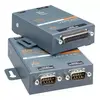
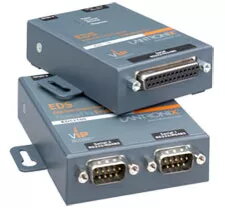
Serial device server Lantronix EDS1100 RS-232/422/485, 10/100Base-T(X), 9–30 V
The Lantronix EDS1100 is a compact one-port serial device server that provides RS-232/422/485 connectivity and 10/100Base-T(X) Ethernet. It runs Evolution OS and supports common network protocols including HTTP/HTTPS, FTP, TFTP, Telnet, TCP/IP, UDP/IP, LPD, DHCP, SSHv2, SSL/TLS and SNMP v2. The unit accepts 9–30 V input and is intended for remote serial-to-Ethernet integration and device management in industrial and commercial environments.
The EDS1100 offers built-in enterprise-grade security with AES, 3DES, SSH and SSL/TLS for encrypted communications and authentication. Evolution OS enables IPv6 support and the option to run custom Linux applications, extending functionality. Multiple configuration methods are supported — Windows DeviceInstaller, serial console, web (HTTP/HTTPS), Telnet, SSH or SNMP — simplifying deployment. The device is compact (64 × 100 × 23 mm) and lightweight (about 200 g), and operates from a wide 9–30 V input range suitable for many installations.
The EDS1100 provides a single serial port, so it is not suitable when multiple native serial ports are required on one device; consider a multiport model if you need several simultaneous serial connections. It is designed as a network appliance rather than a general-purpose computer, so very large or resource-intensive custom applications may exceed its capabilities.
Install the EDS1100 near the serial device and connect the serial lines (RS-232/422/485) and Ethernet cable. Power the unit with a suitable 9–30 V DC supply. Configure network settings and security via the included Windows DeviceInstaller, or use the serial console, web interface (HTTP/HTTPS), Telnet, SSH or SNMP to set IP addressing, protocol options and encryption. Optionally deploy custom applications via the Linux environment if additional functionality is required.
For secure remote management, enable SSH/SSL, apply strong authentication, and keep Evolution OS firmware updated. Use the supplied DeviceInstaller or SSH for initial configuration, and test serial signal levels (RS-232 vs. RS-422/485) to select the correct wiring and termination.
{{highlightedFeature.featureTitle}}:
{{getProductFeatureValueById(product, highlightedFeature.featureId)}}
{{ productComparisonGenerationError }}