
Hurry and order now – up to 50% off!
In cart {{totalProductsCount}} item(s)
Your cart is empty
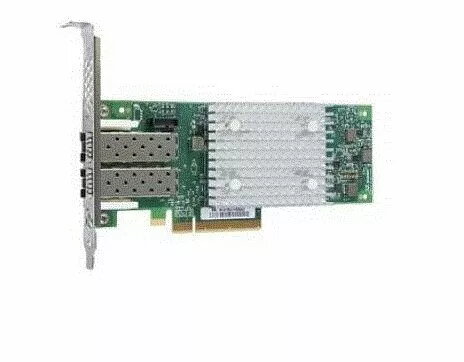
Fibre Channel Adapter Lenovo QLogic 16Gb Enhanced Gen5 FC 01CV763-RFB
Lenovo QLogic 16Gb Enhanced Gen5 FC 01CV763-RFB is a Fibre Channel host bus adapter (HBA) that provides 16 Gbps connectivity for SAN (Storage Area Network) environments. This Gen5 FC adapter supports block-level data transfers and hardware offload capabilities to reduce CPU overhead and improve storage throughput. The adapter is designed for enterprise server deployment and is compatible with Gen5 Fibre Channel infrastructures, enabling connection of servers to storage arrays and supporting common data center operating systems and storage protocols.
The Lenovo QLogic 16Gb Enhanced Gen5 FC adapter offers stable 16 Gbps performance, hardware offload for tasks such as checksum and protocol processing, and compatibility with existing Gen5 FC networks. It is built to meet enterprise reliability and interoperability requirements and reduces host CPU utilization by offloading storage processing. The adapter follows industry standards for Fibre Channel and is intended to integrate with SAN management tools and storage arrays from major vendors.
Install the Lenovo QLogic 16Gb Enhanced Gen5 FC adapter into an available PCIe slot on a compatible server according to the server and adapter installation guides. Connect the adapter ports to SAN switches or directly to storage array Fibre Channel ports using appropriate LC multimode or single-mode transceivers and fibre optic cables supported by the infrastructure. After physical installation, install vendor-provided drivers and management utilities on the host operating system and configure zoning and LUN mapping on the SAN switches and storage arrays as required for the environment.
For reliable operation, ensure firmware and drivers are kept up to date and that the adapter is used with compatible Gen5 Fibre Channel switches, transceivers and cables. Follow SAN best practices for zoning, multipathing and LUN presentation to maintain redundancy and performance. Verify interoperability with storage vendors and consult Lenovo support resources for platform-specific guidance and certified configurations.
{{highlightedFeature.featureTitle}}:
{{getProductFeatureValueById(product, highlightedFeature.featureId)}}
{{ productComparisonGenerationError }}
