
JBL speakers and headphones for pure and deep sound!
In cart {{totalProductsCount}} item(s)
Your cart is empty
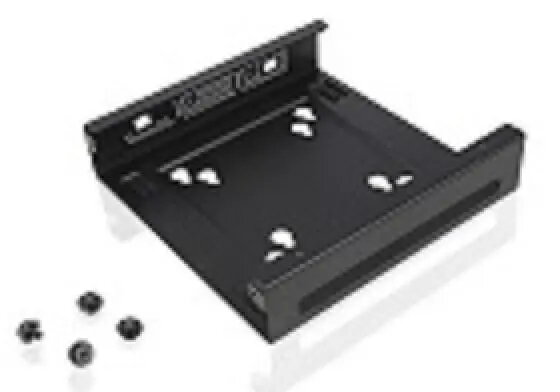
Lenovo ThinkCentre Tiny VESA Mount II for Desktop Mounting
The Lenovo ThinkCentre Tiny VESA Mount II is a specialized mounting bracket engineered to integrate your ThinkCentre Tiny desktop directly with a VESA-compatible monitor or wall mount. This solution is designed to streamline your workspace by elevating the PC off the desk, creating a clutter-free and professional environment. Its robust construction ensures that your device remains securely positioned while maintaining full access to all essential ports, buttons, and cable connections for efficient daily operation.
This mounting solution significantly improves ergonomics and space management in any office or home setup. By utilizing the VESA interface on the back of your display, it eliminates the need for extra desk space, allowing for a cleaner and more organized workstation. The bracket is built with high-quality materials to provide long-term stability and durability, ensuring that your hardware is protected and properly ventilated. Furthermore, the design allows for quick installation and easy access to the computer, facilitating maintenance and connectivity without requiring the removal of the mount.
This mount is specifically designed for the ThinkCentre Tiny form factor and may not be compatible with other desktop sizes or non-VESA compliant monitors. If your monitor lacks a standard VESA mounting pattern, this bracket cannot be attached as intended.
To install the mount, align the bracket with the VESA holes on the back of your monitor or wall mount. Secure the bracket using the provided screws, ensuring it is firmly attached. Once the bracket is in place, slide your ThinkCentre Tiny desktop into the mount until it clicks or is secured according to the specific model instructions. Connect your power and peripheral cables, ensuring they are routed neatly through the designated openings to maintain a tidy workspace.
For optimal performance and safety, ensure all screws are tightened securely during installation. Periodically check the mount to ensure it remains stable and that all cables are properly managed to prevent strain on the ports.
{{highlightedFeature.featureTitle}}:
{{getProductFeatureValueById(product, highlightedFeature.featureId)}}
{{ productComparisonGenerationError }}
