

Dreame vacuums for fast and efficient cleaning!
In cart {{totalProductsCount}} item(s)
Your cart is empty
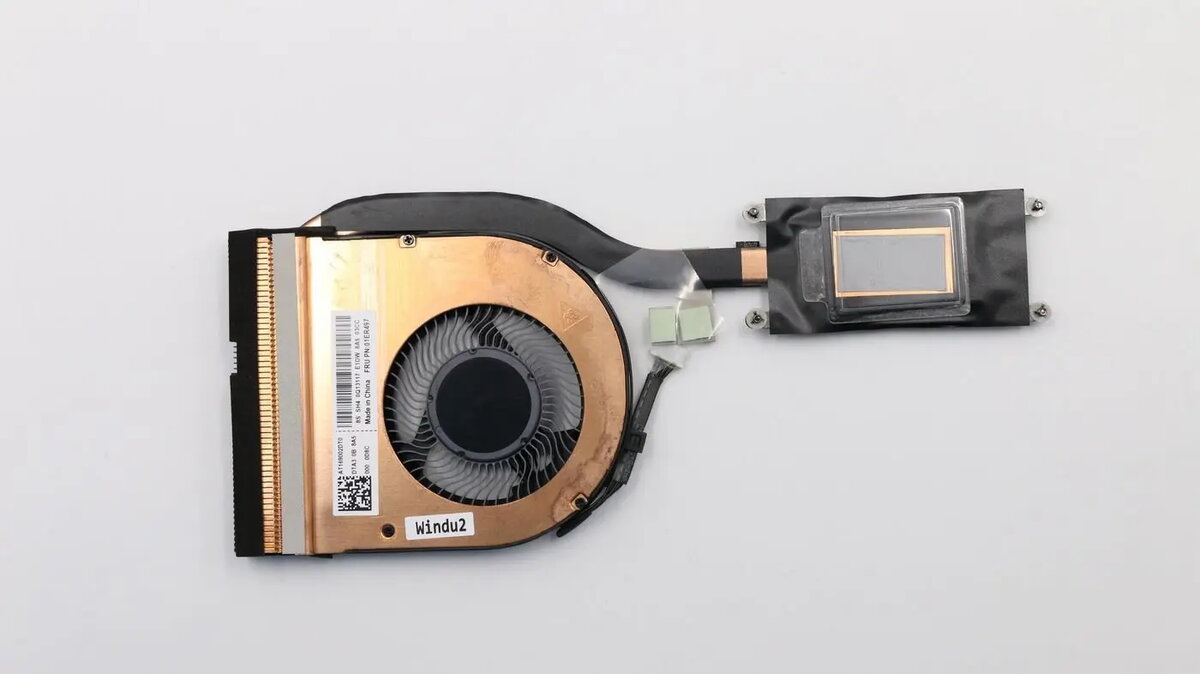
CPU cooling fan and heatsink Lenovo 01LV695 compatible system cooling module
Replacement CPU cooling fan and heatsink Lenovo compatible system cooling module designed to restore or improve thermal management in supported Lenovo laptops and desktop systems. This assembly combines an axial fan with an integrated heatsink to remove heat from the processor, maintaining stable operating temperatures during sustained workloads and preventing thermal throttling. It is intended for use as a direct replacement or upgrade when the original cooling component is damaged, noisy, or underperforming.
The integrated fan and heatsink provide targeted airflow and efficient heat transfer to keep the CPU within manufacturer-recommended temperature ranges. The module is compact and engineered to match mounting points and airflow channels of compatible Lenovo systems, simplifying installation. The assembled design reduces the need for separate parts and minimizes airflow losses, while the fan’s balanced rotor and bearing type reduce vibration and operational noise compared with worn original units.
Power down the system and disconnect all external power sources before beginning. Access the internal compartment according to the device service manual, remove the old cooling assembly and carefully detach any retained thermal interface material. Align the replacement cooling module with the CPU and mounting points, secure it evenly to the chassis or heatsink retention hardware, and reconnect the fan power connector to the motherboard. Apply appropriate thermal paste between the CPU and heatsink if not pre-applied, reassemble the device and verify fan operation and system temperature in BIOS or with monitoring software.
Use compatible replacement parts and follow manufacturer service instructions. Clean surrounding airflow channels and intake/exhaust vents before installation, apply a thin, even layer of thermal paste if required, and ensure firm but even fastening to avoid uneven contact with the CPU surface. After installation, monitor temperatures under load to confirm effective cooling.
{{highlightedFeature.featureTitle}}:
{{getProductFeatureValueById(product, highlightedFeature.featureId)}}
{{ productComparisonGenerationError }}
