
Filters you can trust. Pure water every day.
In cart {{totalProductsCount}} item(s)
Your cart is empty
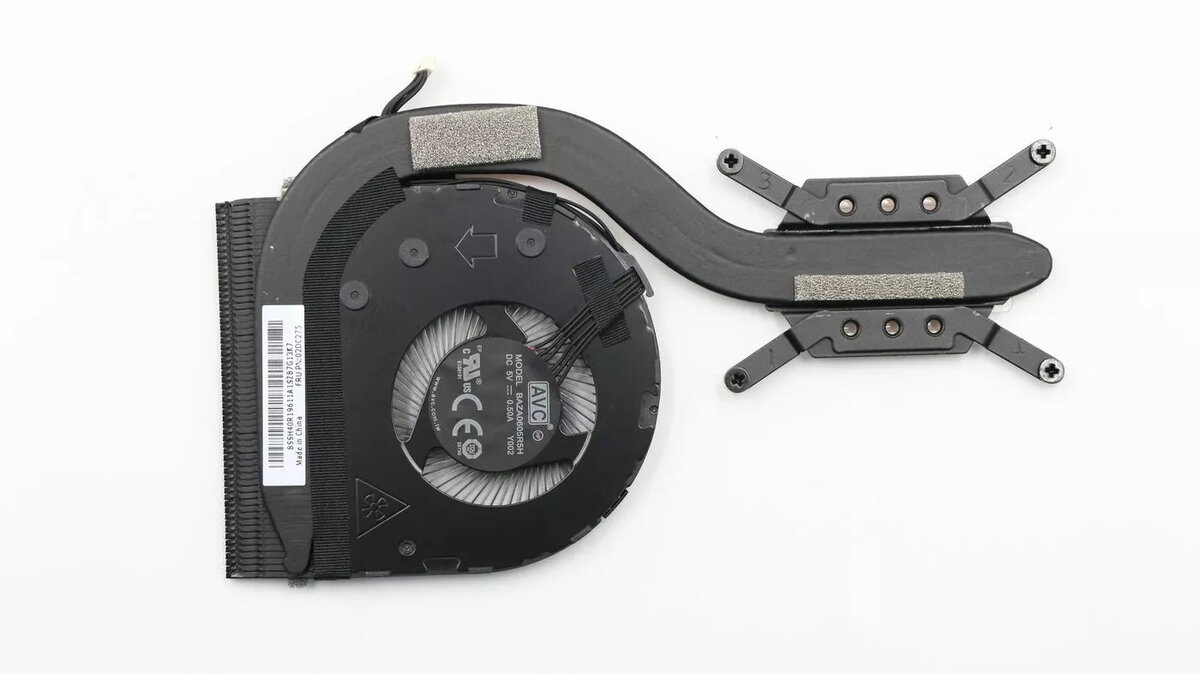
Thermal module Lenovo 02DC275 - replacement cooling assembly for compatible Lenovo laptops
Thermal module Lenovo 02DC275 is a replacement cooling assembly designed for compatible Lenovo laptops. It transfers heat away from the CPU and GPU to the heat sink and fan exhaust, helping to maintain stable operating temperatures and reduce the risk of thermal throttling. The module is intended for repair or upgrade of laptop cooling systems and requires verification of model compatibility prior to installation. Installation involves basic laptop disassembly and careful handling of thermal interfaces.
This replacement cooling assembly restores the designed cooling path between processor components and the chassis exhaust, improving heat dissipation efficiency without altering system components. The module is manufactured to match Lenovo mechanical and thermal layout standards for compatible models, enabling direct fitment where specified. Using a purpose-made thermal module helps preserve processor performance under sustained load and can extend the service life of temperature-sensitive components when installed correctly.
Power off the laptop, disconnect all power sources and remove the battery if applicable. Access the internal components by following the service manual or disassembly guide for the exact Lenovo model. Remove the existing cooling assembly by unscrewing the mounting screws and detaching any connected thermal pads or cables. Clean old thermal compound from processor and heatsink contact surfaces with isopropyl alcohol and a lint-free cloth. Apply a thin, even layer of new thermal compound to the CPU/GPU contact areas, position the replacement thermal module in alignment with mounting holes, and secure it with the original screws to the specified torque if available. Reconnect any fan or sensor cables, reassemble the laptop, and power on to verify fan operation and temperature behavior.
Confirm model compatibility before ordering. Use the laptop manufacturer’s service documentation for disassembly steps and torque specifications. Replace thermal compound when installing the module and ensure contact surfaces are clean and free of debris. If uncertain about performing the replacement, seek professional service to avoid damage to the motherboard or connected components.
{{highlightedFeature.featureTitle}}:
{{getProductFeatureValueById(product, highlightedFeature.featureId)}}
{{ productComparisonGenerationError }}
