
Powerful EcoFlow stations for energy anywhere!
In cart {{totalProductsCount}} item(s)
Your cart is empty
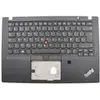
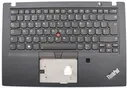
Backlit laptop keyboard cover C-Cover by Lenovo 02HM310 — replacement for compatible Lenovo models
Replacement backlit laptop keyboard module C-Cover by Lenovo 02HM310 is a direct-fit keyboard assembly designed for compatible Lenovo notebook models. The unit integrates the keyboard with backlight functionality and the necessary mounting interface to restore illuminated key input on laptops that either lack lighting or have a damaged keyboard module. This C-Cover keyboard is intended as a component-level replacement that matches the physical layout and connector placement of the original part.
The backlit keyboard module provides uniform key illumination for typing in low-light environments and supports standard laptop key travel and tactile response consistent with Lenovo layouts. Installation uses the existing mounting points and connector interface, enabling a straightforward replacement without modifying the chassis. The assembly is supplied as a single unit, reducing the need to source separate parts and simplifying repair or upgrade tasks.
Power off the laptop and remove any external power source and battery where applicable before starting the replacement. Open the notebook chassis according to the manufacturer service instructions to access the keyboard mounting points; remove the old keyboard module by disconnecting the internal ribbon cable and unscrewing or unclipping the mounting fasteners. Position the C-Cover keyboard assembly into the chassis, secure it using the original mounting points, and reconnect the internal keyboard ribbon connector. Reassemble the laptop, restore power, and verify backlight operation and key responsiveness in the operating system keyboard settings.
Handle the keyboard assembly with care to avoid damage to the thin ribbon cable and connector. Use anti-static precautions during installation and follow Lenovo service documentation or a qualified technician’s guidance if unsure about disassembly procedures. If backlight does not illuminate after installation, check keyboard backlight settings in the operating system and verify the internal connector is seated correctly.
{{highlightedFeature.featureTitle}}:
{{getProductFeatureValueById(product, highlightedFeature.featureId)}}
{{ productComparisonGenerationError }}
