
Dreame vacuums for fast and efficient cleaning!
In cart {{totalProductsCount}} item(s)
Your cart is empty
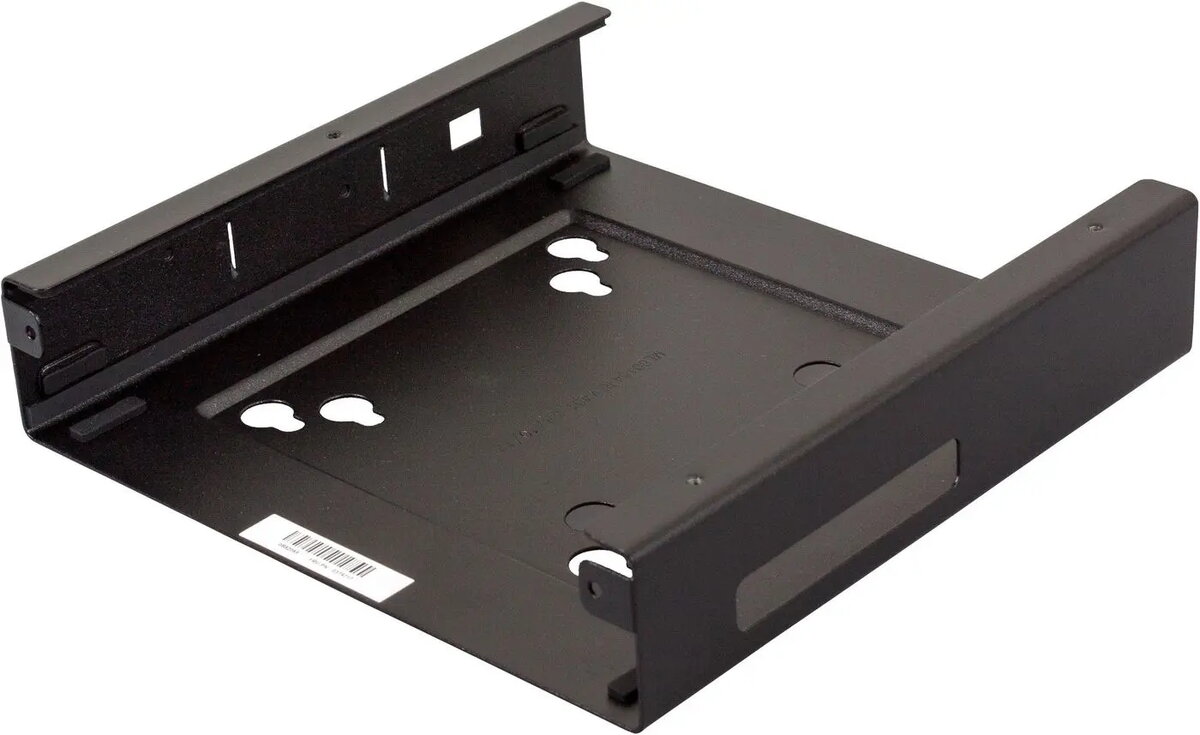
Lenovo VESA Mount Bracket Kit for Monitor Mounting
The Lenovo VESA Mount bracket kit provides a robust and secure solution for mounting compatible Lenovo monitors onto standard VESA-compliant hardware. This kit is engineered to integrate seamlessly with monitor arms, wall mounts, and adjustable stands, facilitating a more organized and ergonomic workspace. By enabling the use of third-party mounting systems, it helps users optimize their desk layout and achieve better viewing angles for improved comfort during extended periods of use.
This mounting kit offers significant benefits for both professional office environments and home workstations. It allows for greater flexibility in monitor placement, which is essential for maintaining proper posture and reducing eye strain. The durable construction ensures that the monitor remains stable and secure once mounted, providing peace of mind. Furthermore, by lifting the display off the desk surface, the kit helps reclaim valuable workspace, allowing for a cleaner and more efficient desktop arrangement.
This kit is designed specifically for compatible Lenovo monitors and may not fit displays from other manufacturers or specific Lenovo models not listed as compatible. It is not intended for use with monitors that already feature integrated VESA mounting holes, as those units can typically be attached directly to mounts without additional hardware.
To use the Lenovo VESA Mount bracket kit, first ensure that your monitor is compatible with the specific mounting interface. Begin by attaching the bracket securely to the back of the monitor according to the provided instructions, ensuring all screws are tightened firmly. Once the bracket is attached, align the assembly with your chosen VESA-compliant monitor arm or wall mount. Secure the monitor to the mount using the appropriate screws, ensuring the connection is stable before releasing the weight of the monitor.
Regularly inspect the mounting screws and connections to ensure they remain tight and secure over time, especially if the monitor position is adjusted frequently.
{{highlightedFeature.featureTitle}}:
{{getProductFeatureValueById(product, highlightedFeature.featureId)}}
{{ productComparisonGenerationError }}
