
Save time and money with our discounts!
In cart {{totalProductsCount}} item(s)
Your cart is empty
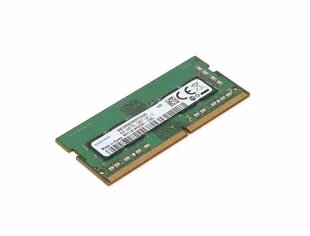
Memory Module Lenovo DDR3L 8 GB 1600 MHz
The Lenovo 11201304 memory module provides a single 8 GB DDR3L stick operating at 1600 MHz, made for laptop systems that accept low-voltage DDR3L SO‑DIMM modules. This 1 x 8 GB configuration increases available RAM capacity to improve application responsiveness and support multitasking, while maintaining compatibility with systems that require 1.35V DDR3L memory.
This Lenovo DDR3L 8 GB 1600 MHz module delivers a balance of capacity and power efficiency: the 8 GB density enables smoother switching between multiple applications and better handling of memory‑intensive tasks, while the DDR3L low‑voltage design reduces power draw compared with standard DDR3 modules. The 1600 MHz clock speed provides a reliable data transfer rate suitable for everyday computing and productivity workloads, and the single‑module format simplifies upgrades in systems with free SO‑DIMM slots.
Power off the laptop and disconnect from any power source, including battery if removable. Open the access panel following your device manufacturer’s instructions to reach the SO‑DIMM slot. If replacing an existing module, gently release the retaining clips and remove the old module. Align the notch on the DDR3L module with the slot and insert at an angle, then press down until the retaining clips snap into place. Reassemble the laptop, reconnect power, and verify system recognition of the new 8 GB module in the operating system or BIOS.
Ensure your laptop motherboard supports DDR3L 1600 MHz SO‑DIMM modules and low‑voltage operation before purchase. For dual‑channel operation, install a matched module of the same capacity and speed in the complementary slot. After installation, update BIOS/UEFI if required and run a memory test or system diagnostics to confirm stability.
{{highlightedFeature.featureTitle}}:
{{getProductFeatureValueById(product, highlightedFeature.featureId)}}
{{ productComparisonGenerationError }}
