
Filters you can trust. Pure water every day.
In cart {{totalProductsCount}} item(s)
Your cart is empty
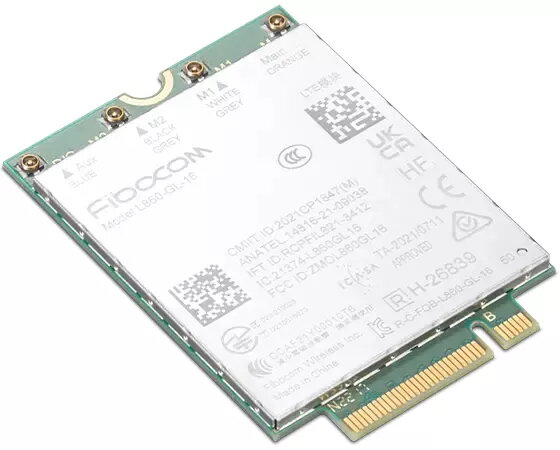
Internal WWAN Network Card Lenovo 4XC1M72799 M.2 interface, internal, 0.008 kg, green
The Lenovo 4XC1M72799 internal WWAN network card is a compact module designed to add mobile broadband connectivity to compatible laptops and embedded systems. With an M.2 host interface and lightweight internal construction (0.008 kg), this green module integrates into supported systems to enable on-the-go internet access via operator SIM cards or embedded eSIM solutions when supported by the host device.
The M.2 interface ensures straightforward installation into systems with a compatible slot, while the internal design keeps the module securely mounted inside the device. Its low weight and small footprint reduce impact on device balance and portability. Being a dedicated WWAN module, it enables persistent mobile data connections without relying on external dongles or tethering from a smartphone.
Power down and unplug the host device before installation. Open the device access panel according to the manufacturer instructions, locate a compatible M.2 WWAN slot, and insert the module at the correct angle until it seats; secure it with the appropriate screw. Reassemble the device, power it on and install any required drivers or firmware provided by the system vendor. Configure the mobile broadband connection through the operating system or vendor connection manager, insert a supported SIM card if required, and verify network registration with a cellular operator.
Confirm host compatibility and antenna availability before purchase: many systems require external antenna cables or specific BIOS support for WWAN modules. Use drivers and firmware from the device manufacturer to ensure proper operation and network certification.
{{highlightedFeature.featureTitle}}:
{{getProductFeatureValueById(product, highlightedFeature.featureId)}}
{{ productComparisonGenerationError }}
