
JBL speakers and headphones for pure and deep sound!
In cart {{totalProductsCount}} item(s)
Your cart is empty
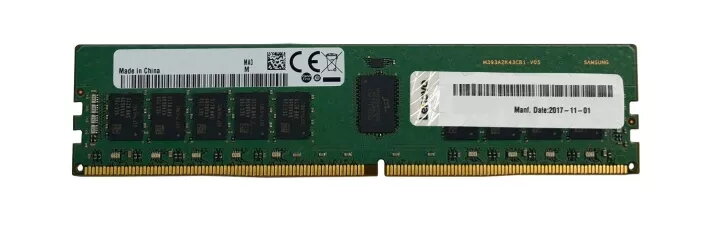
Memory Module Lenovo DDR4 16GB 2933MHz 2x8GB
The Lenovo 16GB DDR4 2933MHz memory kit, consisting of two 8GB modules, is engineered to provide reliable and high-performance data processing for ThinkSystem servers. Utilizing industry-standard components from Tier 1 suppliers, this RDIMM memory is rigorously tested to ensure maximum compatibility and stability within the Lenovo server ecosystem. By operating at a frequency of 2933 MHz, these modules facilitate efficient data handling and improved system responsiveness for demanding enterprise environments.
This memory kit offers significant benefits for server infrastructure, including enhanced bandwidth and reduced latency, which are critical for memory-intensive workloads. The RDIMM form factor ensures data integrity through error-correcting code support, making it a dependable choice for mission-critical applications. Furthermore, the modules are tuned to perform optimally within ThinkSystem servers, providing a seamless integration that minimizes downtime and maximizes operational efficiency. The dual-channel configuration allows for balanced data throughput, contributing to a more stable and high-performing computing environment.
This memory module is specifically designed for server hardware using the RDIMM standard and is not compatible with standard desktop motherboards or laptops that require UDIMM memory. Users should verify their server's compatibility with 2933 MHz RDIMM modules before installation.
Installation should be performed while the server is powered off and disconnected from the power source. Open the server chassis and locate the memory DIMM slots on the motherboard. Ensure the locking tabs are open, then align the notch on the memory module with the key in the slot. Press down firmly on both ends of the module until the locking tabs click into place. Once installed, power on the server and enter the BIOS or system management interface to confirm that the new memory is correctly detected and initialized.
For optimal performance, it is recommended to populate memory channels according to the server manufacturer's guidelines to take full advantage of the dual-channel architecture. Always handle memory modules by the edges to avoid electrostatic discharge damage to the components.
{{highlightedFeature.featureTitle}}:
{{getProductFeatureValueById(product, highlightedFeature.featureId)}}
{{ productComparisonGenerationError }}
