
JBL speakers and headphones for pure and deep sound!
In cart {{totalProductsCount}} item(s)
Your cart is empty
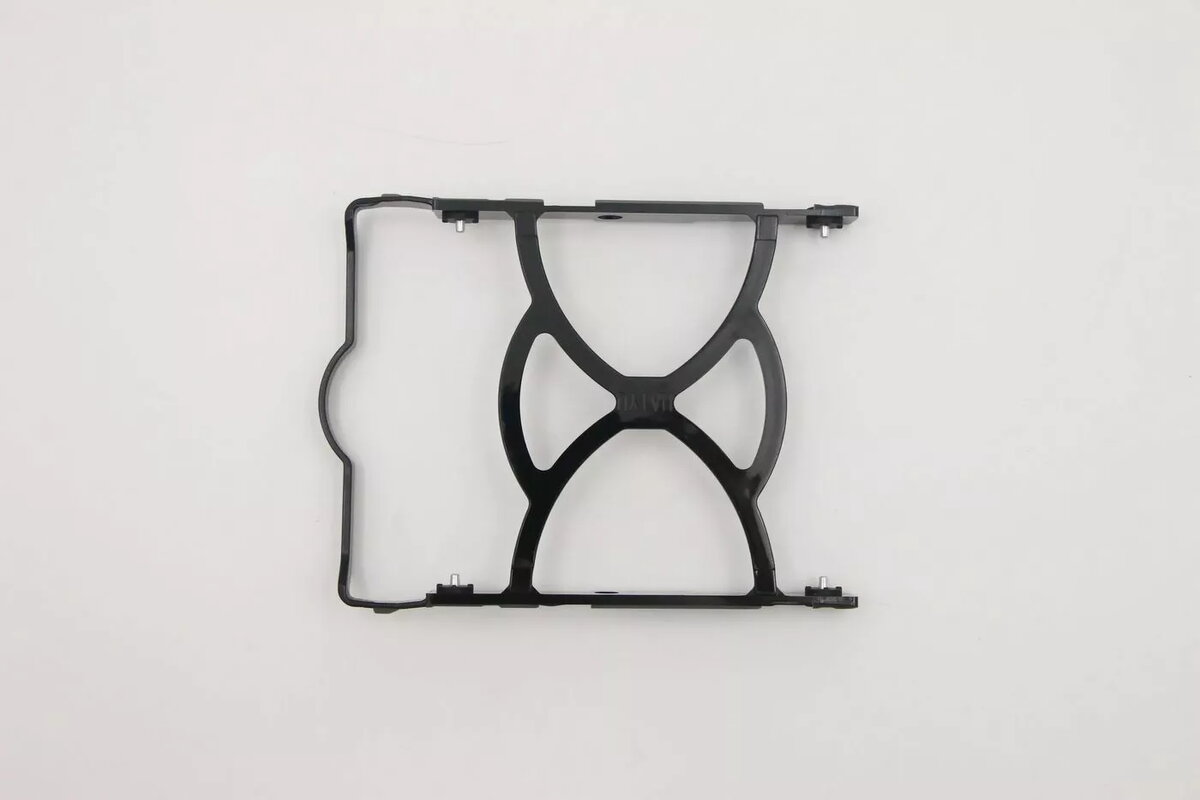
3.5" HDD Tray Lenovo FXN replacement mounting bracket for 3.5-inch hard drives
Lenovo 3.5" HDD Tray FXN replacement mounting bracket for 3.5-inch hard drives is a purpose-built mechanical carrier designed to secure a standard 3.5-inch SATA or SAS hard disk drive inside compatible Lenovo servers and chassis. The tray provides the correct screw locations, alignment features, and mounting points to ensure a stable fit and reliable drive positioning for service, replacement, or storage expansion tasks.
This replacement mounting bracket restores the original mechanical interface and drive alignment, enabling straightforward installation and removal of 3.5-inch hard drives without modifying the chassis. It helps maintain proper airflow and drive stability inside the server bay, supports routine drive swaps and upgrades, and reduces the risk of misalignment or vibration by providing factory-compatible screw and guide locations.
Power down the server or follow your equipment's hot-swap procedure if supported. Remove the existing tray or bay cover, position the 3.5-inch drive into the replacement bracket aligning it with the screw holes, and fasten the drive using the appropriate screws. Slide or insert the assembled tray into the chassis bay until it engages with the bay guides or latch. Verify the drive is seated correctly and reconnect power and data connections per server instructions before returning the unit to operation.
Handle the bracket and hard drive on an anti-static surface and use appropriate screw torque to avoid damage. Verify chassis compatibility with the tray before installation and follow Lenovo service documentation for hot-swap procedures, drive initialization, and system configuration after installing the drive.
{{highlightedFeature.featureTitle}}:
{{getProductFeatureValueById(product, highlightedFeature.featureId)}}
{{ productComparisonGenerationError }}
