JBL speakers and headphones for pure and deep sound!
In cart {{totalProductsCount}} item(s)
Your cart is empty
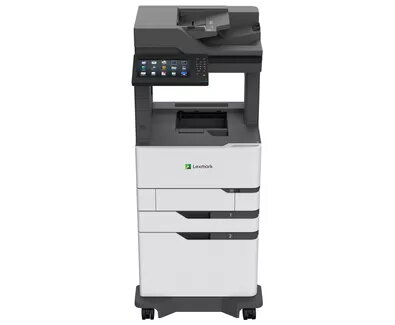
Multifunction Printer Lexmark MX822adxe Laser Mono
The Lexmark MX822adxe Laser Mono is a multifunction printer designed for busy office environments that require fast, reliable monochrome output combined with colour scanning and basic fax functionality. It delivers up to 52 pages per minute in black-and-white with a maximum resolution of 1200 x 1200 DPI, supports A4 paper and offers network connectivity via Ethernet and USB 2.0. The unit's black and white exterior fits typical office interiors while its high monthly duty cycle is intended to handle large print volumes.
The printer provides high-speed mono printing at 52 ppm with a fine maximum resolution of 1200 x 1200 DPI, enabling clear text and sharp business documents. Integrated colour scanning expands functionality for document workflows, and mono copying and faxing reduce the need for separate devices. Built-in Ethernet and USB 2.0 interfaces support wired networked environments, while the high maximum duty cycle supports continuous heavy use. Its A4 support and direct printing capabilities simplify everyday office tasks.
Set the Lexmark MX822adxe on a stable surface with adequate ventilation and connect it to your wired network using the Ethernet interface or to a workstation via USB 2.0. Load A4 paper into the main tray following the alignment guides. Use the control panel or the printer's network settings to configure IP and print preferences. For everyday printing, send documents from a connected computer or mobile device that supports direct printing; for scanning, place originals on the flatbed or in the feeder and choose colour scan options. Regularly monitor consumable levels and output trays to ensure uninterrupted operation.
To maintain print quality and reliability, use manufacturer-recommended toner and perform periodic maintenance as described in the service guide. For high-volume environments, schedule routine checks of paper trays, media alignment, and network settings. Store paper in a dry environment and ensure adequate clearance around the device for airflow.
{{highlightedFeature.featureTitle}}:
{{getProductFeatureValueById(product, highlightedFeature.featureId)}}
{{ productComparisonGenerationError }}