Powerful EcoFlow stations for energy anywhere!
In cart {{totalProductsCount}} item(s)
Your cart is empty
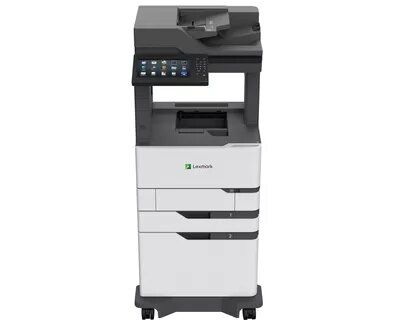
Multifunction Device Lexmark MX826adxe Laser Mono Printing
The Lexmark MX826adxe Laser Mono Printing multifunction device is a high-performance office machine designed for organisations that require fast, reliable monochrome output together with scanning and copying capabilities. Based on laser printing technology, it delivers sharp black-and-white prints at a maximum resolution of 1200 x 1200 DPI and a rated print speed of up to 66 pages per minute. The device supports A4 media and includes wired network connectivity and direct USB printing for efficient integration into a busy office environment.
This Lexmark multifunction device combines high-speed mono printing, mono copying and colour scanning in a single footprint, reducing the need for separate devices. Its 1200 x 1200 DPI maximum resolution ensures clear text and detailed line art, while the 66 ppm print speed supports high-volume workflows. Built-in Ethernet LAN and USB 2.0 interfaces provide stable network and local connections. The robust monthly duty cycle rating supports continuous heavy use, and the neutral black-and-white design suits a variety of professional interiors.
Place the Lexmark MX826adxe on a stable, level surface that can support its weight and ensure adequate ventilation around the unit. Connect the device to your network using the Ethernet port or to a workstation via USB 2.0. Load A4 paper into the main tray and adjust paper guides to prevent misfeeds. Use the front control panel for printing, copying and scanning operations or access device functions through the networked driver and software on a connected computer. For scanning to network locations or emails, configure the destination addresses and scan profiles via the device menu or web-based administration interface.
To maintain consistent print quality and reliable operation, use manufacturer-recommended toner and consumables, perform regular preventive maintenance as described in the user manual, and ensure the device firmware and network settings are kept up to date. For large print volumes, monitor consumable levels and plan replacement to avoid downtime.
{{highlightedFeature.featureTitle}}:
{{getProductFeatureValueById(product, highlightedFeature.featureId)}}
{{ productComparisonGenerationError }}