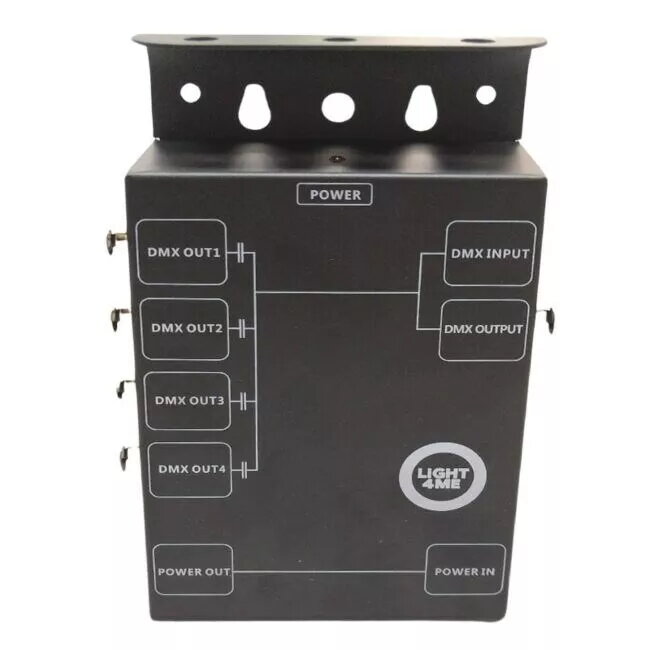
The Light4Me XSPLIT 4 is a DMX512 splitter that accepts a single DMX input and provides four isolated DMX outputs for reliable signal distribution. Designed for stage lighting, event rigs and permanent installations, the XSPLIT 4 buffers the incoming signal and supplies electrically isolated outputs to prevent ground loops and protect both controllers and fixtures. The compact unit supports the practical needs of touring, rental and fixed-install environments where one source must feed multiple DMX runs.
Advantages
The XSPLIT 4 offers electrical isolation on each output, reducing the risk of interference and faults spreading between devices. Signal buffering preserves DMX timing and integrity over longer cable runs. The unit’s four outputs allow separate DMX lines to be routed to different lighting zones or dimmer packs without the need for manual patching at the controller. Its build is targeted at professional use, with straightforward connectivity that simplifies setup and troubleshooting.
Suitable for
- Live concerts and touring rigs requiring multiple DMX runs
- Theatrical and stage lighting installations
- Rental houses and production companies that need reliable signal splitting
- Fixed installations in clubs, houses of worship, and event venues
- Situations where electrical isolation is needed to prevent ground loop issues
When it may not be suitable
This DMX splitter is intended for distributing and isolating DMX512 signals; it does not provide protocol conversion or Ethernet/Art-Net/sACN to DMX bridging. If you require network-to-DMX conversion, large-scale network management or advanced routing features, a dedicated converter or a network node would be more appropriate. The XSPLIT 4 also does not replace a full-featured lighting controller.
Key specifications
- One DMX512 input
- Four electrically isolated DMX512 outputs
- Signal buffering to preserve DMX timing
- Compact form factor suitable for rack or case mounting
- Designed for professional stage and installation use
How to use
Connect the DMX source (controller) to the input connector on the XSPLIT 4, then run DMX cables from each of the four isolated outputs to the respective fixtures, dimmers or sub-controllers. Use standard DMX512 cabling and follow proper termination practices on the last device in each run. Power the unit according to the manufacturer’s instructions before use. The isolated outputs distribute the buffered DMX signal without manual configuration, so setup is typically limited to cabling and termination checks.
What to consider before purchase
- Ensure your setup requires four isolated DMX outputs rather than network-to-DMX conversion or more complex routing
- Check physical connector types and mounting requirements to match your rig or flight case
- Confirm that DMX512 (not Ethernet-based lighting protocols) is the control method in your installation
Usage recommendations
For best results, use quality DMX cable, keep cable runs within recommended lengths per DMX standards, and terminate the last device on each output run. When deploying in touring or rental contexts, label input and output lines and include the splitter in your equipment checklist to simplify setup and troubleshooting.