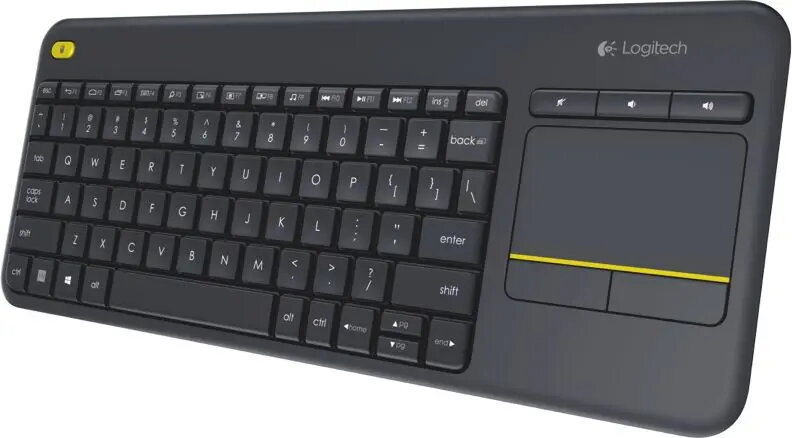
This product page features the Logitech K400 PLUS Wireless Keyboard QWERTZ German Layout with Touchpad wireless keyboard, which is compared against several similar modifications of the same model from Logitech: Wireless Touch Keyboard Logitech K400 Plus, Logitech K400 Plus Wireless Touch Keyboard, Mini, QWERTY, Nordic Layout, Black, Logitech Wireless Touch Keyboard K400 Plus Mini QWERTZ Black, Wireless Touch Keyboard Logitech K400 Plus (Czech layout), and Wireless Touch Keyboard Logitech K400 Plus (Swiss layout). All these products share core capabilities: they are wireless, use RF connectivity, feature an integrated touchpad, and are designed for effortless media control, home entertainment systems, and Smart TV navigation from a distance. The primary differences among them lie in their keyboard language layouts and regional targeting, alongside minor form factor variations.
⚙️ The table below compares the key specifications, including connection type, integrated touchpad, form factor, and most importantly, the keyboard language layout, which determines typing comfort for specific regions.
| Parameter | Logitech K400 PLUS (German) | Wireless Touch Keyboard K400 Plus | K400 Plus (Nordic) | K400 Plus Mini QWERTZ (Hungarian) | K400 Plus (Czech) | K400 Plus (Swiss) | Practical significance |
|---|
| Device type | Wireless keyboard with touchpad | Wireless keyboard with touchpad | Wireless keyboard with touchpad | Wireless keyboard with touchpad | Wireless keyboard with touchpad | Wireless keyboard with touchpad | All options offer identical core functionality for cable-free media system control. |
| Connectivity interface | RF Wireless | RF Wireless | RF Wireless | RF Wireless | RF Wireless | RF Wireless | The identical wireless connection type ensures stable performance at a distance from a TV or PC. |
| Integrated touchpad | Yes | Yes | Yes | Yes | Yes | Yes | The built-in touchpad removes the need for a separate mouse in living room setups. |
| Language layout | German (QWERTZ) | German (QWERTZ) | Nordic (QWERTY) | Hungarian (QWERTZ) | Czech (QWERTZ) | Swiss (QWERTZ) | The main decision factor: the layout must match the user's typing habits and regional standards. |
◎ The table below evaluates how well each modification matches specific user needs, language preferences, and usage scenarios.
| Use case | Recommended product | Why |
|---|
| Typing in German and controlling home media systems | Logitech K400 PLUS Wireless Keyboard QWERTZ German Layout with Touchpad | The German QWERTZ layout is tailored for users in Germany or those who frequently type in German. |
| Navigating Smart TVs and media centers in Nordic countries | Logitech K400 Plus Wireless Touch Keyboard, Mini, QWERTY, Nordic Layout, Black | Features a Nordic layout and QWERTY configuration, optimized for the northern European region. |
| Typing in Hungarian from the living room couch | Logitech Wireless Touch Keyboard K400 Plus Mini QWERTZ Black | The Hungarian language layout provides a comfortable typing experience for users in Hungary. |
| Using a media keyboard with Czech characters | Wireless Touch Keyboard Logitech K400 Plus (Czech) | The inclusion of the Czech layout makes daily text entry convenient for users in the Czech Republic. |
| Universal tasks and Swiss input standards | Wireless Touch Keyboard Logitech K400 Plus (Swiss) | The Swiss layout meets the specific language input requirements of users in Switzerland. |
The Logitech K400 PLUS Wireless Keyboard QWERTZ German Layout with Touchpad presented on this page is functionally identical to the other K400 Plus variants, offering dependable wireless connectivity and a built-in touchpad for managing Smart TVs and PCs from a distance. The defining difference is the German QWERTZ layout. Choose this product if you require German language input, while alternative versions cater to users in different language regions.