Powerful EcoFlow stations for energy anywhere!
In cart {{totalProductsCount}} item(s)
Your cart is empty
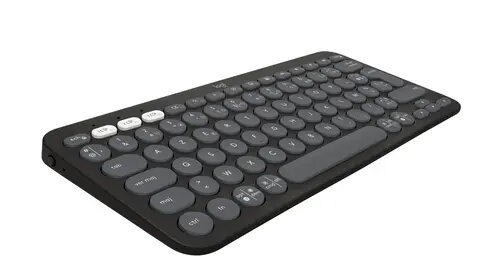
Logitech Pebble Keys 2 K380S Wireless Keyboard
The Logitech Pebble Keys 2 K380S Wireless Keyboard is a slim, minimalist input device engineered for modern multi-device workflows. Its compact design and quiet, responsive keys make it an excellent choice for users who prioritize portability and a clutter-free workspace. By utilizing advanced Bluetooth technology, this keyboard allows for seamless transitions between up to three connected devices, such as computers, tablets, and smartphones, ensuring high productivity across different platforms.
This keyboard stands out due to its ultra-slim profile, which fits easily into bags for mobile work. The quiet typing mechanism provides a comfortable experience that minimizes noise in shared environments or quiet offices. Its multi-device pairing capability is highly efficient, allowing users to switch between devices with a simple button press. Additionally, the keyboard is built with sustainability in mind, incorporating recycled plastic, and offers an impressive battery life to support long-term usage without frequent interruptions.
This keyboard may not be ideal for professional gamers who require mechanical switches, high polling rates, or wired connectivity for minimal latency. Furthermore, users who prefer a full-sized layout with a dedicated numeric keypad may find the compact design restrictive for data-heavy tasks.
To begin using the Logitech Pebble Keys 2 K380S, insert the included batteries and power on the device. Activate Bluetooth on your computer, tablet, or smartphone and put the keyboard into pairing mode by holding down one of the Easy-Switch buttons until the LED blinks. Select the keyboard from your device's Bluetooth settings to complete the connection. You can repeat this process for up to three devices and switch between them instantly by pressing the corresponding Easy-Switch button.
For the best experience, install the Logi Options+ software to customize shortcut keys and optimize the keyboard performance for your specific operating system. Keep the keyboard on a flat, stable surface to ensure consistent key response.
{{highlightedFeature.featureTitle}}:
{{getProductFeatureValueById(product, highlightedFeature.featureId)}}