{{ totalProductsCount }}

In cart {{totalProductsCount}} item(s)

Total:
{{sum | formatAmount}}

Your cart is empty

header-product Keyboard Mouse Combo Logitech POP Icon 920-013140
63.99 €

Keyboard Mouse Combo Logitech POP Icon 920-013140

Fast delivery available
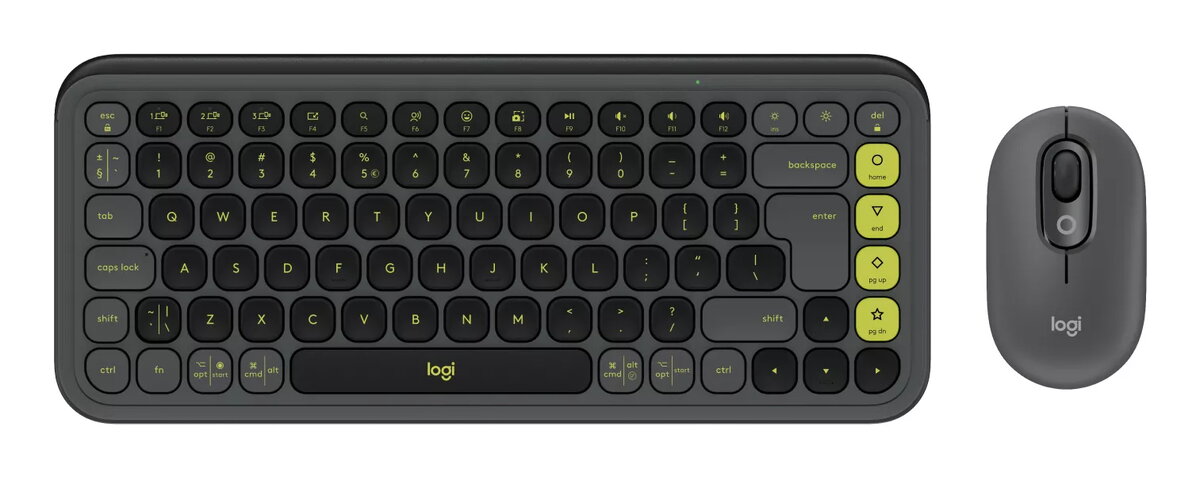
Keyboard Mouse Combo Logitech POP Icon Photo 1
Keep track of price changes You keep track of price changes
Watch the price drop

Leave your address - as soon as the price of the product goes down, you'll know about it right away

You keep track of price changes

Keyboard Mouse Combo Logitech POP Icon 920-013140

{{email}}
You keep track of price changes

Keyboard Mouse Combo Logitech POP Icon 920-013140

{{email}}
{{selectedOffer && selectedOffer.price | formatAmount}}

Short description

The Logitech POP Icon Combo features a mini QWERTY keyboard with scissor key switches for a comfortable typing experience. It connects wirelessly via Bluetooth and is designed for universal use. The stylish granite and green color adds a modern touch to your workspace. This combo includes a matching mouse, making it a perfect choice for those seeking functionality and aesthetics in one package.
Available at price 63.99 €: 58 pcs.
Total available for order: 85 pcs.
Warranty: 2 Years
SKU: 11120258
free shipment

Cheapest delivery:

Unisend LV

Pick-up points

Unisend LV

Cost

1.79 €

Deliver

{{selectedOffer.parcelStationDeliveryString}}

Customer service center
2b. Kengaraga str., Riga, Latvia, LV-1063
17.08.2026 {{selectedOffer.officeDeliveryString}}
free
Courier Delivery Please note that in case of a large parcel additional delivery costs may apply!
20.08.2026 {{selectedOffer.courierDeliveryString}}
From 4.99 € (Weight: 0.87 kg)
Parcel couriers
Unisend LV / Venipak Pickup LV / Venipak Locker LV / Latvijas Pasts pakomāts / DPD Paku skapis / Omniva LV / Latvijas Pasts nodaļa
20.08.2026 {{selectedOffer.parcelStationDeliveryString}}
From 1.79 €
payment
Payment Methods:
Bank transfer, Bank cards on-line, Apple Pay, Google Pay
Together cheaper
{{product.price | formatAmount}}
{{product.title}}
{{productBundle.reference.specialPrice | formatAmount}}
{{productBundle.title}}
{{productBundlePreviousPrice | formatAmount}}
{{productBundleSpecialPrice | formatAmount}}

You saving {{productBundleYouSave | formatAmount}}

Product information

Description

The Logitech POP Icon Combo (920-013140) is a compact Bluetooth keyboard and matching mouse designed to combine comfortable typing, customizable shortcuts and a distinctive look. The mini QWERTY keyboard features low-profile scissor switches for precise, quiet typing, while the contoured POP Mouse includes SilentTouch Technology and a SmartWheel for fast, accurate scrolling. The set is available in coordinated colours (Granite & Green) and uses recycled plastic in several components.

Advantages

The keyboard provides smooth, low-profile keys for comfortable and quiet typing and the mouse delivers whisper-quiet clicks and ergonomic contouring. Customizable Action Keys and compatibility with the Logi Options+ app let you assign shortcuts for productivity and media. Easy-Switch buttons let you pair and switch between multiple Bluetooth devices. Long battery life offers up to 3 years for the keyboard and up to 2 years for the mouse under typical usage. Packaging uses FSC-certified paper and certain plastic parts are made from post-consumer recycled material.

Suitable for

  • Everyday office and home productivity on laptops, tablets and phones
  • Users who need quiet, low-profile typing for shared spaces
  • People who prefer a compact mini QWERTY layout and matching mouse
  • Those who switch between devices and need fast device pairing

Key specifications

  • Brand: Logitech; Model: POP Icon Combo (920-013140)
  • Connection: Bluetooth
  • Keyboard: Mini QWERTY, US International layout, scissor key switches, low-profile keys
  • Mouse: POP Mouse with SilentTouch Technology and SmartWheel
  • Product colours: Granite & Green
  • Battery life: Keyboard up to 3 years; Mouse up to 2 years (typical use)
  • Compatibility: Windows, macOS, iPadOS, iOS, Android
  • Materials: contains post-consumer recycled plastic (percentages vary by colour/component)
  • Packaging: paper from FSC-certified forests and controlled sources

How to use

Turn on each device and activate Bluetooth on your host device. Use the Easy-Switch buttons on the keyboard and mouse to enter pairing mode, then select the device name in your operating system's Bluetooth settings. Install the Logi Options+ app to customise Action Keys, FN keys and mouse behaviours. Use the Action Keys for one-press access to productivity apps, social media or AI tools; press the break-mode key to open media apps such as Netflix or Spotify. Scroll with the SmartWheel and switch between precision and speed-scroll modes with a flick.

Usage recommendations

For best results, install the Logi Options+ app to set up Action Key shortcuts and adjust mouse sensitivity. Replace batteries according to the device indicators and keep firmware updated via the app to ensure optimal performance and security.

Specifications

Number of products included: The number of products that are included in the package.
2 pc(s)
Mouse included: A mouse is included with this product.
Yes
Backlight: Product has a built-in light source for its illuminating.
No
Numeric keypad: Small, palm-sized, seventeen key section of a computer keyboard, usually on the very far right. The numeric keypad features digits 0 to 9, addition (+), subtraction (-), multiplication (*) and division (/) symbols, a decimal point (.) and Num Lock and Enter keys. Laptop keyboards often do not have a numpad, but may provide numpad input by holding a modifier key (typically labelled "Fn") and operating keys on the standard keyboard.
No
Keyboard form factor: Keyboard size, e.g. standard, mini.
Mini
Pointing device:
No
Keyboard layout: The type of keys on a keyboard, and their position on the keyboard. This can differ from country to country.
QWERTY
Keyboard key switch: The characteristics of the key switch, mechanical vs rubber dome. A mechanical key switch is usually more expensive, gives a stronger feedback and can be more precise.
Scissor key switch
Device interface: The ports (sockets) where the device connects with other devices.
Bluetooth
Connectivity technology: The technology that enables connectivity of the device, e.g. wired or wireless.
Wireless
Recommended usage: What the product should be used for, and how it should be used (e.g. ambient temperature).
Universal
Power source type: What the power source is.
Battery
Product colour: The colour e.g. red, blue, green, black, white.
Green, Granite
Keyboard language: The letters which are marked on the keys for convenience of the keyboard usage with specific language.
US International
All features

Recycling data

Product post-consumer recycled plastic: The percentage of post-consumer recycled plastic relative to the total weight of all plastic used in the product.
70 %
Product recycled materials: Identifies which specific recycled or secondary material types are present in the product.
Recycled plastic
Product made with recycled materials: Indicates whether the product contains any proportion of recycled or secondary raw materials in its composition.
Yes

Other features

Warranty period:
2 year(s)
Applications supported:
Logi Options+

Packaging content

Packaging content:
Mouse 1 X AA battery (pre-installed) User documentation Sticker Keyboard 2 X AAA batteries (pre-installed) User documentation Sticker
User guide:
Yes
Batteries included:
Yes
Number of products included: The number of products that are included in the package.
2 pc(s)

Weight & dimensions

Mouse weight: How heavy the mouse is.
81.4 g
Mouse dimensions (WxDxH):
59.4 x 35.2 x 104.8
Keyboard weight:
530 g
Keyboard dimensions (WxDxH):
324.5 x 22 x 137

Sustainability

Sustainability certificates:
Forest Stewardship Council (FSC)

System requirements

Other operating systems supported:
ChromeOS
Mobile operating systems supported: The operating systems e.g. Android, iOS, that can be used with the mobile device.
Android 12.0, iPadOS
Linux operating systems supported: 8 RT. Linux (9.4, 9.5), Red Hat Enterprise Linux 5.0 (supported with a pre-built package); SUSE Linux (10.3, 11.0, 11, 11.1, 11.2), Fedora (9, 9.0, 10, 10.0, 11.0, 11, 12, 12.0), Ubuntu (8.04, 8.04.1, 8.04.2, 8.10, 9.04, 9.10, 10.04), Debian (5.0, 5.0.1, 5.0.2, 5.0.3)
Yes
Mac operating systems supported: Mac operating systems e.g. OS X can be used with the device.
Mac OS X 14.0 Sonoma, Mac OS X 13.0 Ventura, Mac OS X 12.0 Monterey
Windows operating systems supported: Windows vesions wich can be used with the device.
Windows 11, Windows 10

Mouse

Buttons durability (million clicks):
3
Mouse on/off switch:
Yes
Mouse battery life:
24 month(s)
Mouse battery technology:
Alkaline
Mouse battery type:
AA
Scrolling directions:
Vertical
Scroll type: Type of scroll in computer input device, e.g. wheel, touch.
Wheel
Scroll: Move displayed text or graphics in a particular direction on a computer screen in order to view different parts of them.
Yes
Buttons type: The type of the buttons.
Pressed buttons
Buttons quantity: The number of buttons that there are in/on the product.
3
Movement resolution:
400 DPI
Movement detection technology: The technology employed to detect motion, e.g. Dual, using combinations of different sensing technologies to help reduce false triggering.
Optical
Form factor: The shape or design of the product.
Ambidextrous
Mouse included: A mouse is included with this product.
Yes

Battery

Battery technology: The type of battery in the device, e.g. nickel–cadmium (NiCd).
Alkaline

Power

Service life of battery:
36 month(s)
Number of batteries (keyboard):
2
Keyboard battery type:
AAA
Power source type: What the power source is.
Battery

Features

Wireless range:
10 m

Design

Surface coloration: Type of surface coloration e.g. monotone, image.
Monochromatic
Product colour: The colour e.g. red, blue, green, black, white.
Green, Granite
Keyboard style: The style of the keyboard e.g. straight, curved.
Straight
Backlight: Product has a built-in light source for its illuminating.
No

Keyboard

On/off switch: The button which is pressed to switch the device on or off.
Yes
Bluetooth Low Energy (BLE):
Yes
Actuation force:
60 g
Key travel distance:
1.8 mm
Programmable hot keys:
Yes
Hot keys:
Yes
Multi-device support:
Yes
Keyboard key profile:
Low-profile
Keyboard keys operating life:
10 million characters
Numeric keypad: Small, palm-sized, seventeen key section of a computer keyboard, usually on the very far right. The numeric keypad features digits 0 to 9, addition (+), subtraction (-), multiplication (*) and division (/) symbols, a decimal point (.) and Num Lock and Enter keys. Laptop keyboards often do not have a numpad, but may provide numpad input by holding a modifier key (typically labelled "Fn") and operating keys on the standard keyboard.
No
Keyboard form factor: Keyboard size, e.g. standard, mini.
Mini
Pointing device:
No
Keyboard language: The letters which are marked on the keys for convenience of the keyboard usage with specific language.
US International
Keyboard layout: The type of keys on a keyboard, and their position on the keyboard. This can differ from country to country.
QWERTY
Keyboard key switch: The characteristics of the key switch, mechanical vs rubber dome. A mechanical key switch is usually more expensive, gives a stronger feedback and can be more precise.
Scissor key switch
Device interface: The ports (sockets) where the device connects with other devices.
Bluetooth
Connectivity technology: The technology that enables connectivity of the device, e.g. wired or wireless.
Wireless
Recommended usage: What the product should be used for, and how it should be used (e.g. ambient temperature).
Universal

Description

Machine translation. Load original

Similar products

{{product.title}} Show details Hide details

{{highlightedFeature.featureTitle}}:

{{getProductFeatureValueById(product, highlightedFeature.featureId)}}

{{product.price | formatAmount}}
Might be useful
{{product.manufacturerName}}
{{product.categoryName}}
{{product.title}}
{{product.specialPrice}}
{{product.price}}
Stock data
Warehouse Stock Delivery to the store Store Price
WH355 58 17.08.2026
63.99 € Best price
BT19 16 Tuesday Best delivery
Fast shipping
70.49 €
BT14 3 Tuesday Best delivery
Fast shipping
73.49 €
Show all offers Hide
Available only for legal entities
Warehouse Stock Delivery to the store Store Price
WH109 2 31.08.2026
88.99 €
63.99 €
Stock: 58
Delivery Date: 17.08.2026
Warehouse: WH355
Fast shipping
70.49 €
Stock: 16
Delivery Date: Tuesday Best delivery
Warehouse: BT19
Fast shipping
73.49 €
Stock: 3
Delivery Date: Tuesday Best delivery
Warehouse: BT14
Fast shipping
78.49 €
Stock: 6
Delivery Date: Tuesday Best delivery
Warehouse: BT13
Available only for legal entities
88.99 €
Stock: 2
Delivery Date: 31.08.2026
Warehouse: WH109

Customer reviews

Customer questions

FAQ

How much does the Keyboard Mouse Combo Logitech POP Icon cost, and is it available for purchase?

The price is 63.99 € (valid at the time of publication and already includes all taxes). The item is available for order — 85 pcs. are in stock, and you can place your purchase right now with delivery across Latvia and Europe or choose pickup at the Riga collection point. We offer favorable purchase terms, including the option to split the payment into convenient monthly installments. Availability and price are updated in real time, so we recommend placing your order in advance.

If I order this product today, when will I receive my order?

If you place your order today, delivery will be as fast and convenient as possible. You will be able to pick up your order on 17.08.2026 at the Riga pickup point or choose delivery across Latvia and Europe. We carefully inspect every purchase and pack it securely for safe transportation.

What payment options are available?

AiO.lv offers several payment methods: Bank transfer, Bank cards on-line, Apple Pay, Google Pay. All transactions are 100% secure and encrypted.

Can this product be purchased for a company (with VAT)?

Yes. AiO.lv works with legal entities in Latvia and across Europe. The product price already includes VAT. For certain product categories, as well as for companies from other EU countries with a valid VAT number, a 0% VAT rate may apply. We issue the invoice immediately after the order is placed, support electronic BIS invoices, and automatically generate all necessary accounting documents. You can complete the purchase for a company online — simply select the company profile and choose bank transfer as the payment method during checkout.

What is the warranty period?

All Logitech products come with an official 2 Years warranty. It covers all manufacturing defects and malfunctions that may occur during use. The warranty is valid at all authorized Logitech service centers and through AiO.lv

Can the product be returned after purchase?

Yes, you can return the product within 14 days of purchase if you bought it as a consumer (not a legal entity). Returns are possible without giving any reason — the main condition is that the product retains its original appearance and full set of accessories. We will make the process as simple and convenient as possible: just contact our customer support team, and we will help you arrange the return.

Where should I contact for warranty service?

For warranty-related questions you can contact the AiO.lv (SIA VSPRO) customer support team. We will assist with consultation, warranty claim processing, and coordination with certified service centers.

How can I tell if this product suits my needs?

When making a choice, we recommend paying attention to the key features: number of products included, mouse included, backlight, numeric keypad, keyboard form factor, pointing device, keyboard layout, keyboard key switch, device interface, connectivity technology, recommended usage, power source type, product colour, keyboard language, compatibility with your devices or usage conditions, material quality, functionality, and warranty terms. These characteristics will help you determine how well the model meets your needs.

Where can I download the instructions for Keyboard Mouse Combo Logitech POP Icon?

You can download the instructions in PDF format from the “Instructions” section on the product description page. The file contains complete information about installation, setup, and usage.

warranty
14-Day Return Policy We are confident in our quality, but if the purchase doesn’t fit — you have 14 days to return the product with peace of mind.
shipping
Fast Delivery Get your orders as quickly as possible — right to your door, parcel lockers, or pickup points across Latvia and the EU.
payment
Secure Payment Pay the way you prefer: cash, VISA, MasterCard, Apple Pay, Google Pay, bank transfer, or 0% installment plan.
warranty
Quality Since 2008 AiO.lv has been on the market for over 18 years and has earned trust — with more than 6000 genuine positive reviews on Google.