{{ totalProductsCount }}

In cart {{totalProductsCount}} item(s)

Total:
{{sum | formatAmount}}

Your cart is empty

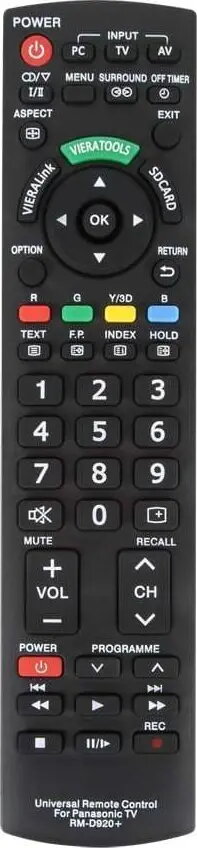
header-product Universal TV Remote Control LP PIL1031 for Panasonic LCD/LED TVs – LP PIL1031

Universal TV Remote Control LP PIL1031 for Panasonic LCD/LED TVs – LP PIL1031

LP PIL1031 universal remote for Panasonic LCD/LED Photo 1
Out of stock.
View similar!

Short description

LP PIL1031 is a universal remote control designed for Panasonic LCD and LED televisions. It provides basic TV control functions such as power, volume, channel selection and menu navigation and is intended as a replacement or spare remote for compatible Panasonic models. Easy to program and suitable for home use with LCD/LED TV sets.
Warranty: 2 Years
SKU: 12365486
Manufacturer: LP
delivery
Information regarding the items availability for purchase will be posted on this site
price
Item cost information will be published on this site
Together cheaper
{{product.price | formatAmount}}
{{product.title}}
{{productBundle.reference.specialPrice | formatAmount}}
{{productBundle.title}}
{{productBundlePreviousPrice | formatAmount}}
{{productBundleSpecialPrice | formatAmount}}

You saving {{productBundleYouSave | formatAmount}}

Product information

Description

LP PIL1031 is a universal TV remote control designed for use with Panasonic LCD and LED televisions. The remote provides essential control functions including power on/off, volume adjustment, channel selection and menu navigation. It is intended as a replacement or spare control for compatible Panasonic sets and is programmed through simple code entry or automatic search routines depending on the TV model.

Advantages

The LP PIL1031 offers a compact, familiar button layout that mirrors common Panasonic control schemes, enabling straightforward operation for everyday TV tasks. Its universal compatibility with a range of LCD and LED models reduces the need for a model-specific remote, and the low-profile design makes it easy to store or keep near the TV. The remote uses standard batteries and is engineered for reliable infrared communication across typical living-room distances.

Suitable for

  • Replacing a lost or damaged Panasonic remote for basic TV functions
  • Secondary or spare remote for living rooms, bedrooms or guest rooms
  • Users who need simple power, volume, channel and menu control
  • Homes with Panasonic LCD or LED television models that accept universal remotes

When it may not be suitable

The LP PIL1031 provides core control functions but does not include advanced features such as voice control, backlighting or dedicated smart-TV app buttons. It may not support proprietary or model-specific functions available on original manufacturer's remotes, such as special picture modes, specific input shortcuts or manufacturer-specific smart TV controls. If you require full feature parity with a particular Panasonic model, verify support before purchase.

Key specifications

  • Compatibility: Universal remote for Panasonic LCD and LED televisions
  • Controls: Power, volume, channel selection, menu navigation and basic playback controls
  • Interface: Infrared (IR) transmission for line-of-sight operation
  • Power: Operates on standard replaceable batteries (not included)
  • Form factor: Compact handheld remote with tactile buttons

How to use

Insert the required batteries and point the remote toward the TV’s infrared receiver. Program the remote using the supplied code list or the automatic code search procedure described in the included instructions: enter the code for your Panasonic model or let the remote cycle through codes until the TV responds, then save the code. Use the main buttons for power, volume and channel changes; access the TV menu and navigate using the directional and select keys. Replace batteries when response weakens.

What to consider before purchase

  • Confirm your Panasonic TV model supports universal IR remotes or check compatibility tips
  • Verify that required advanced functions (if any) are supported by a non-original remote
  • Ensure line-of-sight between remote and TV IR sensor for reliable operation
  • Prepare standard batteries (typically AA or AAA) as required by the remote

Usage recommendations

For reliable operation, replace batteries in pairs, keep the remote within typical room distances (about 5–10 meters) and avoid blocking the TV’s IR receiver. If programming fails, consult the TV model code list or retry the automatic search routine in a well-lit area with fresh batteries.

Description

Machine translation. Load original

Similar products

{{product.title}} Show details Hide details

{{highlightedFeature.featureTitle}}:

{{getProductFeatureValueById(product, highlightedFeature.featureId)}}

{{product.price | formatAmount}}
Might be useful
{{product.manufacturerName}}
{{product.categoryName}}
{{product.title}}
{{product.specialPrice}}
{{product.price}}

Customer reviews

Customer questions

FAQ

What payment options are available?

AiO.lv offers several payment methods: Bank transfer. All transactions are 100% secure and encrypted.

Can this product be purchased for a company (with VAT)?

Yes. AiO.lv works with legal entities in Latvia and across Europe. The product price already includes VAT. For certain product categories, as well as for companies from other EU countries with a valid VAT number, a 0% VAT rate may apply. We issue the invoice immediately after the order is placed, support electronic BIS invoices, and automatically generate all necessary accounting documents. You can complete the purchase for a company online — simply select the company profile and choose bank transfer as the payment method during checkout.

What is the warranty period?

All LP products come with an official 2 Years warranty. It covers all manufacturing defects and malfunctions that may occur during use. The warranty is valid at all authorized LP service centers and through AiO.lv

Can the product be returned after purchase?

Yes, you can return the product within 14 days of purchase if you bought it as a consumer (not a legal entity). Returns are possible without giving any reason — the main condition is that the product retains its original appearance and full set of accessories. We will make the process as simple and convenient as possible: just contact our customer support team, and we will help you arrange the return.

Where should I contact for warranty service?

For warranty-related questions you can contact the AiO.lv (SIA VSPRO) customer support team. We will assist with consultation, warranty claim processing, and coordination with certified service centers.
warranty
14-Day Return Policy We are confident in our quality, but if the purchase doesn’t fit — you have 14 days to return the product with peace of mind.
shipping
Fast Delivery Get your orders as quickly as possible — right to your door, parcel lockers, or pickup points across Latvia and the EU.
payment
Secure Payment Pay the way you prefer: cash, VISA, MasterCard, Apple Pay, Google Pay, bank transfer, or 0% installment plan.
warranty
Quality Since 2008 AiO.lv has been on the market for over 18 years and has earned trust — with more than 6000 genuine positive reviews on Google.