{{ totalProductsCount }}

In cart {{totalProductsCount}} item(s)

Total:
{{sum | formatAmount}}

Your cart is empty

header-product Graphics card MATROX M9140-E512LAF 0.5 GB GDDR2 PCI Express x16, passive cooling, max 1920x1200

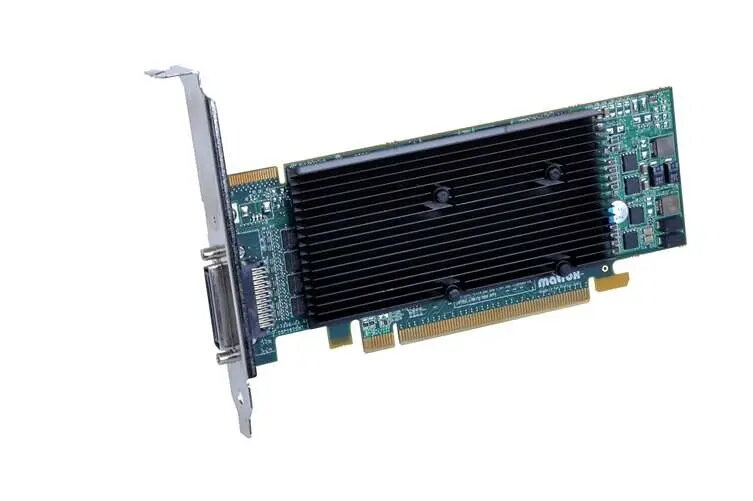
Graphics card MATROX M9140-E512LAF 0.5 GB GDDR2 PCI Express x16, passive cooling, max 1920x1200

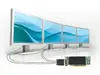
MATROX M9140-E512LAF graphics card Photo 1
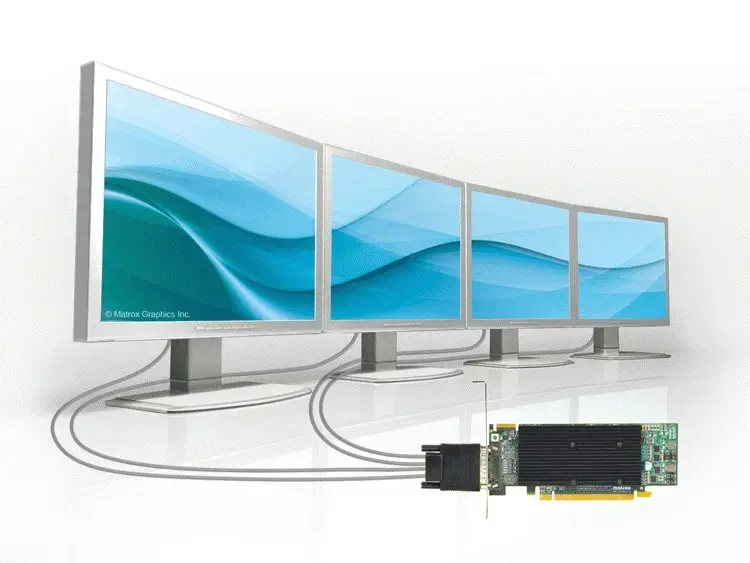
MATROX M9140-E512LAF graphics card Photo 2
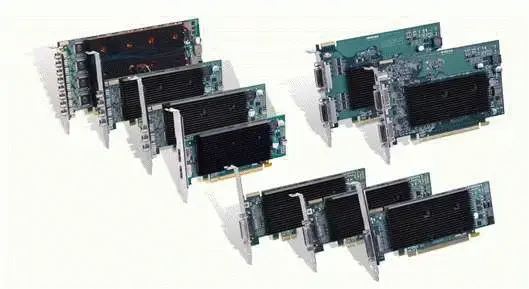
MATROX M9140-E512LAF graphics card Photo 3
MATROX M9140-E512LAF graphics card Photo 1
MATROX M9140-E512LAF graphics card Photo 2
MATROX M9140-E512LAF graphics card Photo 3
Out of stock.
View similar!

Short description

Discrete MATROX M9140-E512LAF graphics card with M9140 GPU, 0.5 GB GDDR2 memory and PCI Express x16 interface. Supports up to 1920×1200 resolution and OpenGL 2.0. Passive cooling makes it suitable for silent systems and office or industrial displays where basic 2D/3D acceleration, multiple-monitor output and low power operation are required.
Warranty: 2 Years
SKU: 12101144
delivery
Information regarding the items availability for purchase will be posted on this site
price
Item cost information will be published on this site
Together cheaper
{{product.price | formatAmount}}
{{product.title}}
{{productBundle.reference.specialPrice | formatAmount}}
{{productBundle.title}}
{{productBundlePreviousPrice | formatAmount}}
{{productBundleSpecialPrice | formatAmount}}

You saving {{productBundleYouSave | formatAmount}}

Product information

Description

MATROX M9140-E512LAF is a discrete multi-display graphics card based on the M9140 GPU with 0.5 GB GDDR2 memory and a PCI Express x16 interface. The card is designed for quiet operation with passive cooling and supports output resolutions up to 1920×1200 per display. It provides multi-monitor capabilities and basic 2D/3D acceleration suitable for office, industrial and embedded systems that require low power consumption and reliable, fanless operation.

Advantages

The Matrox M9140-E512LAF delivers support for up to four simultaneous monitors from a single card at high resolution, with options for independent or stretched desktop modes and hardware-assisted edge overlap for blended displays. Its passive, fanless cooling reduces acoustic noise and increases reliability in noise-sensitive environments. The low-profile form factor and included bracket options simplify integration into varied system chassis, and broad operating system support enables use in diverse deployments.

Suitable for

  • Multi-monitor office workstations and financial trading desks
  • Digital signage and control-room displays
  • Industrial and embedded systems requiring silent operation
  • Environments needing stretched or independent desktops across several screens

Key specifications

  • Graphics processor: M9140
  • Memory: 0.5 GB GDDR2
  • Interface: PCI Express x16
  • Cooling: Passive (fanless)
  • Maximum per-output resolution: 1920 × 1200 pixels
  • OpenGL support: version 2.0
  • Form factor: low-profile with full-height bracket included
  • Multi-display support: up to four outputs from one card; multi-card scaling supported

How to use

Install the MATROX M9140-E512LAF into an available PCI Express x16 slot on a compatible motherboard and secure the appropriate bracket for your chassis. Connect displays using the supplied multi-monitor adapter cable and DVI-I/HD15 adapters as required by your monitors. After hardware installation, install the Matrox driver package compatible with your operating system and configure display modes such as extended, stretched or cloned desktop using the Matrox PowerDesk software or the provided driver control panel. For multi-card setups, install additional M-Series cards and configure joined or expanded desktop modes according to the driver documentation.

Usage recommendations

For stable operation, use the card in systems with adequate airflow despite its passive cooler, and ensure display cables and adapters are fully seated. Use Matrox PowerDesk or the vendor driver package to precisely align edge overlap and configure multi-monitor layouts. When deploying multiple cards in one system, verify chassis space and power supply capacity, and follow the Matrox multi-card setup guide to achieve the desired number of displays.

Specifications

Cooling type: The method used to cool the device or to cool the air around the device.
Passive
Dual Link DVI: A dual-link DVI interface sends data over both of the DVI links to the monitor, and this is how higher resolutions are achieved. With dual-link DVI, a resolution of 2048 x 1536 is possible.
No
OpenGL version: OpenGL (Open Graphics Library) is a specification defining a cross-language cross-platform API for writing applications that produce 3D computer graphics (and 2D computer graphics as well). The interface consists of over 250 different function calls which can be used to draw complex three-dimensional scenes from simple primitives.
2.0
TV tuner integrated: Device has an in-built TV tuner.
No
DVI-D ports quantity: This is the amount of DVI-I interfaces. Digital Visual Interface (DVI) is a video display interface developed by the Digital Display Working Group (DDWG). The digital interface is used to connect a video source to a display device, such as a computer monitor. DVI-D means DVI digital, which means it can only support digital, but not analog.
0
DVI-I ports quantity: This is the amount of DVI-I interfaces. Digital Visual Interface (DVI) is a video display interface developed by the Digital Display Working Group (DDWG). The digital interface is used to connect a video source to a display device, such as a computer monitor. DVI-I is DVI integrated, which means it can support digital and analog.
0
DisplayPorts quantity: Number of DisplayPorts. A DisplayPort is a digital display interface developed by the Video Electronics Standards Association (VESA). The interface is primarily used to connect a video source to a display device such as a computer monitor, though it can also be used to carry audio, USB, and other forms of data.
0
HDMI ports quantity: The number of sockets (ports) for HDMI connections. HDMI (High-Definition Multimedia Interface) is a compact audio/video interface for transferring uncompressed video data and compressed/uncompressed digital audio data from a HDMI-compliant device ("the source device") to a compatible computer monitor, video projector, digital television, or digital audio device. HDMI is a digital replacement for existing analog video standards.
0
Interface type:
PCI Express x16
Graphics card memory type: The type of memory used by the video card. Often a combination of dedicated memory (Video RAM or VRAM) and dynamic system memory is used. UMA stands for Unified Memory Architecture, and is a computer memory architecture that allows the graphics processing unit to share system memory. Other abreviations: RAM = Random Access Memory, SDRAM = synchronous dynamic RAM, DDR = double-data-rate.
GDDR2
Discrete graphics card memory:
0.5 GB
CUDA: CUDA (aka Compute Unified Device Architecture) is a parallel computing platform and programming model created by NVIDIA and implemented by the graphics processing units (GPUs) that they produce. CUDA gives program developers direct access to the virtual instruction set and memory of the parallel computational elements in CUDA GPUs.
No
Maximum resolution: The maximum number of pixels that can be displayed in the image. It is usually quoted as width × height,: for example, "1024 × 768" means the width is 1024 pixels and the height is 768 pixels.
1920 x 1200
Graphics processor: Also known as a graphics processing unit (GPU), this is a specialized electronic circuit designed to rapidly manipulate and alter memory to accelerate the creation of images in a frame buffer intended for output to a display. GPUs are used in embedded systems, mobile phones, personal computers, workstations, and game consoles. Modern GPUs are very efficient at manipulating computer graphics.
M9140
Graphics processor family: The category to which the graphics processor (GPU) belongs e.g. Southern Islands family of Radeon processors (made by AMD), GeForce 600 (made by NVIDIA).
Matrox
Parallel processing technology support: Parallel processing technology is the simultaneous use of more than one CPU or processor core to execute a program or multiple computational threads. Ideally, parallel processing makes programs run faster because there are more engines (CPUs or Cores) running it. In practice, it is often difficult to divide a program in such a way that separate CPUs or cores can execute different portions without interfering with each other. Most computers have just one CPU, but some models have several, and multi-core processor chips are becoming the norm. There are even computers with thousands of CPUs.
Not supported
All features

Logistics data

Harmonized System (HS) code:
84733020

Other features

Number of processors installed: Number of processors in the product.
1
Cable length: How long the cable is.
0.3 m
HDMI: HDMI (High-Definition Multimedia Interface) is a compact audio/video interface for transferring uncompressed video data and compressed/uncompressed digital audio data from a HDMI-compliant device ("the source device") to a compatible computer monitor, video projector, digital television, or digital audio device. HDMI is a digital replacement for existing analog video standards.
No
Mac compatibility: Product can be used with Apple Mac software and/or hardware.
No

Weight & dimensions

Height: The measurement of the product from head to foot or from base to top.
69 mm
Depth: The distance from the front to the back of something.
19 mm
Length: The measurement or extent of something from end to end.
168 mm

System requirements

Linux operating systems supported: 8 RT. Linux (9.4, 9.5), Red Hat Enterprise Linux 5.0 (supported with a pre-built package); SUSE Linux (10.3, 11.0, 11, 11.1, 11.2), Fedora (9, 9.0, 10, 10.0, 11.0, 11, 12, 12.0), Ubuntu (8.04, 8.04.1, 8.04.2, 8.10, 9.04, 9.10, 10.04), Debian (5.0, 5.0.1, 5.0.2, 5.0.3)
Yes
Mac operating systems supported: Mac operating systems e.g. OS X can be used with the device.
No
Windows operating systems supported: Windows vesions wich can be used with the device.
Windows 7 Starter, Windows 7 Professional, Windows 7 Professional x64, Windows 7 Home Premium, Windows 7 Starter x64, Windows 7 Ultimate, Windows 7 Ultimate x64, Windows Vista Business, Windows Vista Business x64, Windows Vista Home Basic, Windows Vista Home Basic x64, Windows Vista Home Premium, Windows Vista Home Premium x64, Windows Vista Ultimate, Windows Vista Ultimate x64, Windows XP Home, Windows XP Home x64, Windows XP Professional, Windows XP Professional x64, Windows 7 Home Premium x64

Design

Certification:
Class B, ROHS, WEEE
Form factor: The shape or design of the product.
Half-Height/Half-Length (HH/HL)
Cooling type: The method used to cool the device or to cool the air around the device.
Passive

Performance

Dual Link DVI: A dual-link DVI interface sends data over both of the DVI links to the monitor, and this is how higher resolutions are achieved. With dual-link DVI, a resolution of 2048 x 1536 is possible.
No
HDCP: High-bandwidth Digital Content Protection (HDCP) is a form of digital copy protection to prevent copying of digital audio and video content as it travels across connections.
No
OpenGL version: OpenGL (Open Graphics Library) is a specification defining a cross-language cross-platform API for writing applications that produce 3D computer graphics (and 2D computer graphics as well). The interface consists of over 250 different function calls which can be used to draw complex three-dimensional scenes from simple primitives.
2.0
TV tuner integrated: Device has an in-built TV tuner.
No
PhysX: PPU (microprocessor) expansion card designed by Ageia to accelerate PhysX-enabled video games.
No

Ports & interfaces

VGA (D-Sub) ports quantity: Number of VGA (D-Sub) ports (connecting interfaces) in the device. The VGA (D-Sub) connector is a 15 pin connector between a computer and a monitor. It was first introduced in 1987 by IBM.
4
Dual VGA:
Yes
TV-out:
No
DVI-I ports quantity: This is the amount of DVI-I interfaces. Digital Visual Interface (DVI) is a video display interface developed by the Digital Display Working Group (DDWG). The digital interface is used to connect a video source to a display device, such as a computer monitor. DVI-I is DVI integrated, which means it can support digital and analog.
0
DVI-D ports quantity: This is the amount of DVI-I interfaces. Digital Visual Interface (DVI) is a video display interface developed by the Digital Display Working Group (DDWG). The digital interface is used to connect a video source to a display device, such as a computer monitor. DVI-D means DVI digital, which means it can only support digital, but not analog.
0
DisplayPorts quantity: Number of DisplayPorts. A DisplayPort is a digital display interface developed by the Video Electronics Standards Association (VESA). The interface is primarily used to connect a video source to a display device such as a computer monitor, though it can also be used to carry audio, USB, and other forms of data.
0
HDMI ports quantity: The number of sockets (ports) for HDMI connections. HDMI (High-Definition Multimedia Interface) is a compact audio/video interface for transferring uncompressed video data and compressed/uncompressed digital audio data from a HDMI-compliant device ("the source device") to a compatible computer monitor, video projector, digital television, or digital audio device. HDMI is a digital replacement for existing analog video standards.
0
Interface type:
PCI Express x16

Memory

Graphics card memory type: The type of memory used by the video card. Often a combination of dedicated memory (Video RAM or VRAM) and dynamic system memory is used. UMA stands for Unified Memory Architecture, and is a computer memory architecture that allows the graphics processing unit to share system memory. Other abreviations: RAM = Random Access Memory, SDRAM = synchronous dynamic RAM, DDR = double-data-rate.
GDDR2
Discrete graphics card memory:
0.5 GB

Processor

Parallel processing technology support: Parallel processing technology is the simultaneous use of more than one CPU or processor core to execute a program or multiple computational threads. Ideally, parallel processing makes programs run faster because there are more engines (CPUs or Cores) running it. In practice, it is often difficult to divide a program in such a way that separate CPUs or cores can execute different portions without interfering with each other. Most computers have just one CPU, but some models have several, and multi-core processor chips are becoming the norm. There are even computers with thousands of CPUs.
Not supported
Maximum displays per videocard:
4
FireStream: A stream processor produced by Advanced Micro Devices (AMD) to use the stream processing/GPGPU (General Purpose Graphics Processing Units) concept for heavy floating-point computations to target various industries, such as the High Performance Computing (HPC), scientific, and financial sectors. Originally developed by ATI Technologies until the company was acquired by AMD in 2006, the product line was previously branded as both ATI FireStream and AMD Stream Processor.
No
CUDA: CUDA (aka Compute Unified Device Architecture) is a parallel computing platform and programming model created by NVIDIA and implemented by the graphics processing units (GPUs) that they produce. CUDA gives program developers direct access to the virtual instruction set and memory of the parallel computational elements in CUDA GPUs.
No
Maximum resolution: The maximum number of pixels that can be displayed in the image. It is usually quoted as width × height,: for example, "1024 × 768" means the width is 1024 pixels and the height is 768 pixels.
1920 x 1200
Graphics processor: Also known as a graphics processing unit (GPU), this is a specialized electronic circuit designed to rapidly manipulate and alter memory to accelerate the creation of images in a frame buffer intended for output to a display. GPUs are used in embedded systems, mobile phones, personal computers, workstations, and game consoles. Modern GPUs are very efficient at manipulating computer graphics.
M9140
Graphics processor family: The category to which the graphics processor (GPU) belongs e.g. Southern Islands family of Radeon processors (made by AMD), GeForce 600 (made by NVIDIA).
Matrox

Description

Machine translation. Load original

Similar products

{{product.title}} Show details Hide details

{{highlightedFeature.featureTitle}}:

{{getProductFeatureValueById(product, highlightedFeature.featureId)}}

{{product.price | formatAmount}}
Might be useful
{{product.manufacturerName}}
{{product.categoryName}}
{{product.title}}
{{product.specialPrice}}
{{product.price}}

Customer reviews

Customer questions

FAQ

What payment options are available?

AiO.lv offers several payment methods: Bank transfer, Leasing for legal entities. All transactions are 100% secure and encrypted.

Can this product be purchased for a company (with VAT)?

Yes. AiO.lv works with legal entities in Latvia and across Europe. The product price already includes VAT. For certain product categories, as well as for companies from other EU countries with a valid VAT number, a 0% VAT rate may apply. We issue the invoice immediately after the order is placed, support electronic BIS invoices, and automatically generate all necessary accounting documents. You can complete the purchase for a company online — simply select the company profile and choose bank transfer as the payment method during checkout.

What is the warranty period?

All MATROX products come with an official 2 Years warranty. It covers all manufacturing defects and malfunctions that may occur during use. The warranty is valid at all authorized MATROX service centers and through AiO.lv

Can the product be returned after purchase?

Yes, you can return the product within 14 days of purchase if you bought it as a consumer (not a legal entity). Returns are possible without giving any reason — the main condition is that the product retains its original appearance and full set of accessories. We will make the process as simple and convenient as possible: just contact our customer support team, and we will help you arrange the return.

Where should I contact for warranty service?

For warranty-related questions you can contact the AiO.lv (SIA VSPRO) customer support team. We will assist with consultation, warranty claim processing, and coordination with certified service centers.

How can I tell if this product suits my needs?

When making a choice, we recommend paying attention to the key features: cooling type, dual link dvi, opengl version, tv tuner integrated, dvi-d ports quantity, dvi-i ports quantity, displayports quantity, hdmi ports quantity, interface type, graphics card memory type, discrete graphics card memory, cuda, maximum resolution, graphics processor, graphics processor family, parallel processing technology support, compatibility with your devices or usage conditions, material quality, functionality, and warranty terms. These characteristics will help you determine how well the model meets your needs.

Where can I download the instructions for MATROX M9140-E512LAF graphics card?

You can download the instructions in PDF format from the “Instructions” section on the product description page. The file contains complete information about installation, setup, and usage.
warranty
14-Day Return Policy We are confident in our quality, but if the purchase doesn’t fit — you have 14 days to return the product with peace of mind.
shipping
Fast Delivery Get your orders as quickly as possible — right to your door, parcel lockers, or pickup points across Latvia and the EU.
payment
Secure Payment Pay the way you prefer: cash, VISA, MasterCard, Apple Pay, Google Pay, bank transfer, or 0% installment plan.
warranty
Quality Since 2008 AiO.lv has been on the market for over 18 years and has earned trust — with more than 6000 genuine positive reviews on Google.