
{{ totalProductsCount }}

In cart {{totalProductsCount}} item(s)

Total:
{{sum | formatAmount}}

Your cart is empty

header-product Keyboard Microsoft Surface Pro Signature Keyboard with Slim Pen 2 — Platinum, Microsoft Cover Port, Docking

Keyboard Microsoft Surface Pro Signature Keyboard with Slim Pen 2 — Platinum, Microsoft Cover Port, Docking

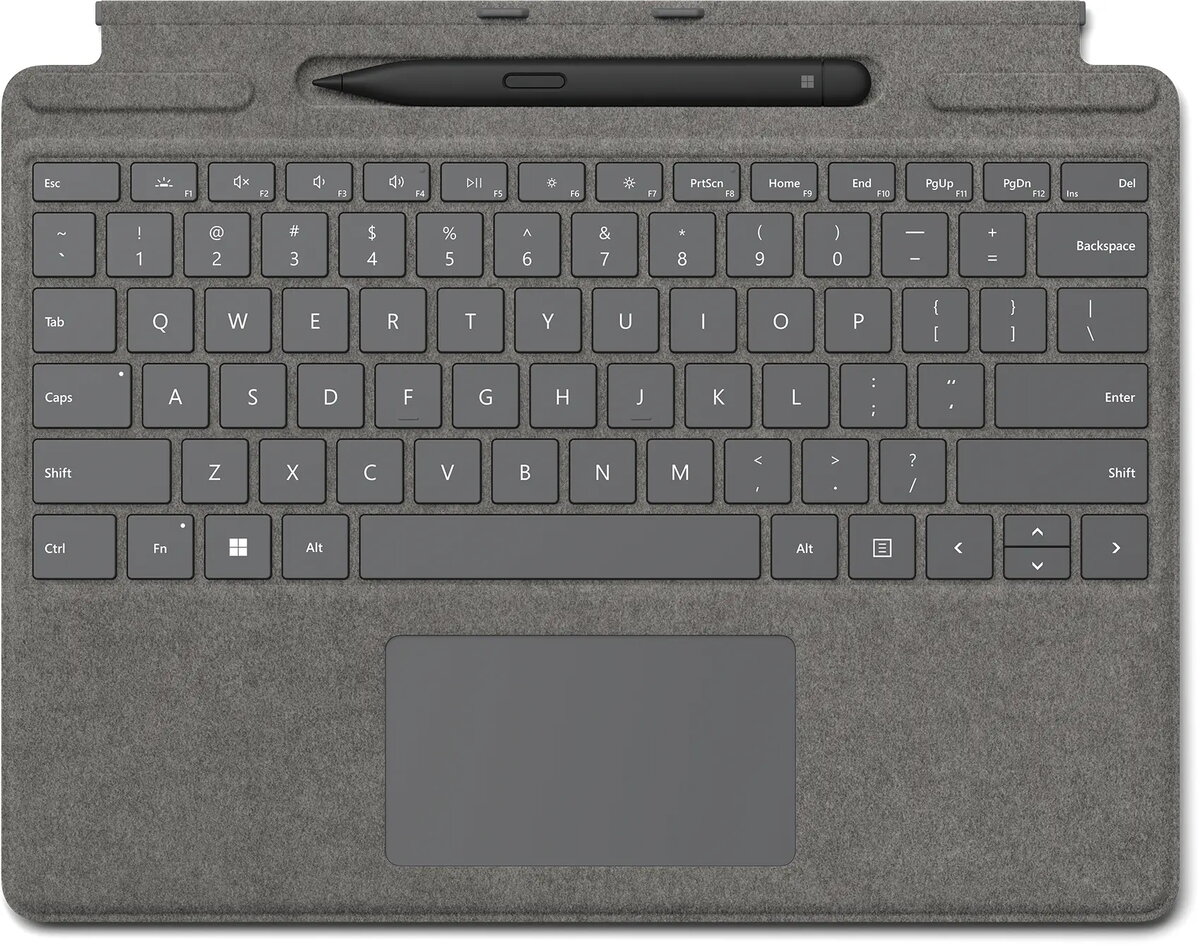
Microsoft Surface Pro Signature Keyboard w/ Slim Pen 2 Photo 1
Out of stock.
View similar!

Short description

Microsoft Surface Pro Signature Keyboard with Slim Pen 2 is a detachable keyboard cover for Surface Pro devices that connects via the Microsoft Cover port and uses docking power. Compatible with Surface Pro 10, 9, 8 and Surface Pro X, it includes a touchpad and integrated Slim Pen 2 storage. Finished in platinum and weighing 0.294 kg, it supports Windows 10 and Windows 11.
Warranty: 2 Years
SKU: 12024452

delivery
Information regarding the items availability for purchase will be posted on this site
price
Item cost information will be published on this site
Together cheaper
{{product.price | formatAmount}}
{{product.title}}
{{productBundle.reference.specialPrice | formatAmount}}
{{productBundle.title}}
{{productBundlePreviousPrice | formatAmount}}
{{productBundleSpecialPrice | formatAmount}}

You saving {{productBundleYouSave | formatAmount}}

Product information

Description

Next-level versatility comes in the perfect pair—Slim Pen 2 stores securely and recharges in the premium keyboard, featuring a large glass touchpad. Ready to pair with Surface Pro 9

Key Features

  • Touchpad
  • Cover
  • Docking Microsoft Cover port
  • Power source: Dock
  • Brand compatibility: Microsoft
  • Platinum

Specifications

Numeric keypad: Small, palm-sized, seventeen key section of a computer keyboard, usually on the very far right. The numeric keypad features digits 0 to 9, addition (+), subtraction (-), multiplication (*) and division (/) symbols, a decimal point (.) and Num Lock and Enter keys. Laptop keyboards often do not have a numpad, but may provide numpad input by holding a modifier key (typically labelled "Fn") and operating keys on the standard keyboard.
No
Pointing device:
Touchpad
Device interface: The ports (sockets) where the device connects with other devices.
Microsoft Cover port
Connectivity technology: The technology that enables connectivity of the device, e.g. wired or wireless.
Docking
Product colour: The colour e.g. red, blue, green, black, white.
Platinum
All features
Power source: What is providing power for the product e.g. mains electricity.
Dock
Pen included: The product includes a pen.
Yes
Accelerometer:
Yes
Cover:
Yes

Other features

Height: The measurement of the product from head to foot or from base to top.
4.89 mm
Width: The measurement or extent of something from side to side.
289.1 mm
Depth: The distance from the front to the back of something.
226.1 mm
Compatibility: The other products, software and hardware this product can be used with.
Surface Pro 10 Surface Pro 9 Surface Pro 8 Surface Pro X
Brand compatibility: What other brands this brand can be used with.
Microsoft

Technical details

Housing material: What the casing of the product is made of.
Alcantara

Weight & dimensions

Weight: Weight of the product without packaging (net weight). If possible, the net weight is given including standard accessories and supplies. Please note that sometimes the manufacturer leaves out the weight of accessories and/or supplies.
0.294 kg

System requirements

Windows operating systems supported: Windows vesions wich can be used with the device.
Windows 11, Windows 10

Design

Product colour: The colour e.g. red, blue, green, black, white.
Platinum
Island-style keyboard:
Yes

Keyboard

Multimedia keys:
Yes
Windows keys:
Yes
Numeric keypad: Small, palm-sized, seventeen key section of a computer keyboard, usually on the very far right. The numeric keypad features digits 0 to 9, addition (+), subtraction (-), multiplication (*) and division (/) symbols, a decimal point (.) and Num Lock and Enter keys. Laptop keyboards often do not have a numpad, but may provide numpad input by holding a modifier key (typically labelled "Fn") and operating keys on the standard keyboard.
No
Pointing device:
Touchpad
Device interface: The ports (sockets) where the device connects with other devices.
Microsoft Cover port
Connectivity technology: The technology that enables connectivity of the device, e.g. wired or wireless.
Docking

Description

Machine translation. Load original

Similar products

{{product.title}}
Show details Hide details

{{highlightedFeature.featureTitle}}:

{{getProductFeatureValueById(product, highlightedFeature.featureId)}}

{{product.price | formatAmount}}
Might be useful
{{product.manufacturerName}}
{{product.categoryName}}
{{product.title}}
{{product.specialPrice}}
{{product.price}}

Customer reviews

Customer questions

FAQ

What payment options are available?

AiO.lv offers several payment methods: Bank transfer. All transactions are 100% secure and encrypted.

Can this product be purchased for a company (with VAT)?

Yes. AiO.lv works with legal entities in Latvia and across Europe. The product price already includes VAT. For certain product categories, as well as for companies from other EU countries with a valid VAT number, a 0% VAT rate may apply. We issue the invoice immediately after the order is placed, support electronic BIS invoices, and automatically generate all necessary accounting documents. You can complete the purchase for a company online — simply select the company profile and choose bank transfer as the payment method during checkout.

What is the warranty period?

All Microsoft products come with an official 2 Years warranty. It covers all manufacturing defects and malfunctions that may occur during use. The warranty is valid at all authorized Microsoft service centers and through AiO.lv

Can the product be returned after purchase?

Yes, you can return the product within 14 days of purchase if you bought it as a consumer (not a legal entity). Returns are possible without giving any reason — the main condition is that the product retains its original appearance and full set of accessories. We will make the process as simple and convenient as possible: just contact our customer support team, and we will help you arrange the return.

Where should I contact for warranty service?

For warranty-related questions you can contact the AiO.lv (SIA VSPRO) customer support team. We will assist with consultation, warranty claim processing, and coordination with certified service centers.

How can I tell if this product suits my needs?

When making a choice, we recommend paying attention to the key features: numeric keypad, pointing device, device interface, connectivity technology, product colour, compatibility with your devices or usage conditions, material quality, functionality, and warranty terms. These characteristics will help you determine how well the model meets your needs.
warranty
14-Day Return Policy We are confident in our quality, but if the purchase doesn’t fit — you have 14 days to return the product with peace of mind.
shipping
Fast Delivery Get your orders as quickly as possible — right to your door, parcel lockers, or pickup points across Latvia and the EU.
payment
Secure Payment Pay the way you prefer: cash, VISA, MasterCard, Apple Pay, Google Pay, bank transfer, or 0% installment plan.
warranty
Quality Since 2008 AiO.lv has been on the market for over 18 years and has earned trust — with more than 6000 genuine positive reviews on Google.