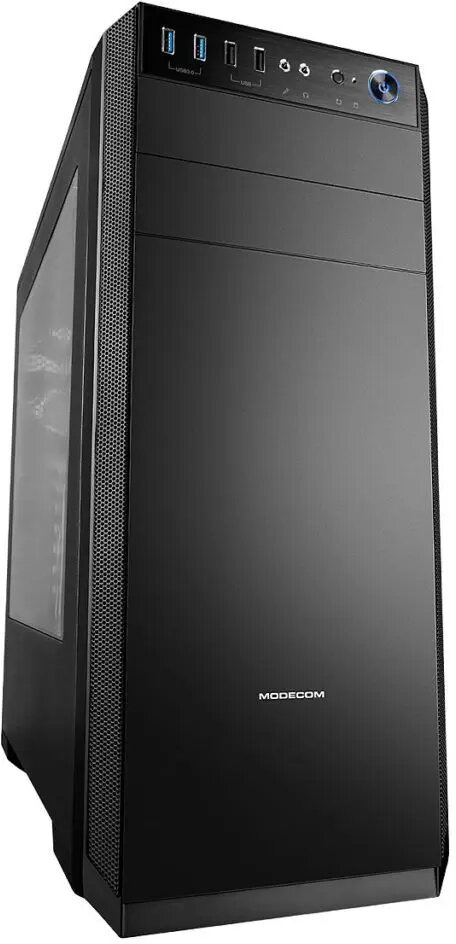
The desktop PC case Desktop PC case MODECOM Oberon Pro black is compared against several alternative case models, including various modifications of the MODECOM Oberon Pro series such as tempered glass and LE versions, as well as the MODECOM VOLCANO AQ200 ARGB. All compared products belong to the Midi Tower category and support standard ATX, Micro ATX, and ITX motherboards. The main practical differences between the base Oberon Pro and the alternatives lie in specific features such as tempered glass side panels, ARGB lighting, and drive bay arrangements.
⚙️ The table below compares characteristics such as case form factor, supported motherboards, graphics card clearance, drive bay configuration, and cooling or exterior design features.
| Comparison parameter | Desktop PC case MODECOM Oberon Pro black | PC Case MODECOM Oberon Pro Midi Tower — Black, ATX/ITX/Micro ATX, tempered glass, up to 395 mm GPU | PC Case MODECOM Oberon Pro Midi Tower, Tempered Glass, microATX/ATX, 7 slots, 395 mm GPU, 2x3.5" + 3x2.5" bays, USB 3.2 Gen1 | PC Case MODECOM OBERON PRO LE Midi Tower — SPCC, ATX/Micro‑ATX/ITX, 7 slots, 3x2.5" + 2x3.5", GPU up to 39.5 cm, PSU up to 24 cm, USB 3.2 Gen1 | PC Case MODECOM Oberon Pro Midi Tower — black, supports ATX/microATX/ITX, 7 expansion slots, up to 395 mm GPU, 5 HDD/3 SSD bays | Computer case MODECOM VOLCANO AQ200 ARGB MIDI black | Practical conclusion |
|---|
| Type and form factor | PC Midi Tower case | Midi Tower | Midi Tower | Midi Tower (SPCC) | Midi Tower | MIDI tower | All products share the standard Midi Tower form factor designed to house conventional PC components. |
| Supported motherboards | Standard PC components | ATX, Micro ATX, ITX | Micro ATX, ATX | ATX, Micro-ATX, ITX | ATX, microATX, ITX | ATX, micro-ATX, mini-ITX | Core motherboard compatibility remains virtually identical across the Oberon Pro and Volcano series. |
| Cooling and construction | Provides space for cooling and cable routing | Tempered glass, dust filter, 1x120 mm front/rear fans | Tempered glass, dust filters, cable management, 120 mm fans | Rear 120 mm fan, PSU support up to 24 cm | Includes 120 mm front/rear fans, filters, cable management | ARGB lighting, enhanced airflow support | Oberon Pro variants offer choices between solid or glass side panels, whereas Volcano focuses on lighting integration. |
| Storage and expansion | Space for drives and expansion cards | 7 slots, 1x 5.25", 3x 2.5", 2x 3.5" | 7 slots, 2x 3.5" + 3x 2.5" | 7 slots, 1x 5.25", 2x 3.5", 3x 2.5" | 7 slots, 1x 5.25", 2x 3.5", 3x 2.5" | Storage and expansion card slots | Most Oberon Pro models maintain identical flexibility for internal storage drives and expansion cards. |
◎ The table below evaluates how well each product suits different user needs and usage scenarios.
| Usage scenario | Recommended product | Why |
|---|
| Standard office or home PC build without visual requirements | Desktop PC case MODECOM Oberon Pro black | The base model serves well for practical, understated builds where transparent side panels are unnecessary. |
| Gaming setup with a desire to showcase internal components | PC Case MODECOM Oberon Pro Midi Tower (tempered glass variants) | Glass side panel variants allow users to showcase illuminated internal components and graphics cards. |
| Gaming build focused on dynamic lighting effects | Computer case MODECOM VOLCANO AQ200 ARGB MIDI black | Features built-in ARGB lighting and is styled specifically for modern gaming environments. |
The choice between the base Desktop PC case MODECOM Oberon Pro black and alternative modifications depends primarily on your visual preferences and specific build requirements. If you prefer a clean, traditional look without transparent panels, the base model is a solid, practical choice. For builds featuring illuminated components or glass side panels, selecting a glass-equipped Oberon Pro variant or the Volcano series is more suitable.