
{{ totalProductsCount }}

In cart {{totalProductsCount}} item(s)

Total:
{{sum | formatAmount}}

Your cart is empty

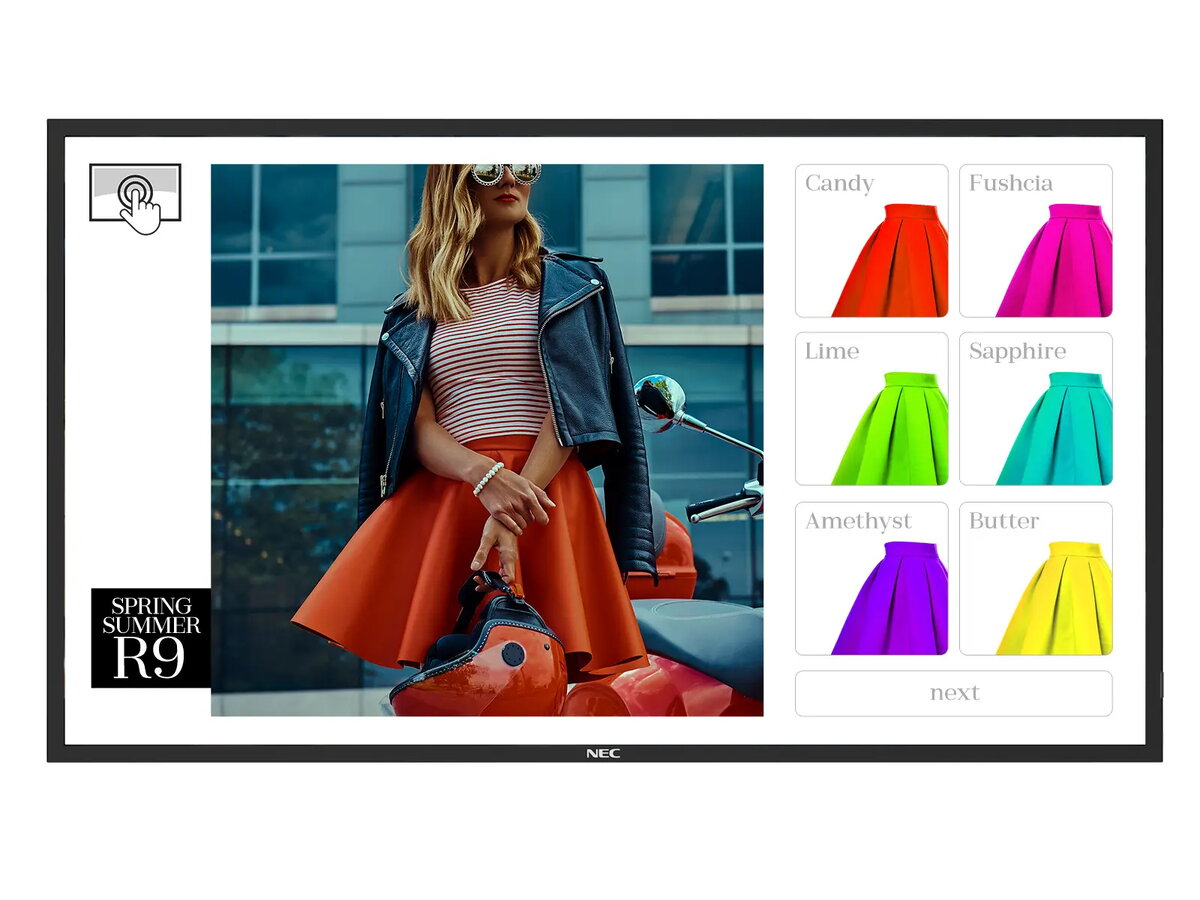
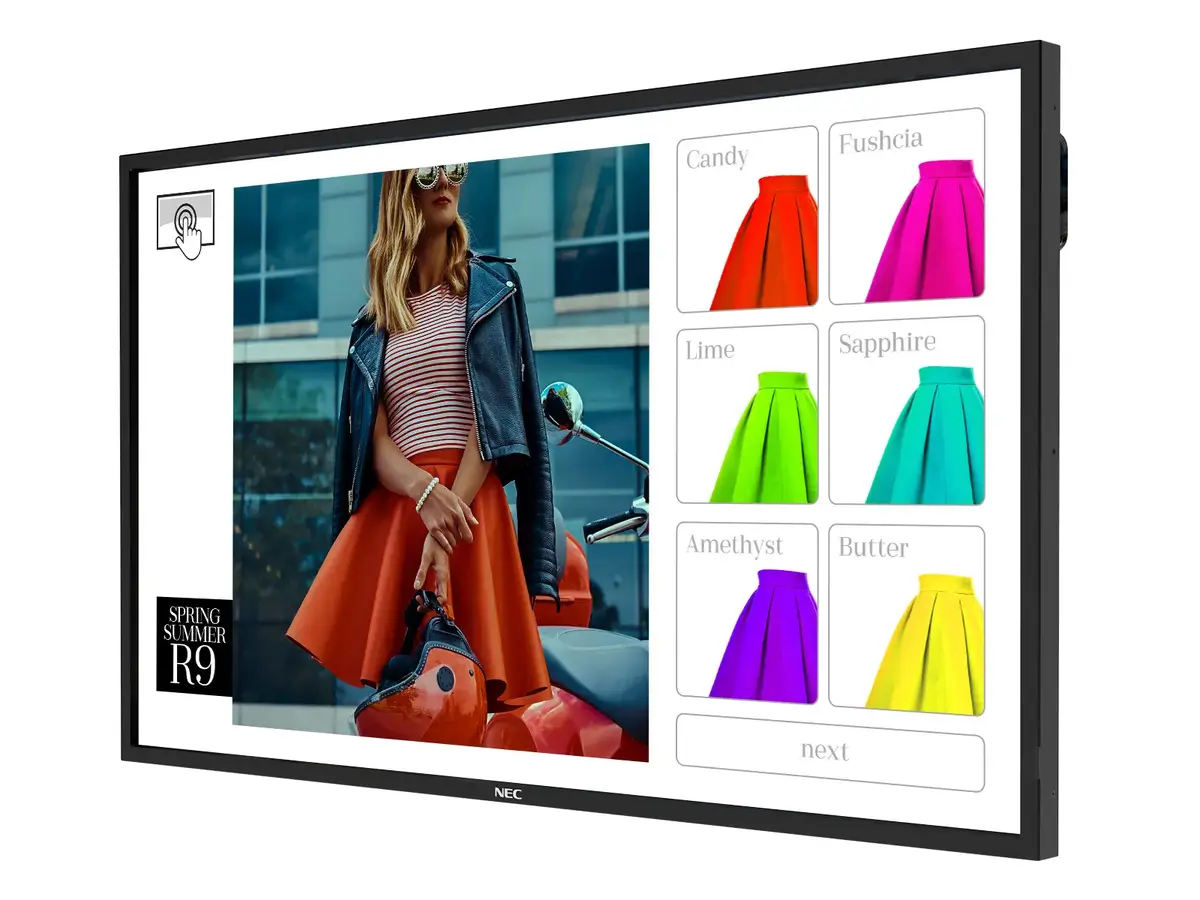
header-product Monitor NEC MultiSync ME551 IR-2 55" Touchscreen LED 3840 x 2160
1,556.99 €

Monitor NEC MultiSync ME551 IR-2 55" Touchscreen LED 3840 x 2160

Monitor NEC MultiSync ME551 IR-2 Photo 1
Monitor NEC MultiSync ME551 IR-2 Photo 2
Monitor NEC MultiSync ME551 IR-2 Photo 1
Monitor NEC MultiSync ME551 IR-2 Photo 2
Keep track of price changes You keep track of price changes
Watch the price drop

Leave your address - as soon as the price of the product goes down, you'll know about it right away

You keep track of price changes

Monitor NEC MultiSync ME551 IR-2 55" Touchscreen LED 3840 x 2160

{{email}}
You keep track of price changes

Monitor NEC MultiSync ME551 IR-2 55" Touchscreen LED 3840 x 2160

{{email}}
{{selectedOffer && selectedOffer.price | formatAmount}}

Short description

The NEC MultiSync ME551 IR-2 is a 55" touchscreen monitor designed for kiosk applications. It features LED technology, a resolution of 3840 x 2160 pixels, and a brightness of 400 cd/m². With an operating time of 18/7, it is ideal for continuous use in public spaces. The sleek black design complements any environment.
Available for order: 50 pcs.
Warranty: 2 Years
SKU: 11588939
delivery
to the Customer Service Center at Kengaraga 2b, Riga
12.10.2026 {{selectedOffer.officeDeliveryString}}
free
Customer service center
2b. Kengaraga str., Riga, Latvia, LV-1063
12.10.2026 {{selectedOffer.officeDeliveryString}}
free
Courier Delivery Please note that in case of a large parcel additional delivery costs may apply!
15.10.2026 {{selectedOffer.courierDeliveryString}}
From 53.99 € (Weight: 31.80 kg)
payment
Payment Methods:
Bank transfer, Leasing for legal entities
Leasing for legal entities: from 54.18 euros per month
Together cheaper
{{product.price | formatAmount}}
{{product.title}}
{{productBundle.reference.specialPrice | formatAmount}}
{{productBundle.title}}
{{productBundlePreviousPrice | formatAmount}}
{{productBundleSpecialPrice | formatAmount}}

You saving {{productBundleYouSave | formatAmount}}

Product information

Description

The NEC MultiSync ME551 IR-2 is a 55" touchscreen monitor designed for kiosk and small-business interactive signage. It uses LED backlight and an IPS panel to deliver 3840 x 2160 resolution at 400 cd/m² brightness. The unit supports infrared multi-touch, can run in landscape or portrait orientation and is rated for up to 18/7 continuous operation, making it suitable for retail, hospitality and meeting-room use where reliable touch interaction is required.

Advantages

The ME551 IR-2 combines commercial-grade durability with a slim, unobtrusive black design. Its infrared touch system provides fast, precise response with support for multiple simultaneous touch points. The front surface is finished with thermally tempered anti-glare glass for improved readability, reduced reflections and greater resistance to vandalism. Multiple industry-standard video and network interfaces and compatibility with modular computing options enable flexible integration and secure remote management.

Suitable for

  • Retail kiosks and interactive product displays
  • Restaurant ordering stations and digital menus
  • Small meeting rooms and collaboration touchpoints
  • Indoor wayfinding and informational kiosks

Key specifications

  • Display diagonal: 55" (139.7 cm)
  • Native resolution: 3840 x 2160 (4K UHD)
  • Panel type: IPS
  • Display technology: LED backlight
  • Brightness: 400 cd/m²
  • Touch technology: infrared multi-touch (supports up to 20 touch points)
  • Operating mode: up to 18/7 continuous operation
  • Response time: 8 ms
  • Contrast ratio (typical): 8000:1
  • Built-in audio: 10 W speaker(s)
  • Orientation: landscape or portrait
  • Network: Ethernet LAN
  • Front surface: thermally tempered anti-glare glass
  • Color: Black
  • VESA mounting supported

How to use

Install the ME551 IR-2 on a secure mount or kiosk enclosure following VESA mounting specifications and connect required video and network cabling. Choose landscape or portrait orientation according to the application. Calibrate touch input if needed using the display’s on-screen settings or connected PC. Configure network settings and, if applicable, attach a modular compute module or external media player for the interactive content. Verify audio, touch responsiveness and screen readability under typical ambient lighting.

Usage recommendations

For reliable operation in public or commercial environments, use the display within the specified 18/7 duty cycle, keep the tempered glass surface clean using recommended non-abrasive cleaners, and manage devices remotely via NEC NaviSet Administrator 2 for proactive maintenance and security. Ensure adequate ventilation around the installation and protect against direct outdoor exposure.

Specifications

Display diagonal: Size of the display for this product, measured diagonally, usually in inches.
55 "
Display resolution: The number of distinct pixels in each dimension that can be displayed. It is usually quoted as width × height, with the units in pixels: for example, "1024 × 768" means the width is 1024 pixels and the height is 768 pixels. The higher the number of pixels, the sharper the image.
3840 x 2160
Panel type:
IPS
Display technology: The technology used in the display e.g. plasma, LED.
LED
Power consumption (standby): The amount of electricity that is consumed when the product is on standby.
0.5 W
Power consumption (typical): Amount of power consumed by this model, often expressed in watts (W). Typical values that manufacturers give are power consumption when off, standby/suspended mode, typical use, maximum usage.
120 W
VESA mounting:
Yes
Wi-Fi: Popular technology that allows an electronic device to exchange data or connect to the internet wirelessly using radio waves.
No
Ethernet LAN: An Ethernet LAN (Local Area Network) interface is present, for a wired conection via a cable.
Yes
USB port: The device features a socket into which a USB cable can be plugged.
Yes
DisplayPorts quantity: Number of DisplayPorts. A DisplayPort is a digital display interface developed by the Video Electronics Standards Association (VESA). The interface is primarily used to connect a video source to a display device such as a computer monitor, though it can also be used to carry audio, USB, and other forms of data.
2
DVI port: Digital Visual Interface (DVI) is a video display interface to connect a video source to a display device, such as a computer monitor.
No
HDMI ports quantity: The number of sockets (ports) for HDMI connections. HDMI (High-Definition Multimedia Interface) is a compact audio/video interface for transferring uncompressed video data and compressed/uncompressed digital audio data from a HDMI-compliant device ("the source device") to a compatible computer monitor, video projector, digital television, or digital audio device. HDMI is a digital replacement for existing analog video standards.
4
Product design: The creation of a plan or convention for the construction of an object or a system.
Kiosk design
Built-in processor: Whether or not a processor is built into the device.
Yes
Computer system:
Yes
Purpose: What the product is used for.
Retail
Built-in speaker(s): The device contains speaker(s) to produce sound.
Yes
Touchscreen: A screen of a laptop, smartphone, etc., that responds to touch so you can control the interface using your fingers.
Yes
Product colour: The colour e.g. red, blue, green, black, white.
Black
All features

Features

Base material:
Metal

Other features

International Protection (IP) code: The IP code classifies and rates the degree of protection provided against the intrusion (including body parts such as hands and fingers), dust, accidental contact, and water by mechanical casings and electrical enclosures. It is published by the International Electrotechnical Commission (IEC). The digits (characteristic numerals) indicate conformity with the conditions summarized in the tables below. Where there is no protection rating with regard to one of the criteria, the digit is replaced with the letter X. an electrical socket rated IP22 is protected against insertion of fingers and will not be damaged or become unsafe during a specified test in which it is exposed to vertically or nearly vertically dripping water. Another example is the Sony Xperia Z Ultra, one of the first cellular phones to be IP-rated; it is rated at IP58 and marketed as "dust resistant" and can be "immersed in 1.5 meter of freshwater for up to 30 minutes".
IP5X, IP2X

Certificates

Certification:
CE; EMC Class B; REACH; RoHS SO 9241-307, Class 1

Operational conditions

Storage relative humidity (H-H):
10 - 90
Storage temperature (T-T): The minimum and maximum temperatures at which the product can be safely stored.
-20 - 60
Operating relative humidity (H-H):
20 - 80
Operating temperature (T-T): The minimum and maximum temperatures at which the product can be safely operated.
0 - 35

Packaging content

Cables included:
HDMI, Power, USB
Batteries included:
Yes
Remote control included: Component of an electronics device, most commonly a television set, DVD player and home theater systems originally used for operating the device wirelessly from a short line-of-sight distance.
Yes

Weight & dimensions

Display weight:
31800 g
Display height:
730.4 mm
Display depth:
85.4 mm
Display width:
1259.8 mm

Packaging data

Package weight: Weight of the packaged product.
40900 g
Package height: The distance from the top to the bottom of the packaging.
920 mm
Package depth: The distance from the front to the back of the packaging.
250 mm
Package width: The distance from one side of the packaging to the other.
1430 mm

Power

AC input frequency:
50/60
AC input voltage: The voltage of the AC electricity that is inputted into the product.
100-240
Energy consumption (SDR) per 1000 hours: Power consumption in switched-on state expressed in W.
118 kWh
Power consumption (standby): The amount of electricity that is consumed when the product is on standby.
0.5 W
Power consumption (typical): Amount of power consumed by this model, often expressed in watts (W). Typical values that manufacturers give are power consumption when off, standby/suspended mode, typical use, maximum usage.
120 W

Ergonomics

VESA mounting:
Yes

Network

Wi-Fi: Popular technology that allows an electronic device to exchange data or connect to the internet wirelessly using radio waves.
No
Ethernet LAN data rates: The different speed levels of the Ethernet LAN connection.
100
Ethernet LAN: An Ethernet LAN (Local Area Network) interface is present, for a wired conection via a cable.
Yes

Ports & interfaces

DC-in jack: The socket/plug where the DC electricity supply connects to the device.
Yes
RS-232 interface:
Yes
USB Power Delivery up to:
10 W
USB Power Delivery (USB PD):
Yes
USB ports quantity:
1
USB port: The device features a socket into which a USB cable can be plugged.
Yes
DisplayPorts out:
1
DisplayPorts in:
1
DisplayPorts quantity: Number of DisplayPorts. A DisplayPort is a digital display interface developed by the Video Electronics Standards Association (VESA). The interface is primarily used to connect a video source to a display device such as a computer monitor, though it can also be used to carry audio, USB, and other forms of data.
2
DVI port: Digital Visual Interface (DVI) is a video display interface to connect a video source to a display device, such as a computer monitor.
No
HDMI output ports quantity:
2
HDMI input ports quantity:
2
USB version: Universal Serial Bus (USB) is an industry standard developed in the mid-1990s that defines the interface used for connection, communication and power supply between computers and electronic devices. Every new version - for example 1.1, 2.0, 3.0 - is much faster than the previous one.
2.0
HDMI ports quantity: The number of sockets (ports) for HDMI connections. HDMI (High-Definition Multimedia Interface) is a compact audio/video interface for transferring uncompressed video data and compressed/uncompressed digital audio data from a HDMI-compliant device ("the source device") to a compatible computer monitor, video projector, digital television, or digital audio device. HDMI is a digital replacement for existing analog video standards.
4

Design

Placement supported: Where the product can be placed e.g. indoor/outdoor, horizontal/vertical.
Indoor
Bezel width (top):
24.45 mm
Bezel width (side):
24.4 mm
Bezel width (bottom):
24.45 mm
Panel mounting interface: The product can be used wih VESA mounting interfaces.
400 x 400
Orientation:
Horizontal/Vertical
Product colour: The colour e.g. red, blue, green, black, white.
Black
Product design: The creation of a plan or convention for the construction of an object or a system.
Kiosk design

Multimedia

Audio Return Channel (ARC):
Yes

Computer system

Image formats supported: The type of image files that the device can use/display e.g. gif, JPEG (jpg).
JPG
Audio formats supported: The audio formats which this device or software can read/use e.g. MP3, MP4.
MP3, WMV, LPCM, AAC
Video formats supported: The type of video formats that can be used by this device.
TS, MPG, MP4
Processor manufacturer: The manufacturer that produced the processor.
Intel
Built-in processor: Whether or not a processor is built into the device.
Yes
Computer system:
Yes

Performance

HDCP: High-bandwidth Digital Content Protection (HDCP) is a form of digital copy protection to prevent copying of digital audio and video content as it travels across connections.
Yes
Purpose: What the product is used for.
Retail
Operating hours (hours/days):
18/7

Audio

RMS rated power: RMS (Root mean square) is a measure of the continuous power required by a device, in particular audio amplifiers and loudspeakers.
10 W
Number of built-in speakers:
2
Built-in speaker(s): The device contains speaker(s) to produce sound.
Yes

Display

Horizontal scan range:
26 - 135
Vertical scan range:
23 - 86
Surface hardness:
7H
Native refresh rate:
60 Hz
Touch response time:
6 ms
Display diagonal (metric): This is the size of the display screen, measured diagonally.
138.8 cm
Display number of colours:
1.073 billion colours
Viewing angle, vertical: Maximum vertical angle at which a display can be viewed with acceptable visual performance.
178 °
Viewing angle, horizontal: Maximum horizontal angle at which a display can be viewed with acceptable visual performance.
178 °
Contrast ratio (typical): The difference in light intensity between the brightest white and the darkest black.
8000:1
Response time: The response time is the time difference between the moment that a source (for example a video card) sends a signal and that equipment (for example a monitor) receives or display the signal. (Used abbreviations: R/F = Rise and Fall.)
8 ms
Native aspect ratio: The aspect ratio is the ratio of the width of an image to its height. The native aspect ratio is the one which the projector/display is particularly designed for. Images shown in native aspect ratio will utilize the entire resolution of the display and achieve maximum brightness. Images shown in other than native aspect ratio will always have less resolution and less brightness than images shown in native aspect ratio.
16:9
Multi-touch:
Yes
Number of simultaneous touchpoints:
20
Touchscreen: A screen of a laptop, smartphone, etc., that responds to touch so you can control the interface using your fingers.
Yes
Display brightness: Brightness is the amount of radiating light emitted from the screen. The brightness rating is measured in candellas per square meter, commonly known as 'nits'.
400 cd/m²
Touchscreen technology:
Infrared
Panel type:
IPS
LED backlighting type: Backlighting is the illumination of a screen e.g. LCD (liquid crystal display). There are several types of backlighting with LEDs, e.g. full array, edge lit.
Direct-LED
LED backlight: A backlight is a form of illumination used in liquid crystal displays (LCDs). One type of backlight is made by LEDs, which can be either white or RGB (red green blue). White LEDs are used most often in notebooks and desktop screens, and in virtually all mobile LCD screens. RGB LEDs for backlighting are found in high-end color proofing displays such as HP DreamColor LP2480zx monitor or selected HP EliteBook notebooks, as well as newer consumer grade displays such as Dell's Studio series laptops which have an optional RGB LED display.
Yes
Display technology: The technology used in the display e.g. plasma, LED.
LED
Display diagonal: Size of the display for this product, measured diagonally, usually in inches.
55 "
Display resolution: The number of distinct pixels in each dimension that can be displayed. It is usually quoted as width × height, with the units in pixels: for example, "1024 × 768" means the width is 1024 pixels and the height is 768 pixels. The higher the number of pixels, the sharper the image.
3840 x 2160

Similar products

{{product.title}}
Show details Hide details

{{highlightedFeature.featureTitle}}:

{{getProductFeatureValueById(product, highlightedFeature.featureId)}}

{{product.price | formatAmount}}
Might be useful
{{product.manufacturerName}}
{{product.categoryName}}
{{product.title}}
{{product.specialPrice}}
{{product.price}}

Customer reviews

Customer questions

FAQ

How much does the Monitor NEC MultiSync ME551 IR-2 cost, and is it available for purchase?

The price is 1,556.99 € (valid at the time of publication and already includes all taxes). The item is available for order — 50 pcs. are in stock, and you can place your purchase right now with delivery across Latvia and Europe or choose pickup at the Riga collection point. We offer favorable purchase terms, including the option to split the payment into convenient monthly installments. Availability and price are updated in real time, so we recommend placing your order in advance.

If I order this product today, when will I receive my order?

If you place your order today, delivery will be as fast and convenient as possible. You will be able to pick up your order on 12.10.2026 at the Riga pickup point or choose delivery across Latvia and Europe. We carefully inspect every purchase and pack it securely for safe transportation.

What payment options are available?

AiO.lv offers several payment methods: Bank transfer, Leasing for legal entities. All transactions are 100% secure and encrypted.

Can this product be purchased for a company (with VAT)?

Yes. AiO.lv works with legal entities in Latvia and across Europe. The product price already includes VAT. For certain product categories, as well as for companies from other EU countries with a valid VAT number, a 0% VAT rate may apply. We issue the invoice immediately after the order is placed, support electronic BIS invoices, and automatically generate all necessary accounting documents. You can complete the purchase for a company online — simply select the company profile and choose bank transfer as the payment method during checkout.

What is the warranty period?

All NEC products come with an official 2 Years warranty. It covers all manufacturing defects and malfunctions that may occur during use. The warranty is valid at all authorized NEC service centers and through AiO.lv

Can the product be returned after purchase?

Yes, you can return the product within 14 days of purchase if you bought it as a consumer (not a legal entity). Returns are possible without giving any reason — the main condition is that the product retains its original appearance and full set of accessories. We will make the process as simple and convenient as possible: just contact our customer support team, and we will help you arrange the return.

Where should I contact for warranty service?

For warranty-related questions you can contact the AiO.lv (SIA VSPRO) customer support team. We will assist with consultation, warranty claim processing, and coordination with certified service centers.

How can I tell if this product suits my needs?

When making a choice, we recommend paying attention to the key features: display diagonal, display resolution, panel type, display technology, power consumption (standby), power consumption (typical), vesa mounting, wi-fi, ethernet lan, usb port, displayports quantity, dvi port, hdmi ports quantity, product design, built-in processor, computer system, purpose, built-in speaker(s), touchscreen, product colour, compatibility with your devices or usage conditions, material quality, functionality, and warranty terms. These characteristics will help you determine how well the model meets your needs.

Where can I download the instructions for Monitor NEC MultiSync ME551 IR-2?

You can download the instructions in PDF format from the “Instructions” section on the product description page. The file contains complete information about installation, setup, and usage.
warranty
14-Day Return Policy We are confident in our quality, but if the purchase doesn’t fit — you have 14 days to return the product with peace of mind.
shipping
Fast Delivery Get your orders as quickly as possible — right to your door, parcel lockers, or pickup points across Latvia and the EU.
payment
Secure Payment Pay the way you prefer: cash, VISA, MasterCard, Apple Pay, Google Pay, bank transfer, or 0% installment plan.
warranty
Quality Since 2008 AiO.lv has been on the market for over 18 years and has earned trust — with more than 6000 genuine positive reviews on Google.