
Leave your address - as soon as the price of the product goes down, you'll know about it right away
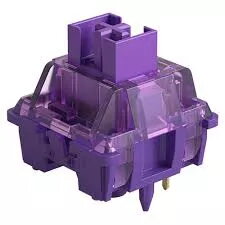
Mechanical switch No name V3 Pro Lavender Purple 5-pin tactile 40g
In cart {{totalProductsCount}} item(s)
Your cart is empty
Mechanical switch No name V3 Pro Lavender Purple 5-pin tactile 40g
Leave your address - as soon as the price of the product goes down, you'll know about it right away
Mechanical switch No name V3 Pro Lavender Purple 5-pin tactile 40g
No name V3 Pro Lavender Purple is a 5-pin tactile mechanical switch with a 40g actuation force, designed for mechanical keyboards that support 5-pin PCB mounting. The Lavender Purple color identifies the switch variant and helps with quick visual selection when customizing key layouts. This switch provides a defined tactile bump that gives clear feedback on each keypress while maintaining a moderate actuation force for fast typing and gaming.
The 5-pin design ensures secure mounting on compatible PCBs and greater stability compared with 3-pin housings. A 40g actuation force offers a balance between responsiveness and comfort, reducing fatigue during extended use. The tactile profile delivers immediate feedback at the point of actuation, improving typing accuracy and providing a perceptible response without a full audible click. The Lavender Purple variant allows consistent visual identification in multi-switch assemblies.
Install the switch into a compatible 5-pin PCB or hot-swap socket following standard mechanical keyboard assembly procedures. If soldering is required, insert the switch pins through the PCB holes and solder from the board underside, ensuring solid joints and correct alignment. For hot-swap PCBs, press the switch down vertically until it seats fully. Test each switch after installation to confirm proper actuation and tactile response. When removing switches from soldered boards, desolder carefully to avoid damaging the PCB or switch pins.
For best results, pair the switches with compatible keycaps and stabilizers; lubricate moving parts only if you prefer a smoother feel, using switch-appropriate lubricants applied sparingly. Avoid exposing switches to moisture or excessive dust. When assembling a keyboard, ensure proper alignment and secure mounting to maintain consistent tactile feedback across all keys.
{{highlightedFeature.featureTitle}}:
{{getProductFeatureValueById(product, highlightedFeature.featureId)}}