
Leave your address - as soon as the price of the product goes down, you'll know about it right away
Network protection device NET-PROTECT (No name) — model NET-PROTECT
In cart {{totalProductsCount}} item(s)
Your cart is empty
Network protection device NET-PROTECT (No name) — model NET-PROTECT
Leave your address - as soon as the price of the product goes down, you'll know about it right away
Network protection device NET-PROTECT (No name) — model NET-PROTECT
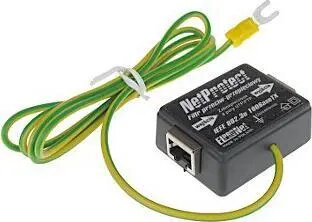
NET-PROTECT network protection device by No name is designed to protect network infrastructure from common electrical and signal disturbances that can affect connected equipment and data transmission. The device monitors and suppresses transient events and provides a simple layer of defense for Ethernet connections in homes, small offices and networked installations where maintaining reliable connectivity and reducing downtime are important.
NET-PROTECT offers continuous passive protection for network lines without requiring complex configuration. Its compact form factor allows easy installation close to routers, switches or wall outlets, and it operates transparently without introducing configuration changes to existing network settings. The device is intended to reduce the risk of equipment damage and service interruptions caused by voltage spikes, surges and other transient disturbances that commonly affect network cabling.
Install NET-PROTECT inline between the incoming network cable and the device to be protected, or place it adjacent to network equipment and route Ethernet cables through or via the unit according to the included installation instructions. Ensure connections are secure and observe any status indicator to confirm normal operation. The device functions automatically once connected and does not require software or network configuration changes.
Place the NET-PROTECT unit as close as possible to the equipment you want to protect, such as a router or switch, and avoid exposure to moisture and extreme temperatures. For installations with multiple network endpoints, consider protecting each critical device or the primary incoming network point to maximize coverage. Regularly inspect connections and the device housing for signs of wear; replace the unit if it shows damage or fails to indicate normal status.
{{highlightedFeature.featureTitle}}:
{{getProductFeatureValueById(product, highlightedFeature.featureId)}}