Dreame vacuums for fast and efficient cleaning!
In cart {{totalProductsCount}} item(s)
Your cart is empty
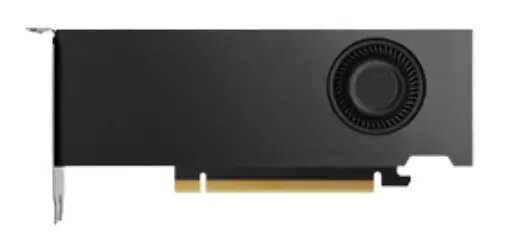
NVIDIA RTX 4000 SFF Ada Generation Graphics Card, 20 GB GDDR6, PCI Express 4.0 x16
The NVIDIA RTX 4000 SFF Ada Generation is a professional-grade graphics card engineered to deliver high-performance computing and rendering capabilities within a compact workstation environment. Built on the advanced NVIDIA Ada Lovelace architecture, this card integrates 20 GB of GDDR6 memory and a 160-bit memory bus to handle complex professional workloads efficiently. Its small form factor design ensures compatibility with space-constrained systems without compromising on the power required for demanding visual computing tasks.
This graphics card offers a significant performance boost for professionals by combining 48 third-generation RT Cores and 192 fourth-generation Tensor Cores with 6,144 CUDA cores. The inclusion of 20 GB of ECC memory ensures data integrity and stability during long-running compute and rendering processes. Its compact size allows for integration into small-form-factor workstations, making it an ideal choice for environments where space is at a premium but high-end graphics performance is non-negotiable. Furthermore, the card is backed by extensive ISV certifications, ensuring seamless operation with a wide range of industry-standard professional software applications.
This card is specifically optimized for professional workstation tasks and may not be the most cost-effective solution for general consumer gaming or casual multimedia use. Due to its specialized small form factor and professional-grade feature set, it may lack the specific cooling or aesthetic features typically sought after by enthusiasts building high-end gaming rigs.
To install the NVIDIA RTX 4000 SFF Ada Generation, ensure your workstation is powered off and disconnected from the electrical supply. Insert the card into an available PCI Express 4.0 x16 slot on your motherboard and secure it with the appropriate mounting screws. Connect your displays to the provided DisplayPort outputs. Once installed, power on your system and download the latest professional drivers from the official NVIDIA website to ensure optimal performance and compatibility with your software suite.
For the best results, keep the workstation environment well-ventilated to allow the active cooling system to function efficiently. Regularly update your graphics drivers through the NVIDIA RTX Experience software to maintain compatibility with the latest professional application releases and security patches.
{{highlightedFeature.featureTitle}}:
{{getProductFeatureValueById(product, highlightedFeature.featureId)}}
{{ productComparisonGenerationError }}