A curated selection of maximum value offers!
In cart {{totalProductsCount}} item(s)
Your cart is empty
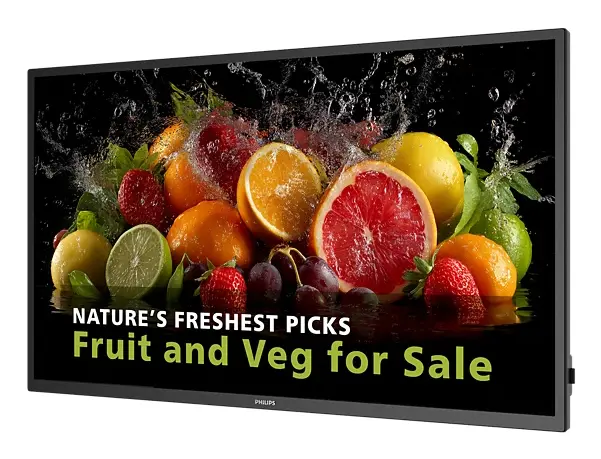
Philips 5000 series 50BDL5050D/00 Signage Display 50 Inch LCD Wi-Fi 600 cd/m² Full HD Black Built-in processor Android
The Philips 5000 series 50BDL5050D/00 Signage Display is a professional-grade 50-inch LCD screen designed to deliver high-impact visual communication for commercial environments. Combining a high brightness level of 600 cd/m² with Full HD resolution and a VA panel, this display ensures clear visibility and sharp text and image delivery even in brightly lit indoor spaces. Equipped with a built-in processor running on the Android operating system and an integrated HTML5 Chromium-based browser, it provides a standalone platform for running applications and managing content directly without needing an external media player. Connectivity options include Wi-Fi and Ethernet LAN, along with HDMI and DisplayPort interfaces, offering flexible integration into existing network infrastructures and AV setups.
The Philips 5000 series signage display offers reliable 24/7 operation, making it suitable for continuous commercial use in demanding public and retail spaces. Its Android-based system architecture simplifies app deployment and cloud-based content management through built-in networking capabilities. Versatile installation is supported via VESA mounting compatibility, allowing both portrait and landscape orientation setups to match specific spatial requirements. Built-in speakers provide an integrated audio solution, reducing the need for external sound equipment in standard messaging scenarios. Additionally, modern connectivity features such as Wi-Fi and Ethernet LAN ensure stable remote management and data transfer.
This display may not be suitable for outdoor environments exposed directly to harsh weather conditions without specialized protective housing. It is primarily engineered for professional commercial signage and digital communication applications rather than standard consumer television broadcasting or personal desktop computing use.
Mount the display securely to a wall or compatible mounting bracket using the integrated VESA mounting interface in either portrait or landscape orientation. Connect the display to a power source and establish a network connection using an Ethernet cable or the built-in Wi-Fi functionality. Power on the device and use the Android-based operating system interface or the integrated HTML5 browser to configure your preferred content management software or display applications. Content can then be transmitted and managed locally or remotely via cloud platforms depending on your system configuration.
Usage recommendations: For optimal performance and longevity, ensure adequate ventilation around the display during operation and utilize scheduled power management settings to reduce energy consumption when content is not actively required.
{{highlightedFeature.featureTitle}}:
{{getProductFeatureValueById(product, highlightedFeature.featureId)}}
{{ productComparisonGenerationError }}
Device manufacturer code
Device manufacturer
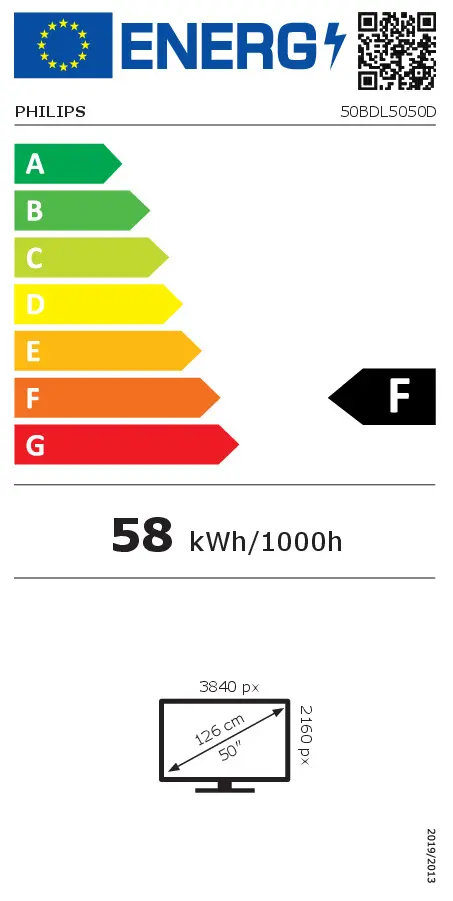
Energy efficiency class is a standard classification that is used all over Europe and which is understandable at first sight. Products can be efficiently compared according to classes, starting from A (the most energy efficient class), and ending with G (the most energy-intensive class). The classification of energy efficiency is based on annual energy consumption which is being calculated on the basis of several different parameters.
Popular technology that allows an electronic device to exchange data or connect to the internet wirelessly using radio waves.
An Ethernet LAN (Local Area Network) interface is present, for a wired conection via a cable.
The device features a socket into which a USB cable can be plugged.
Number of DisplayPorts. A DisplayPort is a digital display interface developed by the Video Electronics Standards Association (VESA). The interface is primarily used to connect a video source to a display device such as a computer monitor, though it can also be used to carry audio, USB, and other forms of data.
The number of sockets (ports) for HDMI connections. HDMI (High-Definition Multimedia Interface) is a compact audio/video interface for transferring uncompressed video data and compressed/uncompressed digital audio data from a HDMI-compliant device ("the source device") to a compatible computer monitor, video projector, digital television, or digital audio device. HDMI is a digital replacement for existing analog video standards.
Whether or not a processor is built into the device.
The device contains speaker(s) to produce sound.
Type of supported High Definition (e.g. Full HD, 4K Ultra HD).
The technology used in the display e.g. plasma, LED.
Size of the display for this product, measured diagonally, usually in inches.
The number of distinct pixels in each dimension that can be displayed. It is usually quoted as width × height, with the units in pixels: for example, "1024 × 768" means the width is 1024 pixels and the height is 768 pixels. The higher the number of pixels, the sharper the image.
The colour e.g. red, blue, green, black, white.