
Dreame vacuums for fast and efficient cleaning!
In cart {{totalProductsCount}} item(s)
Your cart is empty
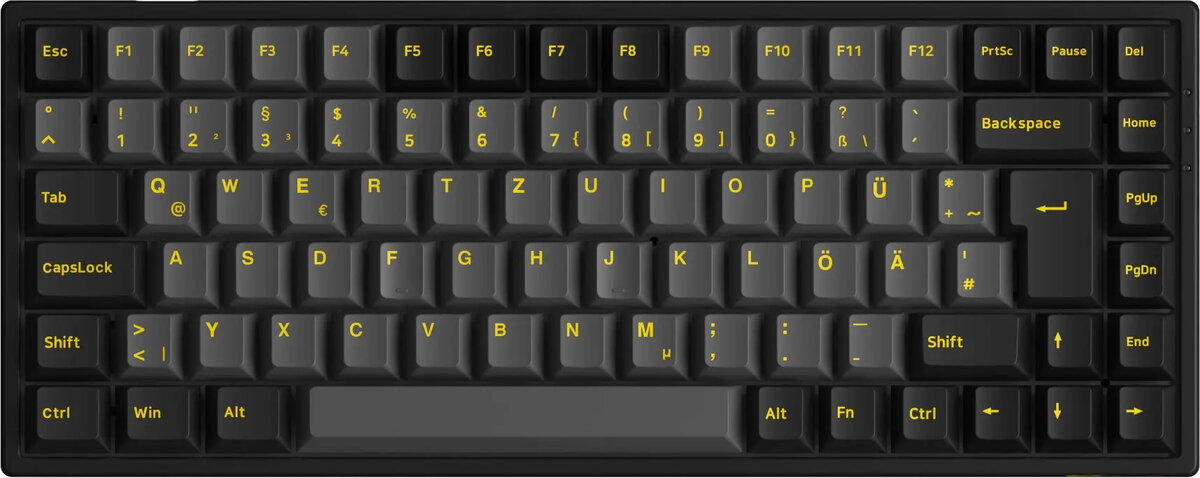
AKKO 3084B Plus Gaming Keyboard, RGB, Akko V3 Cream Yellow Pro Switches, ISO DE, Black & Gold
The AKKO 3084B Plus is a high-performance mechanical gaming keyboard featuring a compact 75% layout, making it an ideal choice for users who want to save desk space without sacrificing functionality. This model comes equipped with Akko V3 Cream Yellow Pro linear switches, which provide a smooth and consistent typing experience suitable for both intense gaming sessions and daily productivity tasks. The keyboard features a striking black and gold color scheme and is designed with the ISO DE layout, ensuring compatibility with German-standard typing requirements.
This keyboard offers exceptional versatility through its triple-mode connectivity, allowing users to switch seamlessly between Bluetooth, 2.4GHz wireless, and USB-C wired connections. The vibrant RGB backlighting is fully customizable, enabling users to tailor the aesthetic to their personal setup. The 75% form factor retains essential navigation keys while maintaining a smaller footprint, and the hot-swappable PCB design allows for easy switch replacement without the need for soldering. The durable construction ensures long-term reliability, while the high-quality keycaps provide a comfortable and tactile feel during extended use.
This keyboard may not be suitable for users who require a dedicated number pad for heavy data entry or accounting tasks, as the 75% layout omits this section. Additionally, users who prefer tactile or clicky switches may find the linear nature of the pre-installed Cream Yellow Pro switches less satisfying for their specific typing preferences.
To begin using the keyboard, connect it to your device via the provided USB-C cable for wired mode, or utilize the wireless receiver for 2.4GHz connectivity. For Bluetooth mode, activate the pairing function through the keyboard shortcuts to connect to your computer, tablet, or smartphone. You can customize the RGB lighting effects and key assignments using the dedicated software provided by the manufacturer. The hot-swap feature allows you to remove and replace switches by using the included puller tool if you wish to customize the typing feel further.
For the best performance, keep the keyboard firmware updated via the manufacturer's software and ensure the battery is charged regularly when using wireless modes. Use the provided keycap and switch pullers to prevent damage when customizing your keyboard.
{{highlightedFeature.featureTitle}}:
{{getProductFeatureValueById(product, highlightedFeature.featureId)}}