Dreame vacuums for fast and efficient cleaning!
In cart {{totalProductsCount}} item(s)
Your cart is empty
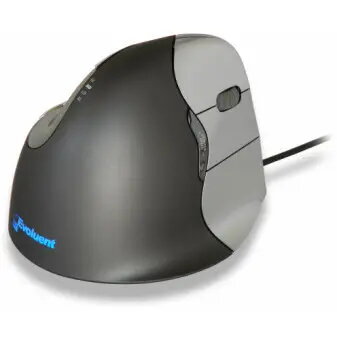
Evoluent VerticalMouse 4 Ergonomic Laser Mouse for Right-Handed Use, USB Type-A
The Evoluent VerticalMouse 4 is a wired ergonomic laser mouse specifically engineered for right-handed users. Its unique vertical design promotes a neutral, upright hand posture that helps prevent forearm twisting, which is a common cause of discomfort during long hours of computer use. This mouse is designed to provide professional-grade reliability and comfort for office environments.
The patented vertical shape is designed to support the hand in a natural position, effectively reducing the strain on the wrist and forearm. By minimizing the need for awkward hand movements, it helps users maintain comfort throughout the workday. The mouse features a sculpted body that allows for easy access to all buttons without requiring finger contortions. Additionally, the integrated laser sensor offers adjustable pointer speeds, which can be modified directly from the side of the device. The inclusion of an extended bottom lip prevents the user's finger from rubbing against the desk surface, further enhancing the ergonomic experience.
This mouse may not be suitable for left-handed users due to its specific right-handed ergonomic design. It is also not intended for users who require a portable, wireless device, as it relies on a wired USB connection for power and data transmission.
To use the Evoluent VerticalMouse 4, simply plug the USB cable into an available port on your computer. The device is designed for immediate use, though installing the Evoluent Mouse Manager software is recommended to unlock the full functionality of the six programmable buttons. Once connected, you can adjust the pointer speed using the controls located on the side of the mouse, with the selected speed indicated by the top-mounted LEDs.
For optimal comfort, ensure your desk height allows your arm to rest at a neutral angle while using the mouse. It is recommended to install the official driver software to customize button functions to your specific workflow needs.
{{highlightedFeature.featureTitle}}:
{{getProductFeatureValueById(product, highlightedFeature.featureId)}}
{{ productComparisonGenerationError }}