
Leave your address - as soon as the price of the product goes down, you'll know about it right away
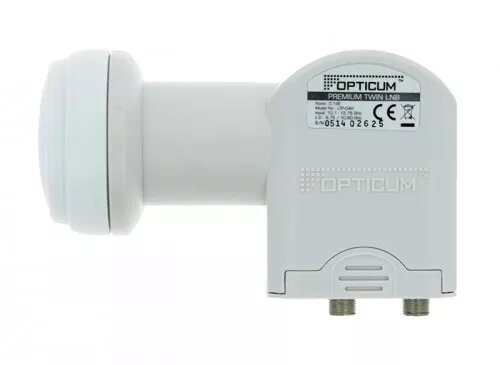
Opticum LTP-04H Twin Low Noise Block Downconverter 10.7 - 12.75 GHz
In cart {{totalProductsCount}} item(s)
Your cart is empty
Opticum LTP-04H Twin Low Noise Block Downconverter 10.7 - 12.75 GHz
Leave your address - as soon as the price of the product goes down, you'll know about it right away
Opticum LTP-04H Twin Low Noise Block Downconverter 10.7 - 12.75 GHz
The Opticum LTP-04H Twin Low Noise Block Downconverter is a high-performance satellite signal receiver component engineered to deliver reliable digital television reception. Operating within the 10.7 to 12.75 GHz frequency range, this device is designed to capture satellite signals with high precision and minimal interference. Its robust construction and standard 40 mm feedhorn diameter make it a versatile solution for residential satellite installations, ensuring seamless integration with most standard satellite dishes available on the market.
This Twin LNB offers the significant advantage of supporting two independent satellite receivers simultaneously from a single satellite dish. By providing two separate outputs, it allows users to watch different channels on two different televisions without the need for additional dishes or complex cabling setups. The low noise figure ensures high signal quality, which is essential for maintaining a stable connection and preventing pixelation or signal loss during adverse weather conditions. Its durable white housing is designed to withstand outdoor environmental factors, providing long-term reliability for your home entertainment system.
This device is not designed for multi-user satellite systems that require more than two independent connections, such as large apartment buildings or complex distribution networks. It is also incompatible with satellite dishes that require a feedhorn diameter other than the standard 40 mm size.
To install the Opticum LTP-04H, remove your existing LNB from the satellite dish arm by loosening the mounting bracket. Insert the new LNB into the 40 mm holder, ensuring it is positioned correctly according to the manufacturer's instructions for your specific dish. Connect your coaxial cables from the two output ports to your satellite receivers. Once connected, perform a signal scan on your receivers to align the dish and lock onto the satellite signal. Ensure that all cable connections are weather-sealed to prevent moisture ingress.
Usage recommendations: For optimal signal strength, ensure the LNB is correctly aligned and the skew angle is adjusted according to your geographic location. Regularly inspect the cable connections and the protective housing for any signs of wear or damage to maintain peak performance.
{{highlightedFeature.featureTitle}}:
{{getProductFeatureValueById(product, highlightedFeature.featureId)}}