{{ totalProductsCount }}

In cart {{totalProductsCount}} item(s)

Total:
{{sum | formatAmount}}

Your cart is empty

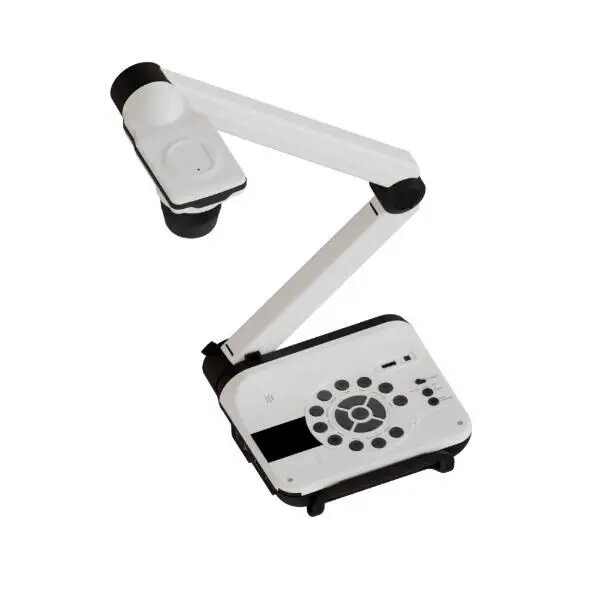
header-product Document Camera OPTOMA DC557 — high-resolution visual presenter for live imaging and teaching

Document Camera OPTOMA DC557 — high-resolution visual presenter for live imaging and teaching

OPTOMA DC557 Document Camera Photo 1
Out of stock.
View similar!

Short description

The OPTOMA DC557 document camera is a visual presenter designed for live imaging of documents, objects and demonstrations in classrooms, meeting rooms and presentations. It provides clear real-time capture for teaching, remote learning, and workshops, supporting close-up detail display and easy integration with projectors or displays for sharing content during lessons and meetings.
Warranty: 2 Years
SKU: 12392707
delivery
Information regarding the items availability for purchase will be posted on this site
price
Item cost information will be published on this site
Together cheaper
{{product.price | formatAmount}}
{{product.title}}
{{productBundle.reference.specialPrice | formatAmount}}
{{productBundle.title}}
{{productBundlePreviousPrice | formatAmount}}
{{productBundleSpecialPrice | formatAmount}}

You saving {{productBundleYouSave | formatAmount}}

Product information

Description

The OPTOMA DC557 document camera is a high-resolution visual presenter engineered for real-time capture of documents, objects and demonstrations. Designed for classrooms, meeting rooms and remote-learning setups, it delivers clear live imaging for teaching, workshops and presentations. The unit integrates with projectors, interactive displays and computers to show close-up details, annotate live feeds and share physical materials with an audience.

Advantages

The OPTOMA DC557 offers high-resolution imaging and reliable autofocus that produce sharp images of text, diagrams and three-dimensional objects without constant manual adjustment. Its adjustable arm and flexible camera head enable close-up views and wide-area framing, while built-in connectivity options simplify connection to displays and recording devices. The presenter supports live annotation and easy switching between sources, making it suitable for varied instructional workflows.

Suitable for

  • Classroom teaching and interactive lessons
  • Remote learning and video conferencing demonstrations
  • Workshops, training sessions and product demonstrations
  • Document display, inspection and close-up visual explanations

When it may not be suitable

The DC557 is optimized for live capture of documents and objects under controlled indoor lighting. It may be less suitable for use in very large auditoriums where extremely long throw imaging or ultra-high zoom from a distance is required. It is also not intended as a replacement for specialised industrial inspection cameras that require custom optics or extreme macro capabilities.

Key specifications

  • High-resolution camera sensor for clear live imaging and close-up detail
  • Autofocus and adjustable camera head for quick framing and focus
  • Flexible arm and compact base designed for tabletop or podium placement
  • Output compatibility with projectors, interactive displays and computers
  • Real-time video feed suitable for annotation and recording

How to use

Position the DC557 on a stable tabletop or podium and connect it to your display device using the appropriate video output or USB connection. Adjust the arm and camera head to frame the document or object, then allow the autofocus to stabilise the image. Use the presenter software or connected display controls to switch sources, zoom, freeze-frame or annotate the live feed as needed. For recording or streaming, set the capture device or conferencing software to recognise the DC557 as the video source.

What to consider before purchase

  • Ensure compatibility with your projector, interactive display or computer ports and required software
  • Confirm the required field of view and zoom capability for your classroom or presentation space
  • Check available desk or podium space and the presenter’s physical footprint

Usage recommendations

For best results use the OPTOMA DC557 in well-lit indoor environments, position the camera 
to minimise glare on glossy documents, and perform a quick autofocus and framing check before each session. When recording or streaming, verify video source settings and test audio-video sync if using external microphones.

Description

Machine translation. Load original

{{highlightedFeature.featureTitle}}:

{{product.title}}
{{product.price}}

{{getProductFeatureValueById(product, highlightedFeature.featureId)}}

Might be useful
{{product.manufacturerName}}
{{product.categoryName}}
{{product.title}}
{{product.specialPrice}}
{{product.price}}

Customer reviews

Customer questions

FAQ

What payment options are available?

AiO.lv offers several payment methods: Bank transfer, Leasing for legal entities. All transactions are 100% secure and encrypted.

Can this product be purchased for a company (with VAT)?

Yes. AiO.lv works with legal entities in Latvia and across Europe. The product price already includes VAT. For certain product categories, as well as for companies from other EU countries with a valid VAT number, a 0% VAT rate may apply. We issue the invoice immediately after the order is placed, support electronic BIS invoices, and automatically generate all necessary accounting documents. You can complete the purchase for a company online — simply select the company profile and choose bank transfer as the payment method during checkout.

What is the warranty period?

All OPTOMA products come with an official 2 Years warranty. It covers all manufacturing defects and malfunctions that may occur during use. The warranty is valid at all authorized OPTOMA service centers and through AiO.lv

Can the product be returned after purchase?

Yes, you can return the product within 14 days of purchase if you bought it as a consumer (not a legal entity). Returns are possible without giving any reason — the main condition is that the product retains its original appearance and full set of accessories. We will make the process as simple and convenient as possible: just contact our customer support team, and we will help you arrange the return.

Where should I contact for warranty service?

For warranty-related questions you can contact the AiO.lv (SIA VSPRO) customer support team. We will assist with consultation, warranty claim processing, and coordination with certified service centers.

warranty
14-Day Return Policy We are confident in our quality, but if the purchase doesn’t fit — you have 14 days to return the product with peace of mind.
shipping
Fast Delivery Get your orders as quickly as possible — right to your door, parcel lockers, or pickup points across Latvia and the EU.
payment
Secure Payment Pay the way you prefer: cash, VISA, MasterCard, Apple Pay, Google Pay, bank transfer, or 0% installment plan.
warranty
Quality Since 2008 AiO.lv has been on the market for over 18 years and has earned trust — with more than 6000 genuine positive reviews on Google.