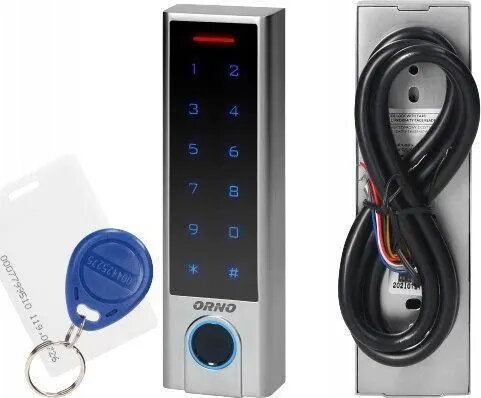
ORNO OR-ZS-826 is an electronic touch keypad door lock that integrates a capacitive touch keyboard, a biometric fingerprint reader and Bluetooth connectivity in a single unit. Designed for residential and light commercial use, the lock provides keyless entry and multiple access methods while its IP68 rating ensures protection against dust and prolonged water exposure. The device supports managing user access, enrolling fingerprints, and pairing with mobile devices for convenient local control.
Advantages
The lock combines fingerprint recognition, capacitive touch input and Bluetooth in one housing, reducing the need for separate access control components. IP68 ingress protection increases durability in challenging environments and outdoor installations. Capacitive touch keys offer a smooth, low-wear interface, while biometric authentication enables fast, reliable identification without physical keys. Bluetooth pairing simplifies local setup and pairing with compatible devices.
Suitable for
- Residential front and back doors requiring keyless entry
- Small offices and commercial premises with controlled access
- Entry points exposed to weather where dust and water resistance is important
- Situations that require multiple access methods (fingerprint, code, Bluetooth)
Key specifications
- Access methods: capacitive touch keypad, biometric fingerprint reader, Bluetooth connectivity
- Environmental protection: IP68 dust and water resistance
- Intended use: electronic door lock for residential and light commercial entrances
- User management: supports enrollment and storage of multiple fingerprint profiles and access codes
- Interface: touch-sensitive keypad for PIN entry
How to use
Install the ORNO OR-ZS-826 according to the supplied fitting instructions for your door type, ensuring secure mechanical fixation and correct alignment with the latch or deadbolt. Enroll administrator fingerprints and codes first, then register additional users as needed. Use the capacitive touch keypad to enter PIN codes, the fingerprint reader for biometric access, or pair a compatible mobile device via Bluetooth to manage settings locally. Ensure batteries are replaced or maintained according to the manufacturer’s guidance to avoid interruption of electronic functions.
Usage recommendations
For reliable operation, install the lock on a properly fitted door and avoid exposing the electronic module to direct high-pressure jets of water despite IP68 protection. Register at least two administrator fingerprints or codes to maintain access in case of sensor issues, and keep backup mechanical keys or an alternative access method available if supported. Periodically clean the touch surface and fingerprint sensor with a soft, dry cloth and check battery status to ensure uninterrupted operation.