Save time and money with our discounts!
In cart {{totalProductsCount}} item(s)
Your cart is empty
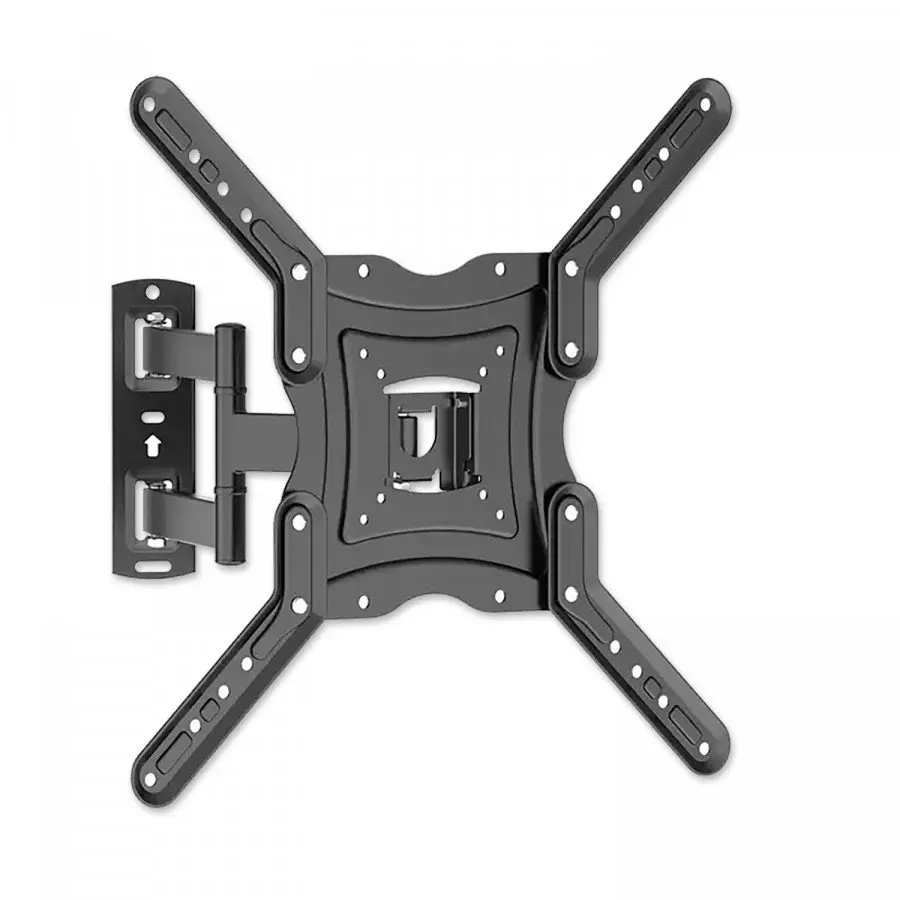
Philips SQM9232 Wall Bracket for 26 to 70 Inch Flat Screens Black Supporting up to 35 kg VESA up to 400x400 mm
The Philips SQM9232 Wall Bracket is a reliable mounting solution designed for flat screens ranging from 26 to 70 inches. Engineered to provide secure support for displays weighing up to 35 kg, this black wall mount ensures your television or monitor is safely attached to the wall while optimizing your living space. With its versatile adjustment options, including a tilt angle range of 12 to -12 degrees and a rotation angle of 180 degrees, it allows you to easily customize your viewing angles for an optimal entertainment experience in your home or office.
This wall bracket offers exceptional flexibility and durability for various display setups. The robust metal construction ensures long-lasting stability and secure placement for your valuable electronics. Integrated features such as tilt adjustment and rotation capabilities make it simple to reduce screen glare and achieve the ideal perspective from anywhere in the room. Additionally, the built-in cable management system helps maintain a clean and organized appearance by keeping cords neatly tucked away behind the screen.
This bracket may not be suitable for screens smaller than 26 inches or larger than 70 inches, nor for displays exceeding the 35 kg weight limit. It is also not compatible with VESA mounting patterns outside the range of 75x75 mm to 400x400 mm, and it requires a sturdy wall structure for safe installation.
To use the Philips SQM9232 wall bracket, first ensure that your wall type is structurally sound and capable of supporting the combined weight of the mount and the display. Attach the mounting brackets securely to the back of your flat screen using the appropriate VESA holes and screws provided. Fasten the wall plate firmly to the wall at your desired height using a level to ensure straight placement. Carefully hang the screen onto the wall mount, secure any locking mechanisms, adjust the tilt and rotation to your preferred viewing angle, and route your cables through the integrated management system.
Usage recommendations: Regularly check all mounting screws and fixings to ensure they remain tight and secure over time. Avoid exceeding the specified weight capacity and ensure cables have enough slack to allow for tilt and rotation adjustments without putting tension on the ports.
{{highlightedFeature.featureTitle}}:
{{getProductFeatureValueById(product, highlightedFeature.featureId)}}
The Philips SQM9232/10 Wall Mount is compared against several alternative brackets from brands including Brateck, Philips, EDBAK, and One For All. All these products are designed to securely mount televisions or computer monitors to the wall, helping to save space and optimize viewing angles in living rooms, offices, or commercial environments. The primary differences lie in the supported screen sizes, maximum load capacities, tilt adjustment features, and intended use cases for smaller monitors versus large-format televisions.
⚙️ The table below compares key technical characteristics, including device type, screen size compatibility, maximum load capacity, and tilt adjustment for each evaluated mount.
| Parameter | Philips SQM9232/10 | Brateck LPA84-445XL | Philips SQM7221/00 | Philips SQM9840/00 | EDBAK GDV121 | One For All SV9016 | Practical significance |
|---|---|---|---|---|---|---|---|
| Brand | Philips | OEM | Philips | Philips | EDBAK | one for all | Identifies the manufacturer and brand ecosystem. |
| Device Type | Wall Mount | TV and Monitor Wall Mount Bracket | Universal Tilt Wall Mount | Large Screen Wall Mount | Monitor Wall Mount | Tilt Flat-Screen Wall Mount | Determines compatibility with specific equipment types. |
| Supported Diagonal | Not specified | Not specified | 13–43 inches | 43–100 inches | 10–29 inches | Not specified | Allows matching the bracket to your screen size. |
| Maximum Load | Not specified | Not specified | 45 kg | 60 kg | Not specified | Not specified | Defines the weight limit for safe television mounting. |
| Tilt Adjustment | Not specified | Not specified | Tilt adjustable | Fixed | Not specified | Tilt adjustable | Affects viewing angles and helps reduce screen glare. |
◎ The table below evaluates which mounting solution is best suited for various user needs, installation scenarios, and room types to help guide your purchasing decision.
| Use case | Recommended product | Why |
|---|---|---|
| Mounting small office monitors | EDBAK GDV121 | Specifically designed for compact screens ranging from 10 to 29 inches to optimize workspace efficiency. |
| Installing medium-sized TVs with tilt functionality | Philips SQM7221/00 or One For All SV9016 | Fits 13–43 inch screens and includes tilt adjustment to improve viewing comfort and reduce glare. |
| Installing very large and heavy televisions | Philips SQM9840/00 | Engineered for massive screens from 43 to 100 inches with a high load capacity of up to 60 kg. |
| Standard universal display mounting | Philips SQM9232/10 or Brateck LPA84-445XL | Suitable for general living or commercial spaces requiring stable and secure wall installation. |
The Philips SQM9232/10 mount is a dependable choice for standard display installations, but selection should be guided by your specific screen dimensions and weight. If you need to support very large TVs up to 60 kg, the Philips SQM9840/00 is the most suitable option. For screens between 13 and 43 inches requiring glare reduction through tilt adjustment, Philips SQM7221/00 or One For All SV9016 are better alternatives. EDBAK GDV121 is ideal for compact desktop monitors, while the Philips SQM9232/10 is best for buyers looking for straightforward hardware support from a trusted brand.