
Save time and money with our discounts!
In cart {{totalProductsCount}} item(s)
Your cart is empty
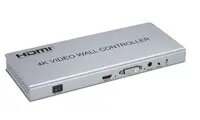
PREMIUMCORD HDMI Video Wall Controller, 1 Input to 4 Outputs, Version 1.4
The PREMIUMCORD HDMI Video Wall Controller is a professional-grade signal distribution device engineered to split a single HDMI input signal across four separate displays. Designed to support the HDMI 1.4 standard, this controller allows users to create seamless multi-screen video wall configurations, ensuring that high-definition content is synchronized across all connected monitors. It provides a reliable solution for environments where consistent and high-quality visual output is required across a larger display area.
This controller offers a robust method for managing complex display setups without the need for specialized graphics cards or complex software configurations. By utilizing a dedicated hardware solution, it ensures low latency and stable signal transmission to all four outputs simultaneously. The device is built to maintain signal integrity, providing a clear and sharp image across all screens, which is essential for professional visual presentations and digital signage applications.
This device may not be suitable for applications requiring 4K resolution at high refresh rates, as it is limited to HDMI 1.4 specifications. It is also not intended for use as a standard HDMI splitter for mirroring identical content if the goal is to create a single large-format image across all screens, as specific video wall processing capabilities should be verified against the intended display layout.
To use the controller, connect your HDMI source device to the input port using a high-quality HDMI cable. Connect each of the four output ports to your respective displays. Once all connections are secure, power on the controller and the displays. The device will automatically process the incoming signal and distribute it across the four screens to form the video wall layout.
For optimal performance, use high-quality, shielded HDMI cables to prevent signal interference. Ensure that all displays are set to the same resolution and aspect ratio to maintain visual consistency across the entire video wall.
{{highlightedFeature.featureTitle}}:
{{getProductFeatureValueById(product, highlightedFeature.featureId)}}
{{ productComparisonGenerationError }}