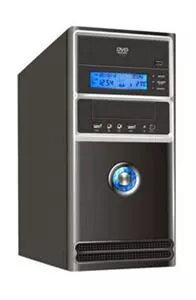
PRIMECOOLER ComfortCase is a series of computer cases available with or without an LCD panel. The PRIMECOOLER ComfortA is a compact Midi Tower with external dimensions 405x173x380 mm and a net weight of 3.1 kg. It supports ATX and microATX motherboards and is designed for an ATX power supply. The front I/O includes 2x USB 2.0 and audio connectors compatible with AC'97 and HD Audio. The case provides external bays for 2x 5.25" and 1x 3.5" devices and one internal 3.5" bay. There are six PCI expansion slots. The power supply mounts to the bottom base of the case and connects via a supplied extension cable, occupying the position normally used by an internal 3.5" drive. An LCD version uses one external 5.25" bay for a blue-backlit display that shows date, time, temperatures (CPU/HDD/SYS) numerically and as thermometer-style graphics (°C/°F), fan rotation (reported for CPU fan), and HDD activity graphically. The LCD model also includes alarm functions for time (alarm clock, requires the PC to be on), fan stop (reported for CPU fan), and sensor over-temperature.
Advantages
The case offers a compact Midi Tower layout compatible with ATX and microATX boards, front audio and USB connectivity, and multiple external/internal drive bays. The LCD-equipped variant provides real-time system information (time, temperatures, fan status, HDD activity) and configurable alarms for time, fan failure and high temperature. Bottom-mounted PSU with an included connection cable allows flexible component placement.
Suitable for
- Home or office desktop builds using ATX or microATX motherboards
- Compact systems where a small Midi Tower footprint is required
- Users who want basic system monitoring via an external LCD (LCD version only)
Key specifications
- External dimensions: 405 x 173 x 380 mm
- Net weight: 3.1 kg (gross/packaged weight noted as 3.8 kg in logistics)
- Drive bays: 2x external 5.25", 1x external 3.5", 1x internal 3.5"
- Fan support: rear 80/92 mm, side 120 mm
- Front I/O: 2x USB 2.0, AC'97 and HD audio
- Expansion slots: 6 PCI
- Power supply: ATX, bottom-mounted with supplied extension cable
- LCD version: occupies one external 5.25" bay; displays date/time, CPU/HDD/SYS temperatures (°C/°F), fan rotation (CPU), HDD activity; alarms for clock, fan stop (CPU), and sensor over-temperature
How to use
Install an ATX power supply into the bottom base and connect it using the included extension cable so the PSU occupies the internal 3.5" position as required. Mount an ATX or microATX motherboard and secure it to the standoffs, then install drives into the external and internal bays. Add fans to the rear (80 or 92 mm) and side (120 mm) mounts as needed for cooling. Connect front panel USB and audio to the motherboard headers (AC'97 or HD Audio). If the case includes the LCD module, mount it in the external 5.25" bay and follow the LCD manual to configure units (°C/°F), alarms and monitoring options.
Usage recommendations
For reliable monitoring with the LCD version, ensure the PC remains powered for alarm functions to work; use the CPU fan connection for fan-failure alerts and place temperature sensors where they can best represent CPU, HDD and system temperatures.