Dreame vacuums for fast and efficient cleaning!
In cart {{totalProductsCount}} item(s)
Your cart is empty
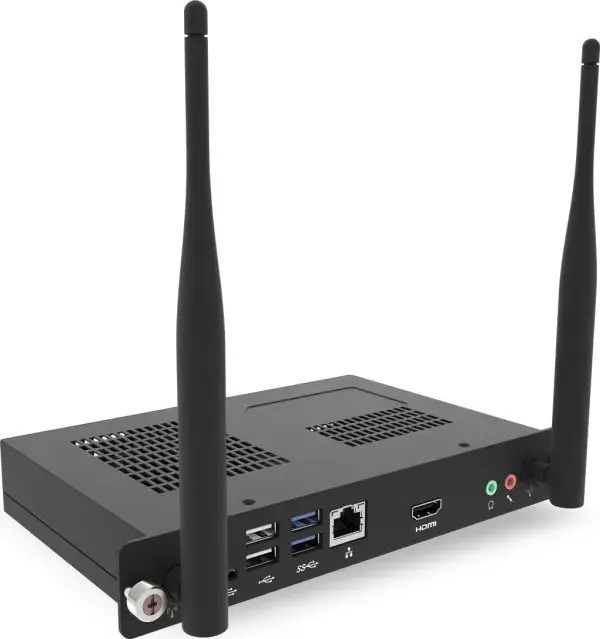
Promethean OPS-M PC Module, Intel Core i5 2.3 GHz, 8GB DDR4 RAM, 256GB SSD, Windows IoT
The Promethean OPS-M PC Module is a high-performance computing solution specifically engineered for seamless integration with interactive displays. By utilizing the Open Pluggable Specification (OPS) standard, this module transforms compatible displays into fully functional, all-in-one computer systems. Powered by an Intel Core i5 processor running at 2.3 GHz and supported by 8GB of DDR4 RAM, it delivers the necessary processing power for demanding professional and educational software. The inclusion of a 256GB SSD ensures rapid boot times and quick access to files, while the pre-installed Windows IoT operating system provides a stable and secure environment for various applications.
This module offers a streamlined design that eliminates the need for external cables and bulky hardware, as it slides directly into the display's OPS slot. The integration of Intel HD Graphics 520 ensures clear visual output, making it ideal for presentations and interactive lessons. With built-in Wi-Fi 5 and Gigabit Ethernet connectivity, the device maintains reliable network access for cloud-based tools and collaborative platforms. Its compact and lightweight construction allows for easy installation and maintenance, while the robust hardware configuration supports multitasking and smooth operation of complex software suites.
This module is not intended for high-end gaming, intensive 3D rendering, or heavy video editing tasks that require dedicated high-performance graphics cards. It is specifically optimized for interactive display applications and general productivity software.
To use the Promethean OPS-M, simply insert the module into the designated OPS slot on the rear of your compatible interactive display. Ensure the device is fully seated and the securing screws are tightened to establish a stable connection. Once installed, connect the display to a power source and turn it on. The system will automatically detect the module, allowing you to access the Windows IoT interface directly through the display's touch or input controls. Configure your network settings via the operating system to begin using your applications.
For optimal performance and longevity, ensure the display is installed in a well-ventilated area to prevent overheating. Regularly update the Windows IoT operating system and drivers to maintain security and compatibility with the latest software versions.
{{highlightedFeature.featureTitle}}:
{{getProductFeatureValueById(product, highlightedFeature.featureId)}}
{{ productComparisonGenerationError }}