


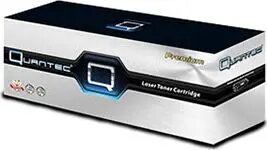
Toner cartridge Quantec TN-1090 (replacement TON-1828) for monochrome laser printers, compatible model TON-1828
Short description

Cheapest delivery:
Unisend LV
Product information
Description
Quantec TN-1090 (replacement TON-1828) is a monochrome laser toner cartridge that provides black toner for text and graphic printing. Designed as a direct replacement for printers compatible with TON-1828, the cartridge restores monochrome printing capability with a standard installation procedure. It is intended for office and home environments where consistent black-and-white output is required for documents, invoices, reports and general-purpose printing.
Advantages
The toner cartridge offers straightforward installation and a form factor matching printers that accept TON-1828, enabling quick replacement and minimal downtime. It provides uniform black density for readable text and clear line art, with consistent performance across typical office print runs. The design is compatible with standard monochrome laser printing workflows and supports basic maintenance practices without special tools.
Suitable for
- Printing black-and-white text documents and reports
- Invoices, receipts and administrative paperwork
- Monochrome graphics, forms and draft prints
- Home office and small business printing environments
Key specifications
- Color: Black toner for monochrome printing
- Consumable type: Laser toner cartridge compatible with TON-1828 form factor
- Intended use: Replacement cartridge for monochrome laser printers
- Installation: Standard user-replaceable cartridge designed for straightforward insertion and removal
- Output: Suitable for text and basic graphics with consistent black density
How to use
Power off the printer if recommended by the manufacturer and open the printer cover to access the toner compartment. Remove the empty cartridge according to the printer’s instructions, unpack the replacement Quantec TN-1090, remove any protective seals or packaging materials, and insert the cartridge into the designated slot until it clicks into place. Close the cover and power the printer on if it was turned off. Run a test page or printer self-check to confirm proper installation and alignment.
Usage recommendations
Store the cartridge in a cool, dry place away from direct sunlight and extreme temperatures. Handle the cartridge by its casing to avoid contact with the toner surface. For best results, use the cartridge within the shelf life recommended by the manufacturer and follow the printer’s maintenance guidance to maintain consistent print quality.


