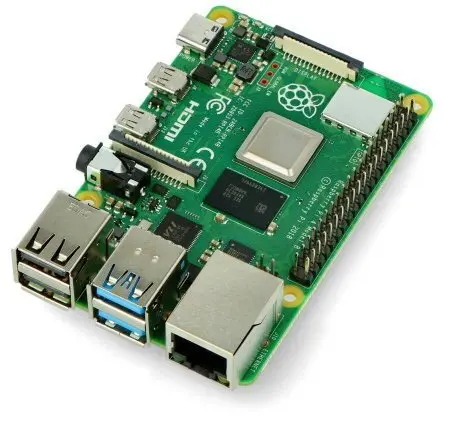
The Raspberry Pi 4 model B is a versatile single-board computer designed to support programming, educational projects, home automation, and embedded applications. Powered by a 1.8GHz processor and equipped with 2GB of RAM, this compact computer delivers reliable computing performance for a wide variety of digital tasks. Integrated dual-band WiFi and Bluetooth connectivity provide flexible networking options, making it easier to connect peripherals and access wireless networks without requiring external adapters. Whether you are building a custom technological solution, learning how to code, or setting up a personal server, this single-board computer offers a stable and adaptable platform for makers, hobbyists, developers, and engineers.
Advantages
The Raspberry Pi 4 model B provides significant processing power with its 1.8GHz processor, ensuring smooth execution of standard computing tasks and lightweight applications. The inclusion of 2GB of RAM allows for efficient multitasking and better handling of moderate workloads compared to earlier iterations. Built-in dual-band WiFi and Bluetooth connectivity streamline workspace organization and eliminate the need for extra dongles, allowing for quick integration into existing wireless networks. Its standardized form factor ensures compatibility with a vast ecosystem of accessories, cases, and expansion modules, enabling endless customization possibilities for diverse technical projects.
Suitable for
- Learning programming languages and software development
- Building smart home automation systems and IoT devices
- Setting up media centers and lightweight personal servers
- Developing embedded applications and technical prototypes
When it may not be suitable
This single-board computer may not be suitable for heavy workstation tasks such as modern high-end gaming, intensive 3D rendering, or professional video editing that require advanced graphics cards and substantial system memory. It is also not intended to function as a direct, high-performance replacement for traditional desktop computers handling heavy enterprise software.
Key specifications
- 1.8GHz processor
- 2GB RAM
- Dual-band WiFi connectivity
- Bluetooth connectivity
- Single-board computer architecture
How to use
To begin using the Raspberry Pi 4 model B, insert a prepared microSD card containing a compatible operating system into the designated slot. Connect a power supply through the USB-C port, and attach a display, keyboard, and mouse to the appropriate ports to access the user interface. Once powered on, follow the initial on-screen setup instructions to configure your network settings and preferences. You can then begin writing code, installing software packages, or configuring your specific hardware project.
What to consider before purchase
- Ensure you have a compatible USB-C power supply that meets the recommended power requirements
- Check whether 2GB of RAM is sufficient for your intended software applications or if a higher RAM variant is needed
- Verify that you have a suitable microSD card for the operating system and storage
- Consider acquiring additional accessories such as a protective case, heat sinks, or cooling fans for optimal thermal management
Usage recommendations
Always use a regulated power supply that meets the official electrical specifications to ensure system stability. Implement adequate cooling solutions, such as heat sinks or a case with ventilation, if the device is expected to run demanding tasks for extended periods. Safely shut down the operating system through the software interface before disconnecting the power to prevent data corruption on the storage card.