Save time and money with our discounts!
In cart {{totalProductsCount}} item(s)
Your cart is empty
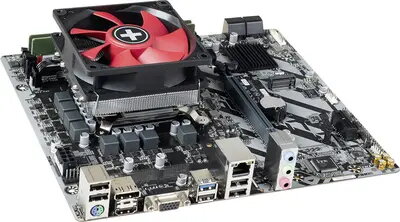
Desktop PC tuning kit Renkforce CRAS00089 with Intel Core Ultra 5 245K, DDR5 RAM, M.2 PCIe NVMe 4.0 x4
The Renkforce CRAS00089 Desktop PC tuning kit combines an Intel Core Ultra 5 245K processor with support for DDR5 memory and an M.2 PCIe NVMe 4.0 x4 storage interface. The kit is designed to upgrade desktop systems for improved multitasking performance, faster application response and reduced storage latency. It targets users who want a balanced increase in CPU capability, memory bandwidth and NVMe throughput without replacing the entire platform.
The integrated Intel Core Ultra 5 245K delivers multi-core performance suitable for everyday productivity and light content creation while maintaining single-threaded responsiveness for common applications. DDR5 memory support increases available bandwidth and improves system responsiveness under multi-application workloads. The M.2 PCIe NVMe 4.0 x4 interface enables significantly higher sequential and random transfer rates compared with older SATA or PCIe 3.0 solutions, reducing load and boot times. The kit approach simplifies coordinated upgrades of CPU, memory and NVMe storage to ensure component compatibility and balanced performance.
Prepare the desktop chassis and a compatible motherboard that supports the Intel Core Ultra 5 class CPU socket and DDR5 memory. Power down and disconnect the system before starting. Install the processor according to the motherboard manufacturer’s instructions, fit DDR5 memory modules into the appropriate DIMM slots, and secure an M.2 NVMe drive into the designated M.2 slot. Reassemble the system, connect power and peripherals, then enter BIOS/UEFI to verify CPU recognition, memory frequency and NVMe device detection. Install or update storage drivers and operating system settings as needed for optimal NVMe performance.
For reliable operation, use a compatible motherboard that explicitly supports the Intel Core Ultra 5 series and DDR5 memory, apply appropriate CPU cooling, and ensure the power supply provides sufficient capacity. Update BIOS/UEFI firmware and storage drivers to the latest stable versions to achieve full PCIe Gen4 NVMe performance and system stability.
{{highlightedFeature.featureTitle}}:
{{getProductFeatureValueById(product, highlightedFeature.featureId)}}
{{ productComparisonGenerationError }}