


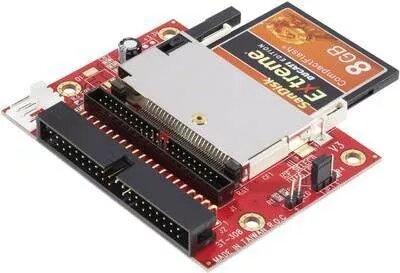
Interface converter Renkforce RF-4886688 — 1× CompactFlash 50-pin to 2× IDE 40-pin
Offer for a legal entity, non-cash payment.
Short description


Cheapest delivery:
Unisend LV
Product information
Description
The Renkforce RF-4886688 interface converter enables the use of a single CompactFlash 50-pin card as an IDE storage device by providing two 40‑pin IDE connectors. Designed to bridge CompactFlash media and standard IDE (PATA) headers, this adapter allows CompactFlash cards to function as master or slave IDE devices in systems with 40‑pin connectors. The converter is suitable for integration into legacy desktop computers, embedded systems and industrial equipment that require a CF-to-IDE interface.
Advantages
This adapter provides a compact and reliable solution for connecting CompactFlash storage to 40‑pin IDE interfaces without requiring firmware changes or specialized drivers on most host systems. By offering two IDE connectors, the converter supports flexible device arrangements (master/slave) and simplifies replacement of aging IDE drives with readily available CompactFlash cards. The passive design reduces power consumption and minimizes potential points of failure compared with active bridge controllers.
Suitable for
- Replacing failing IDE hard drives in legacy desktop PCs
- Storage in embedded systems and single-board computers
- Industrial control equipment and automation devices using 40‑pin IDE headers
- Data recovery or forensic work where CF media must be accessed via IDE
Key specifications
- Host interface: two 40‑pin IDE (PATA) connectors
- Media interface: single CompactFlash 50‑pin connector
- Operation modes: supports master/slave device configurations
- Form factor: compact, board-level converter for internal mounting
- Power: uses standard IDE power via host (requires appropriate power connector in system)
How to use
Install a compatible CompactFlash card into the 50‑pin socket, observing correct orientation. Connect the two 40‑pin IDE cables from the host system to the converter's IDE connectors; configure master/slave jumpers or settings on the CompactFlash card if required by the target system. Supply power according to the host system's IDE power arrangement. On most systems the CF card will be recognized as an IDE drive without additional drivers; verify BIOS or firmware settings to ensure the IDE channel is enabled and the device order is correct.
Usage recommendations
Use industrial-grade or high-endurance CompactFlash cards for applications with frequent writes or long service life requirements. Confirm system BIOS supports legacy IDE devices and adjust cable length to maintain signal integrity; keep IDE ribbon cables as short as practical. Before deploying in critical systems, test the converter and CF card together to verify expected boot behavior and compatibility with the target hardware and software environment.


