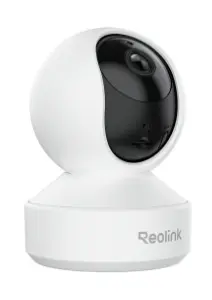
-
Type:
Characteristics of the device.
-
IP security camera
-
Weight:
Weight of the product without packaging (net weight). If possible, the net weight is given including standard accessories and supplies. Please note that sometimes the manufacturer leaves out the weight of accessories and/or supplies.
-
0.235 kg
-
Wi-Fi standards:
The type of wireless local area network (LAN). It can be ad-hoc, where units in a network communicate peer-to-peer, or Infrastructure, where units communicate with each other via an access point A LAN interconnects computers in a small area e.g. home, school or office.
-
802.11a, Wi-Fi 6 (802.11ax), Wi-Fi 5 (802.11ac), Wi-Fi 4 (802.11n), 802.11g, 802.11b
-
Audio system:
System used to play music or speech.
-
2-way
-
Security algorithms:
Security algorithms are used to provide authentication, cipher key generation, integrity and radio link privacy to users on mobile networks. The security algorithms supported are the ones that can be used with this product.
-
WPA2, WPA, WPA3
-
Supported network protocols:
Network protocols tested as compatible with this product e.g. FTP,HTML, POP.
-
SSL, TCP/IP, UDP, IPv4, UPnP, RTSP, RTMP, ONVIF, SMTP, NTP, DHCP, DNS, DDNS, FTP, P2P
-
Compatible memory cards:
Types of memory cards which can be used with this product.
-
MicroSD (TransFlash)
-
Storage temperature (T-T):
The minimum and maximum temperatures at which the product can be safely stored.
-
20 - 85
-
Form factor:
The shape or design of the product.
-
Dome
-
Built-in microphone:
Microphone that is found inside the product.
-
Yes
-
Operating temperature (T-T):
The minimum and maximum temperatures at which the product can be safely operated.
-
-10 - 55
-
Ethernet LAN:
An Ethernet LAN (Local Area Network) interface is present, for a wired conection via a cable.
-
Yes
-
Height:
The measurement of the product from head to foot or from base to top.
-
118 mm
-
Sensor type:
A sensor is a convertor than measures a physical quality (light, temperature etc.) and displays this electronically on a device.
-
CMOS
-
Optical sensor size:
Optical sensors are electronic detectors that convert light, or a change in light, into an electronic signal. They are used in many industrial and consumer applications e.g. lamps that turn on automatically in response to darkness. Optical sensors come in many sizes.
-
25.4 / 2.7
-
Connectivity technology:
The technology that enables connectivity of the device, e.g. wired or wireless.
-
Wired & Wireless
-
Maximum resolution:
The maximum number of pixels that can be displayed in the image. It is usually quoted as width × height,: for example, "1024 × 768" means the width is 1024 pixels and the height is 768 pixels.
-
2880 x 1616
-
Product colour:
The colour e.g. red, blue, green, black, white.
-
White
-
LED type:
-
IR/White
-
Tilt angle range:
-
0 - 50
-
Video compression formats:
-
H.265, H.264
-
Ethernet LAN (RJ-45) ports:
Number of Ethernet LAN (RJ-45) ports (connecting interfaces) in the device. Ethernet LAN (RJ-45) ports allow a computer to connect to the ethernet.
-
1
-
DC-in jack:
The socket/plug where the DC electricity supply connects to the device.
-
Yes
-
Built-in speaker(s):
The device contains speaker(s) to produce sound.
-
Yes
-
Pan range:
-
0 - 355
-
Diameter:
Distance from one side of a body (circle or sphere) to the other side, measured by a straight line passing through the centre of the body.
-
84 mm
-
Wi-Fi:
Popular technology that allows an electronic device to exchange data or connect to the internet wirelessly using radio waves.
-
Yes
-
Card reader integrated:
A card reader is a device that enables reading and, in some cases, writing data to and from a memory card.
-
Yes
-
Placement supported:
Where the product can be placed e.g. indoor/outdoor, horizontal/vertical.
-
Indoor
-
Frame rate:
-
20 fps
-
Manual:
-
Yes
-
Maximum aperture number:
-
1.6
-
Night vision:
Night vision is technology which allows you to see in low light conditions.
-
Yes
-
Fixed focal length:
-
4 mm
-
Number of illumination LEDs:
-
10
-
Mounting type:
Type of mounting e.g. wall mounting.
-
Desk
-
Video motion detection:
-
Yes
-
Video formats supported:
The type of video formats that can be used by this device.
-
H.265, H.264
-
DC output voltage:
-
5
-
DC output current:
-
2 A
-
Maximum memory card size:
The maximum size of memory card that can be used with this device.
-
512 GB
-
Ethernet interface type:
-
Gigabit Ethernet, Fast Ethernet
-
Power source type:
What the power source is.
-
DC
-
Total megapixels:
A megapixel (MP or Mpx) is one million pixels, and is a term used not only for the number of pixels in an image, but also to express the number of image sensor elements of digital cameras or the number of display elements of digital displays. For example, a camera that makes a 2048 × 1536 pixel image typically uses a few extra rows and columns of sensor elements and is commonly said to have "3.2 megapixels" or "3.4 megapixels", depending on whether the number reported is the "effective" or the "total" pixel count (as opposed to the 2048 × 1536 = 3,145,728 finished image pixels).
-
5 MP
-
Built-in HDD:
The product has a hard drive built into it.
-
No
-
Night vision distance:
-
12
-
Video recording:
Recording moving visual images.
-
Yes
-
Built-in light:
There is a light which is inside/on the outside of the product.
-
Yes
-
Auto-tracking:
-
Yes
-
Infra-red wavelength:
-
850 nm
-
Day/night mode:
-
Yes
-
Number of cameras:
The quantity of cameras that product can support.
-
1
-
Number of lenses:
The number of lenses installed in the device.
-
1
-
Infrared (IR) cut-off filter:
-
Yes
-
Number of sensors:
-
1
-
Warranty period:
-
2 year(s)