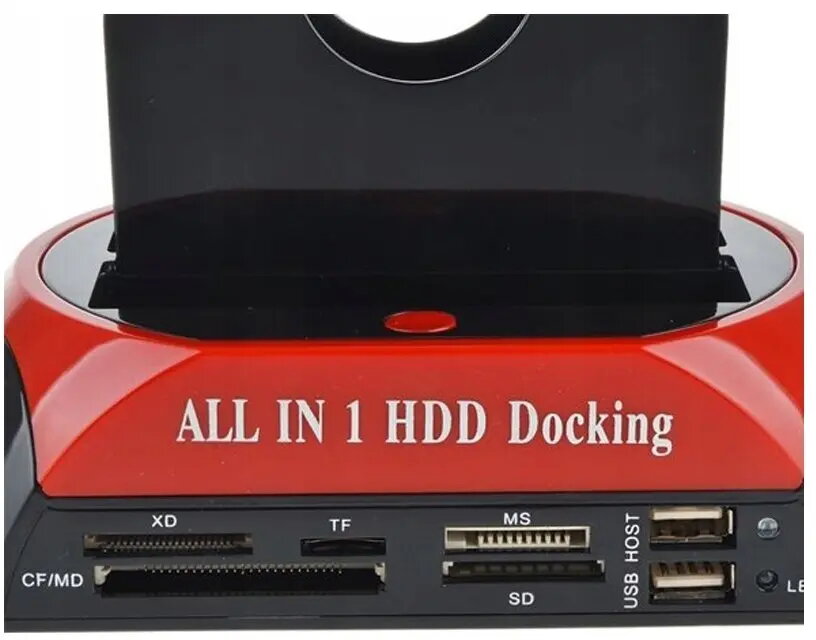
The Retoo Docking Station for SATA Drives and SD Card Reader USB 3.0 — Supports 2.5" & 3.5" SATA provides a compact external interface to connect 2.5-inch and 3.5-inch SATA hard drives and SSDs via a high-speed USB 3.0 connection. The unit includes an integrated memory card reader for common card types, enabling quick plug-and-play access to internal drives and removable media without opening a computer. It is intended for temporary drive access, data transfer, backups and cloning, and can be used on desktop and laptop systems that support USB mass storage devices.
Advantages
The docking station offers a USB 3.0 interface for faster data transfer compared with USB 2.0, backward compatible with older USB ports. Tool-free insertion of 2.5" and 3.5" SATA drives simplifies swapping drives for diagnostics or data recovery. The integrated SD/memory card reader adds flexible support for camera cards and other removable media, reducing the need for additional adapters. Its compact design provides a portable solution for technicians and users who need temporary access to multiple storage devices.
Suitable for
- Transferring large files between SATA drives and a computer
- Creating backups or cloning drives during system upgrades
- Data recovery and forensic access to internal drives
- Temporary use of spare drives without internal installation
- Reading SD and common memory cards from cameras and mobile devices
When it may not be suitable
This docking station is designed for temporary or occasional connection of SATA drives; it is not intended as a 24/7 replacement for internal storage or as a permanent NAS solution. Users requiring enterprise-level redundancy, continuous operation, or network-shared storage should consider purpose-built servers or NAS devices. Also, drive performance will be limited by the USB 3.0 interface and by the drive's native speed, so very high sustained throughput expectations should be validated against the drive and host capabilities.
Key specifications
- Interface to host: USB 3.0 (backward compatible with USB 2.0)
- Supported drive types: 2.5-inch and 3.5-inch SATA HDD and SATA SSD
- Memory card reader: integrated SD/memory card slot(s) for common card formats
- Power: external power adapter support for 3.5-inch drives (if required by the unit)
- Mounting: tool-free, hot-swap capable docking for easy drive insertion and removal
How to use
Insert a compatible 2.5" or 3.5" SATA drive into the docking bay until it seats firmly, or insert a memory card into the appropriate card slot. Connect the docking station to a computer via the supplied USB 3.0 cable and, if required, attach the external power adapter before powering on the unit. The connected drive and card should appear as removable storage in the operating system and can be accessed through the file manager for copying, cloning, or backup operations. Always use the operating system's safe removal or eject function before removing media to avoid data corruption.
What to consider before purchase
- Check that your computer has a USB 3.0 or compatible USB port for optimal transfer speeds
- Verify the docking station supports the specific memory card formats you need
- Confirm whether an external power adapter is required for 3.5" drives and whether it is included
- Consider drive compatibility (SATA interface) and that the device is intended for external/temporary use
Usage recommendations
For reliable transfers, use high-quality USB 3.0 cables and connect directly to a USB port on the computer rather than through an unpowered hub. When performing cloning or large backups, ensure the host computer has adequate cooling and power, and allow drives to complete operations before ejecting. Regularly back up critical data rather than relying on a single external drive for primary storage.