Save time and money with our discounts!
In cart {{totalProductsCount}} item(s)
Your cart is empty
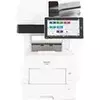
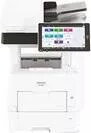
Multifunction Printer Ricoh IM 600F Laser/LED b/w
The Ricoh IM 600F Multifunction Printer Laser/LED b/w is a compact office device designed to handle black-and-white printing, copying and scanning in a single unit. It combines laser/LED imaging technology with a user-oriented control panel to deliver reliable performance in medium-to-high workload environments. The device supports standard paper handling and network connectivity, making it suitable for shared workgroups and departments that require consistent monochrome output and basic document management functions.
The Ricoh IM 600F offers fast monochrome output and a steady duty cycle that supports frequent daily use. Its laser/LED imaging delivers clear text and sharp line work while energy-efficient operation reduces power consumption during standby and active modes. The integrated scanning and copying functions streamline document workflows, and the intuitive user interface simplifies routine tasks. Built-in security features provide options to restrict access and protect scanned or printed data over the network.
Set the Ricoh IM 600F on a stable surface and connect it to power and your office network following the quick-start instructions provided by the manufacturer. Load paper into the standard tray sized to the required paper type and configure basic settings via the device control panel or web interface. Send print jobs from a connected workstation or mobile device using the network printer driver; use the scan function to digitize documents to a network folder or email, and make copies directly from the control panel. Regularly check consumable levels and follow on-screen alerts for routine maintenance tasks.
For consistent results, use standard office paper within the supported weight range and replace toner and imaging units according to the usage indicators. Place the device in a well-ventilated area and ensure periodic cleaning of paper path components to avoid jams. Configure user authentication and network security settings to limit access and protect sensitive documents when the device is used in a shared environment.
{{highlightedFeature.featureTitle}}:
{{getProductFeatureValueById(product, highlightedFeature.featureId)}}
{{ productComparisonGenerationError }}