Dreame vacuums for fast and efficient cleaning!
In cart {{totalProductsCount}} item(s)
Your cart is empty
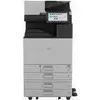
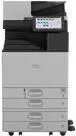
Multifunction Device Ricoh IM C5510A LED Color Printing
The Ricoh IM C5510A LED Color Printing multifunction device combines color printing, scanning and copying in a single office machine. Designed for medium to large workgroups, it uses LED imaging to produce sharp text and vivid color prints at speeds up to 55 pages per minute. The device includes a touchscreen control panel for intuitive operation, supports a wide range of paper sizes and media types, and provides built-in security features to protect documents and network access.
The Ricoh IM C5510A delivers high-quality color output and consistent monochrome text through LED printing technology, offering reliable speed and image stability. Its user-friendly touchscreen simplifies job programming and status monitoring, while flexible media handling and finishing options reduce manual tasks. The multifunction design consolidates printing, scanning and copying functions into one footprint, saving space and streamlining document workflows. Integrated security controls help safeguard sensitive information and restrict unauthorized access.
Place the device on a stable, level surface near a network connection and a power outlet. Load paper into the trays according to the indicated guides and configure the desired default paper size and tray settings via the touchscreen. For printing, install the appropriate printer driver on workstations and select the device from the print dialog. Use the touchscreen menu to select copy or scan functions; scans can be sent to email, network folders or USB storage depending on configuration. Regularly check consumables and follow on-screen prompts for maintenance tasks such as replacing imaging units or paper jams.
For optimal results, use media that match the device's supported weight and size ranges and keep firmware and drivers up to date. Configure user authentication and network security settings to protect sensitive documents. Schedule periodic maintenance and use recommended supplies to maintain consistent print quality and device reliability.
{{highlightedFeature.featureTitle}}:
{{getProductFeatureValueById(product, highlightedFeature.featureId)}}
{{ productComparisonGenerationError }}