{{ totalProductsCount }}

In cart {{totalProductsCount}} item(s)

Total:
{{sum | formatAmount}}

Your cart is empty

header-product Ricoh M 320FSE Laser Black and White Multifunction Printer A4 32 ppm USB Ethernet LAN

Ricoh M 320FSE Laser Black and White Multifunction Printer A4 32 ppm USB Ethernet LAN

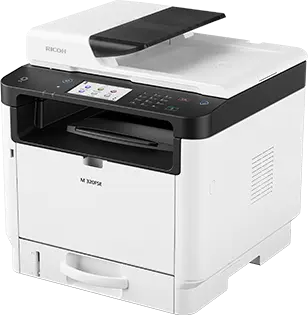
Ricoh M 320FSE B/W Laser MFP Printer Photo 1
Out of stock.
View similar!

Short description

The Ricoh M 320FSE is a black and white laser multifunction printer designed for efficient A4 document handling in busy office environments. Offering a print speed of up to 32 pages per minute, this device combines printing, copying, scanning, and faxing capabilities. It features USB and Ethernet LAN connectivity for seamless network integration and reliable daily workflow performance.
Warranty: 2 Years
SKU: 12647522
delivery
Information regarding the items availability for purchase will be posted on this site
price
Item cost information will be published on this site
Together cheaper
{{product.price | formatAmount}}
{{product.title}}
{{productBundle.reference.specialPrice | formatAmount}}
{{productBundle.title}}
{{productBundlePreviousPrice | formatAmount}}
{{productBundleSpecialPrice | formatAmount}}

You saving {{productBundleYouSave | formatAmount}}

Product information

Description

The Ricoh M 320FSE Laser Black and White Multifunction Printer A4 32 ppm USB Ethernet LAN is a dependable and efficient monochrome printing solution engineered to meet the demanding document handling needs of busy office environments. This versatile device streamlines daily administrative workflows by combining high-speed printing, copying, scanning, and faxing functions into a single, compact unit. Designed for seamless integration into existing network infrastructures, it provides reliable performance for workgroups that require consistent text documents and business forms on A4 paper.

Advantages

This multifunction printer delivers impressive productivity with a print speed of up to 32 pages per minute, significantly reducing wait times for large document batches. Its all-in-one capability eliminates the need for separate standalone office machines, saving valuable workspace and reducing maintenance complexity. Connectivity options including USB and Ethernet LAN ensure that multiple users can access the device securely and reliably across the office network. The laser printing technology guarantees sharp text and crisp graphics, making professional reports and correspondence effortless to produce.

Suitable for

  • Printing daily business reports, invoices, and correspondence in small to medium-sized offices
  • Copying multi-page documents quickly during peak working hours
  • Scanning physical paperwork directly to network destinations or digital archives
  • Sending and receiving traditional business faxes reliably

When it may not be suitable

This device is not designed for environments requiring high-volume color printing, photo reproduction, or specialized graphic design tasks. Users who need to process large formats outside of standard A4 paper will require a different printing solution.

Key specifications

  • Monochrome laser printing technology
  • A4 maximum paper size capability
  • Print speed of up to 32 pages per minute
  • Functions include printing, copying, scanning, and faxing
  • USB and Ethernet LAN connectivity interfaces

How to use

To begin using the printer, connect the device to a power source and link it to your local network using an Ethernet cable or connect directly via USB to a compatible computer. Load standard A4 paper into the paper tray, ensuring the guides are properly adjusted. Install the necessary printer drivers on your workstations. Once set up, you can send print jobs from your computer, use the control panel interface to initiate copies or scans, and manage fax transmissions directly from the device.

What to consider before purchase

  • Ensure your workspace has adequate room for an A4 multifunction device
  • Verify that your network infrastructure supports Ethernet LAN connections or that USB cable access is available
  • Confirm that your primary printing requirements are monochrome and do not require color output
  • Assess your monthly print volume to ensure it aligns with a standard office multifunction printer
Usage recommendations: Place the printer on a stable, flat surface in a well-ventilated area close to your network router or main workstations. Use recommended Ricoh toner supplies and standard A4 paper weights to maintain optimal print quality and prevent paper jams during high-volume jobs.

Description

Machine translation. Load original

Similar products

{{product.title}}
Show details Hide details

{{highlightedFeature.featureTitle}}:

{{getProductFeatureValueById(product, highlightedFeature.featureId)}}

{{product.price | formatAmount}}

Product comparison

The Ricoh M 320FSE multifunction printer is compared with the Ricoh 423692 colour laser multifunction printer, the Ricoh M 2310N and Ricoh M 2810N A3 monochrome laser multifunction printers, the Lexmark MS821dn monochrome laser printer, and the Kyocera ECOSYS PA4000cx colour laser printer. All selected products belong to office printing equipment categories, but they differ significantly in supported paper formats, colour capabilities, processing speeds, and device functions.

⚙️ The specification comparison covers device type, colour capability, maximum paper size, print speed, and connectivity to help evaluate how each model fits specific office workflows.

ParameterRicoh M 320FSERicoh 423692Ricoh M 2310NRicoh M 2810NLexmark MS821dnKyocera ECOSYS PA4000cxPractical significance
Device typeMultifunction (print, copy, scan, fax)Multifunction (print, copy, scan, fax)Multifunction (print, copy, scan)Multifunction (print, copy, scan)Printer (print only)Printer (print only)Ricoh models provide all-in-one office convenience, whereas Lexmark and Kyocera are dedicated single-function printers.
Colour capabilityMonochromeColourMonochromeMonochromeMonochromeColourM 320FSE, M 2310N, M 2810N, and MS821dn are designed for text documents, while colour models support presentations and marketing materials.
Paper formatA4A4A3A3A4A4Ricoh M 2310N and M 2810N handle larger A3 sheets, which is essential for specialized large-format documents.
Print speed32 ppm40 ppm23 ppm28 ppm52 ppm40 ppmLexmark MS821dn offers the highest printing speed for busy workgroups, while M 320FSE provides a balanced speed for daily office tasks.
ConnectivityUSB, EthernetUSB, Ethernet, Wi-FiUSB, EthernetUSB, EthernetUSB, EthernetUSB, EthernetRicoh 423692 features built-in Wi-Fi connectivity, whereas the other options rely on wired Ethernet and USB connections.

◎ The suitability and use case comparison helps identify which product matches specific user requirements and working environments.

Use caseRecommended productWhy
Standard A4 office document handlingRicoh M 320FSEProvides a complete combination of A4 printing, copying, scanning, and faxing at a reliable speed of 32 pages per minute.
Colour document creation and wireless office setupRicoh 423692Delivers high-resolution colour output, automatic duplex scanning, and convenient Wi-Fi network integration.
Large-format A3 document managementRicoh M 2810N or Ricoh M 2310NOffers monochrome printing and copying capabilities on larger A3 paper for specialized business workflows.
High-speed monochrome output for large workgroupsLexmark MS821dnA dedicated high-performance printer delivering fast A4 printing speeds up to 52 pages per minute without scanning functions.
High-volume professional colour printingKyocera ECOSYS PA4000cxDesigned for efficient business environments requiring fast, consistent colour output and automatic duplex printing.

The Ricoh M 320FSE is well-suited for small to medium offices that require a versatile, compact A4 monochrome multifunction device capable of printing, copying, scanning, and faxing. Unlike the dedicated printers from Lexmark and Kyocera, it offers full document processing capabilities, and compared to large A3 models, it provides a streamlined footprint for standard office tasks.

Might be useful
{{product.manufacturerName}}
{{product.categoryName}}
{{product.title}}
{{product.specialPrice}}
{{product.price}}

Customer reviews

Customer questions

FAQ

What payment options are available?

AiO.lv offers several payment methods: Bank transfer, Leasing for legal entities. All transactions are 100% secure and encrypted.

Can this product be purchased for a company (with VAT)?

Yes. AiO.lv works with legal entities in Latvia and across Europe. The product price already includes VAT. For certain product categories, as well as for companies from other EU countries with a valid VAT number, a 0% VAT rate may apply. We issue the invoice immediately after the order is placed, support electronic BIS invoices, and automatically generate all necessary accounting documents. You can complete the purchase for a company online — simply select the company profile and choose bank transfer as the payment method during checkout.

What is the warranty period?

All Ricoh products come with an official 2 Years warranty. It covers all manufacturing defects and malfunctions that may occur during use. The warranty is valid at all authorized Ricoh service centers and through AiO.lv

Can the product be returned after purchase?

Yes, you can return the product within 14 days of purchase if you bought it as a consumer (not a legal entity). Returns are possible without giving any reason — the main condition is that the product retains its original appearance and full set of accessories. We will make the process as simple and convenient as possible: just contact our customer support team, and we will help you arrange the return.

Where should I contact for warranty service?

For warranty-related questions you can contact the AiO.lv (SIA VSPRO) customer support team. We will assist with consultation, warranty claim processing, and coordination with certified service centers.
warranty
14-Day Return Policy We are confident in our quality, but if the purchase doesn’t fit — you have 14 days to return the product with peace of mind.
shipping
Fast Delivery Get your orders as quickly as possible — right to your door, parcel lockers, or pickup points across Latvia and the EU.
payment
Secure Payment Pay the way you prefer: cash, VISA, MasterCard, Apple Pay, Google Pay, bank transfer, or 0% installment plan.
warranty
Quality Since 2008 AiO.lv has been on the market for over 18 years and has earned trust — with more than 6000 genuine positive reviews on Google.