{{ totalProductsCount }}

In cart {{totalProductsCount}} item(s)

Total:
{{sum | formatAmount}}

Your cart is empty

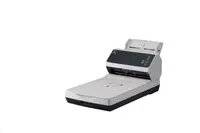
header-product Scanner Ricoh Fi‑8250 A4, 50 ppm, 600 dpi, ADF 100-sheet, USB 3.2, Gigabit LAN

Scanner Ricoh Fi‑8250 A4, 50 ppm, 600 dpi, ADF 100-sheet, USB 3.2, Gigabit LAN

Scanner Ricoh Fi‑8250 A4 50ppm 600dpi Photo 1
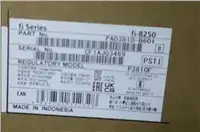
Scanner Ricoh Fi‑8250 A4 50ppm 600dpi Photo 2
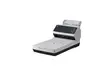
Scanner Ricoh Fi‑8250 A4 50ppm 600dpi Photo 3
Scanner Ricoh Fi‑8250 A4 50ppm 600dpi Photo 1
Scanner Ricoh Fi‑8250 A4 50ppm 600dpi Photo 2
Scanner Ricoh Fi‑8250 A4 50ppm 600dpi Photo 3
Out of stock.
View similar!

Short description

Ricoh Fi‑8250 is an A4 document scanner with 50 ppm (pages per minute) throughput and up to 600 dpi optical resolution. It includes a 100‑sheet automatic document feeder (ADF), automatic duplex scanning, and interfaces via USB 3.2 and Gigabit (RJ45) LAN for networked scanning. Suited for busy offices processing mixed documents and batch scanning tasks.
Warranty: 2 Years
SKU: 12407767
delivery
Information regarding the items availability for purchase will be posted on this site
price
Item cost information will be published on this site
Together cheaper
{{product.price | formatAmount}}
{{product.title}}
{{productBundle.reference.specialPrice | formatAmount}}
{{productBundle.title}}
{{productBundlePreviousPrice | formatAmount}}
{{productBundleSpecialPrice | formatAmount}}

You saving {{productBundleYouSave | formatAmount}}

Product information

Description

Ricoh Fi-8250 is an A4 document scanner designed for mid- to high-volume office environments. It delivers up to 50 ppm (pages per minute) throughput and optical resolution up to 600 dpi, supports automatic duplex scanning and a 100‑sheet automatic document feeder (ADF). Connectivity includes USB 3.2 and Gigabit LAN for direct network integration and shared access across teams. The scanner handles mixed batches and common office media such as single- and double-sided pages, business cards and thin forms, making it suitable for digital archiving, document management and everyday scanning tasks.

Advantages

The Fi-8250 combines fast scanning speed and high optical resolution to balance productivity and image quality. Its 100-sheet ADF with reliable paper feeding reduces manual intervention during batch jobs, while automatic duplex scanning halves handling time for two-sided documents. Network (Gigabit LAN) and USB 3.2 interfaces offer flexible placement and easy integration with document workflows, and the unit’s feed mechanism supports a variety of common document types to accommodate mixed stacks.

Suitable for

  • Busy offices requiring fast batch scanning and digital archiving
  • Shared network environments where multiple users need access to a scanner
  • Departments handling mixed-document scanning (invoices, contracts, forms, business cards)
  • Workflows that require up to 600 dpi scans for readable detail and OCR processing

When it may not be suitable

The Fi-8250 is not intended for scanning large-format documents beyond A4 size or for materials that require specialized flatbed handling, such as bound books or very fragile originals. It may also be less appropriate for users who need ultra-high throughput beyond the specified 50 ppm under sustained continuous operation or who require integrated advanced image editing features on the device itself.

Key specifications

  • Maximum document size: A4 (supports standard A4 single- and double-sided pages)
  • Scan speed: up to 50 pages per minute (single-sided) depending on mode and document
  • Optical resolution: up to 600 dpi
  • Automatic document feeder capacity: 100 sheets
  • Duplex scanning: automatic two-sided scanning
  • Interfaces: USB 3.2 and Gigabit Ethernet (RJ45)
  • Supported media: paper sheets, thin forms, business cards (refer to manufacturer for specific thickness limits)

How to use

Place documents into the 100‑sheet ADF, adjust guides to fit paper width, and select the desired resolution and scan mode (colour, grayscale or black & white) in the scanning application. Choose USB 3.2 for a direct connection to a single workstation or connect the scanner to a network via the Gigabit LAN port to enable shared access and network scanning profiles. Use the supplied or compatible scanning software to set output formats (PDF, searchable PDF, TIFF, JPEG) and enable OCR where needed; confirm file destination and naming rules before starting batch jobs. Regularly clear the feed path and clean rollers according to the maintenance instructions to ensure reliable operation.

What to consider before purchase

  • Verify that A4 size and the supported media types match your document mix (no oversized or very thick materials)
  • Check network requirements and whether Gigabit LAN or USB 3.2 connectivity is preferred for your environment
  • Consider daily duty cycle and whether the rated 50 ppm speed and 100-sheet ADF capacity meet your volume needs
  • Confirm compatibility with your operating system and scanning/document-management software

Usage recommendations

For consistent results with mixed batches, pre-sort documents by size and remove staples or paper clips. Use 300–600 dpi for OCR and archival scans requiring clear text recognition; choose lower resolutions for fast routine archiving. Schedule routine roller cleaning and calibration according to the maintenance guide to minimize misfeeds and preserve image quality.

Description

Machine translation. Load original

Similar products

{{product.title}} Show details Hide details

{{highlightedFeature.featureTitle}}:

{{getProductFeatureValueById(product, highlightedFeature.featureId)}}

{{product.price | formatAmount}}
Might be useful
{{product.manufacturerName}}
{{product.categoryName}}
{{product.title}}
{{product.specialPrice}}
{{product.price}}

Customer reviews

Customer questions

FAQ

What payment options are available?

AiO.lv offers several payment methods: Bank transfer, Leasing for legal entities. All transactions are 100% secure and encrypted.

Can this product be purchased for a company (with VAT)?

Yes. AiO.lv works with legal entities in Latvia and across Europe. The product price already includes VAT. For certain product categories, as well as for companies from other EU countries with a valid VAT number, a 0% VAT rate may apply. We issue the invoice immediately after the order is placed, support electronic BIS invoices, and automatically generate all necessary accounting documents. You can complete the purchase for a company online — simply select the company profile and choose bank transfer as the payment method during checkout.

What is the warranty period?

All Ricoh products come with an official 2 Years warranty. It covers all manufacturing defects and malfunctions that may occur during use. The warranty is valid at all authorized Ricoh service centers and through AiO.lv

Can the product be returned after purchase?

Yes, you can return the product within 14 days of purchase if you bought it as a consumer (not a legal entity). Returns are possible without giving any reason — the main condition is that the product retains its original appearance and full set of accessories. We will make the process as simple and convenient as possible: just contact our customer support team, and we will help you arrange the return.

Where should I contact for warranty service?

For warranty-related questions you can contact the AiO.lv (SIA VSPRO) customer support team. We will assist with consultation, warranty claim processing, and coordination with certified service centers.
warranty
14-Day Return Policy We are confident in our quality, but if the purchase doesn’t fit — you have 14 days to return the product with peace of mind.
shipping
Fast Delivery Get your orders as quickly as possible — right to your door, parcel lockers, or pickup points across Latvia and the EU.
payment
Secure Payment Pay the way you prefer: cash, VISA, MasterCard, Apple Pay, Google Pay, bank transfer, or 0% installment plan.
warranty
Quality Since 2008 AiO.lv has been on the market for over 18 years and has earned trust — with more than 6000 genuine positive reviews on Google.